
About the QQE with Arrows Indicator
The QQE with Arrows Forex indicator for Metatrader 4 is a trend-following tool based on the well-known Quantitative Qualitative Estimation method.
It transforms the original QQE logic into simple visual signals that are easy to act on.
This makes it suitable for traders who want reliable trend signals without complex interpretation.
The indicator is displayed directly on the main price chart.
Buy and sell signals appear as arrows aligned with market direction.
A green arrow signals bullish momentum.
A red arrow signals bearish momentum.
These arrows are designed to appear when trend conditions are favorable rather than during random price movement.
Traders often use it as a primary trend signal or as confirmation within a broader trading strategy.
Free Download
Download the “QQE_arrows.mq4” indicator for MT4
Key Features
- Based on the proven QQE trend calculation method.
- Displays buy and sell arrows directly on the price chart.
- Designed to follow sustained market trends.
- Works on all currency pairs and time frames.
Indicator Chart
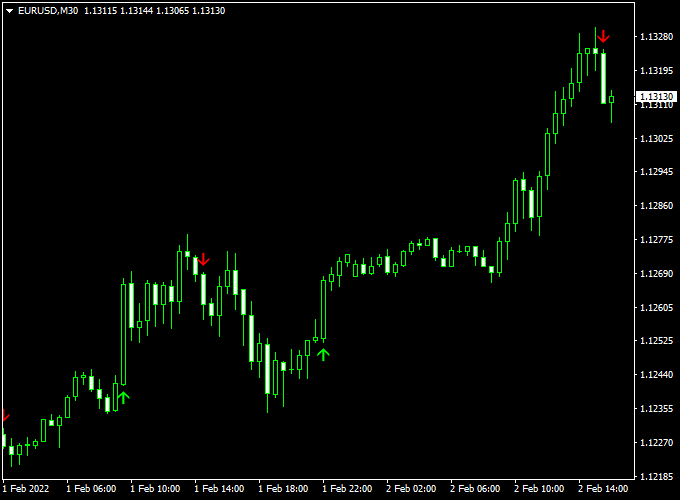
The QQE with Arrows indicator chart shows directional arrows placed along price action.
Green arrows highlight upward momentum and trend continuation.
Red arrows highlight downward momentum and bearish pressure.
Guide to Trade with QQE with Arrows Indicator
Buy Rules
- Allow the market to establish bullish momentum.
- Wait until a green arrow appears directly on the price chart.
- Open a long position once the signal candle has closed.
Sell Rules
- Wait for bearish pressure to develop in the market.
- Look for a red arrow printed on the chart.
- Enter a short position after the signal candle completes.
Stop Loss
- Position the stop loss beyond the nearest price swing.
- For long trades, place the stop loss below recent bullish retracement levels.
- For short trades, place the stop loss above recent bearish retracement levels.
Take Profit
- Set a predefined pip target that matches market conditions.
- Close the trade if an opposite arrow appears.
- Take profits near short-term support or resistance zones.
QQE with Arrows + Extreme Trend Explosion MT4 Scalping Strategy
This scalping strategy combines the QQE with Arrows Forex Indicator with the Extreme Trend Explosion Forex Indicator to provide fast, reliable intraday signals.
It is ideal for traders who want to capture quick moves with clear trend confirmation.
The QQE with Arrows indicator generates green arrows for buy signals and red arrows for sell signals.
The Extreme Trend Explosion indicator confirms the trend: green histogram bars indicate a bullish trend, and red bars indicate a bearish trend.
Using both indicators together helps traders enter high-probability trades while reducing false signals.
Buy Entry Rules
- Wait for a green arrow from the QQE with Arrows indicator.
- Confirm that the Extreme Trend Explosion histogram bars are green.
- Enter a buy position at the close of the confirmation candle.
- Set a stop loss 10–15 pips below the recent swing low.
- Take profit between 20–30 pips or exit when the histogram turns red.
Sell Entry Rules
- Wait for a red arrow from the QQE with Arrows indicator.
- Confirm that the Extreme Trend Explosion histogram bars are red.
- Enter a sell position at the close of the confirmation candle.
- Place a stop loss 10–15 pips above the recent swing high.
- Take profit between 20–30 pips or exit when the histogram turns green.
Advantages
- Clear visual entries with arrows and histogram trend confirmation.
- Fast signals suitable for 5-minute and 15-minute charts.
- Reduces false entries by requiring alignment of signal and trend.
- Works effectively on major currency pairs like EUR/USD, GBP/JPY, and USD/CHF.
Drawbacks
- High volatility or slippage may trigger stop losses prematurely.
- Not suitable for longer-term trading as signals are designed for intraday moves.
Example Case Study 1 – EUR/JPY
On the 5-minute chart, a green arrow appeared at 145.20, with Extreme Trend Explosion histogram bars green.
A buy trade was entered at 145.22, stop loss at 145.10, and take profit at 145.45.
Within 30 minutes, the price hit the target, securing +23 pips.
Example Case Study 2 – GBP/USD
During the London session, a red arrow appeared near 1.3105 while the histogram bars turned red.
A sell trade was entered at 1.3103, stop loss at 1.3120, and take profit at 1.3075.
The trade reached the target within 45 minutes, giving +28 pips.
Strategy Tips
- Use active trading sessions like London and New York for higher volatility and trend clarity.
- Focus on 5-minute or 15-minute charts for the best scalping performance.
- Consider trailing stops once the trade moves in your favor to secure profits.
- Maintain consistent position sizing and risk no more than 2% of your account per trade.
Download Now
Download the “QQE_arrows.mq4” indicator for Metatrader 4
FAQ
Is this indicator suitable for trend trading only?
Yes, it performs best when markets show sustained directional movement.
Choppy conditions may reduce signal quality.
Does the indicator repaint arrows?
Signals remain fixed once printed.
This allows reliable live trading and historical analysis.
Can QQE with Arrows be used as a confirmation tool?
Yes, many traders use it alongside price action or support and resistance.
It works well as directional confirmation.
Which time frames are recommended?
The indicator works on all time frames.
Higher time frames often deliver smoother and more stable signals.
Summary
The QQE with Arrows indicator for MT4 simplifies trend trading using proven QQE logic.
Its arrow-based signals help traders identify momentum direction without overcomplicating analysis.
The clean chart presentation supports focused and disciplined trading.
When paired with solid risk management, QQE with Arrows can enhance trend execution.
It encourages traders to stay aligned with market momentum.





