
About the On Balance Volume Indicator
The On Balance Volume Indicator, commonly known as OBV, is a classic volume-based trading tool available for MetaTrader 4.
It focuses on measuring buying and selling pressure by analyzing how volume flows in relation to price movement.
The indicator is displayed in a separate sub-window below the main chart as a continuous oscillator line.
When volume increases alongside rising prices, the OBV line moves higher, reflecting bullish participation.
When volume expands during falling prices, the line declines, signaling bearish pressure.
The OBV indicator can be used in several ways.
Traders often rely on it for trade entries and exits, while others use it as a confirmation tool to validate trend direction.
It performs particularly well during active market periods such as the London and New York sessions, where volume plays a stronger role in price movement.
Free Download
Download the “OBV.mq4” indicator for MT4
Key Features
- Volume-based oscillator for trend analysis.
- Displayed in a separate MT4 chart window.
- Helps identify bullish and bearish pressure.
- Can be used for entries, exits, or confirmation.
- Effective during high-volume trading sessions.
- Suitable for scalping and intraday strategies.
Indicator Chart
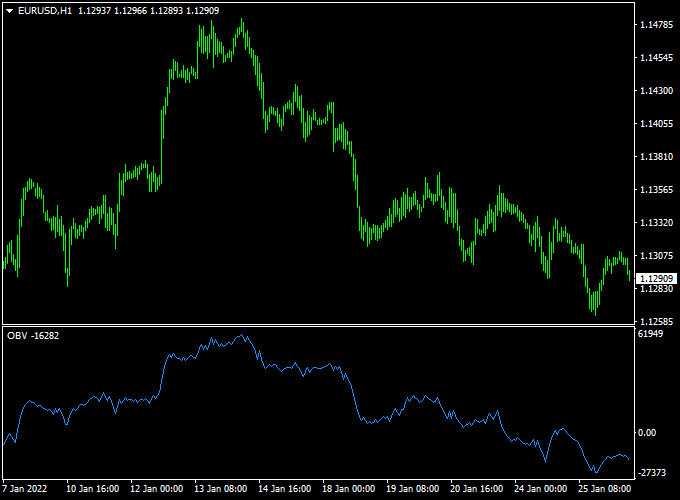
The chart shows the On Balance Volume Indicator plotted in the lower MT4 window.
The OBV line fluctuates around the zero level, reflecting shifts in market participation.
Moves above the zero line suggest increasing bullish volume, while moves below indicate growing bearish volume.
Traders use these changes to align trades with underlying momentum.
Guide to Trade with On Balance Volume Indicator
Buy Rules
- Wait for the OBV line to move back above the 0.00 level.
- Confirm that price action supports upward continuation.
- Look for increasing volume during recent bullish candles.
- Open a buy trade once the bullish shift is established.
Sell Rules
- Wait for the OBV line to move back below the 0.00 level.
- Confirm that price action favors downside movement.
- Check for volume expansion during bearish candles.
- Open a sell trade after the bearish shift is confirmed.
Stop Loss
- Position the stop loss outside the recent consolidation range.
- Allow room for normal price fluctuations.
- Adjust stop placement based on session volatility.
Take Profit
- Target nearby support or resistance zones.
- Close the trade when OBV crosses back through the zero line.
- Secure profits during strong volume-driven moves.
- Exit early if volume momentum weakens.
On Balance Volume Indicator + Reflex Scalper Forex MT4 Strategy
This MT4 strategy combines the On Balance Volume Forex Indicator and the Reflex Buy Sell Forex Scalper to create a short-term scalping system that focuses on momentum and volume confirmation.
The combination helps traders identify early trend changes and avoid false entries during low-volume sessions.
The On Balance Volume (OBV) indicator measures buying and selling pressure based on volume flow.
When the OBV line slides above 0, it suggests accumulation and buying pressure, while a move below 0 indicates selling pressure.
The Reflex Scalper displays a blue histogram for bullish trends and an orange histogram for bearish trends, making it visually clear when momentum changes direction.
This strategy is ideal for day traders and scalpers who prefer fast execution and small but consistent profits.
It works well on the M5 and M15 timeframes and is especially effective on volatile currency pairs such as EURUSD, GBPJPY, and XAUUSD.
Buy Entry Rules
- Wait for the On Balance Volume line to slide above the 0 level, confirming buying pressure.
- Check the Reflex Scalper histogram: a blue bar must appear, confirming an upward momentum shift.
- Enter a buy trade at the close of the confirmation candle.
- Place the stop loss 15 to 20 pips below the recent swing low.
- Set the take profit between 25 and 35 pips or exit when the Reflex Scalper changes from blue to orange.
Sell Entry Rules
- Wait for the On Balance Volume line to drop below the 0 level, showing selling dominance.
- Check the Reflex Scalper histogram: an orange bar must appear to confirm bearish momentum.
- Enter a sell trade at the close of the candle that confirms the move.
- Place the stop loss 15 to 20 pips above the recent swing high.
- Set the take profit between 25 and 35 pips or exit when the Reflex Scalper turns blue again.
Advantages
- Combines volume and momentum, improving accuracy in short-term trading.
- Simple visual setup suitable for both beginners and experienced scalpers.
- Works well on major forex pairs with strong liquidity.
- Provides early detection of trend reversals before the price fully reacts.
Drawbacks
- Performance can drop during low-volume sessions or sideways markets.
- Requires quick reaction and discipline for consistent scalping results.
- False signals can appear if major news events disrupt normal price behavior.
- Needs tight money management due to small pip targets.
Case Study 1: EURUSD M5 Chart
During the London open, the OBV line crossed above 0 while the Reflex Scalper showed a blue histogram.
A buy trade was opened at 1.0725.
Price moved steadily upward for the next 40 minutes, reaching 1.0760 before the histogram turned orange.
The position was closed with a gain of +35 pips.
The combination of volume strength and clear momentum made this setup reliable and low-risk.
Case Study 2: GBPJPY M15 Chart
In the Asian session, the OBV slid below 0 while the Reflex Scalper turned orange, signaling a short entry.
A sell trade was opened at 192.40 with a stop loss at 192.65.
The pair dropped rapidly to 191.85 before retracing.
The position was closed at +55 pips profit.
This case showed how the dual confirmation helped avoid premature exits and captured a clean move within one hour.
Strategy Tips
- Trade only during high-volume sessions like London and New York for stronger OBV confirmation.
- Avoid trading before major economic news releases.
- Use a trailing stop of 10 pips once the trade moves into profit to secure gains.
- Backtest the system on different pairs to find those with consistent OBV responses.
- For added precision, combine with support and resistance zones for entry confirmation.
Download Now
Download the “OBV.mq4” indicator for Metatrader 4
FAQ
What does the zero line represent in OBV?
The zero line acts as a reference point for bullish and bearish volume shifts rather than a fixed overbought or oversold level.
Can OBV be used as a standalone indicator?
Yes, many traders use it on its own, though it is often combined with price action or trend tools.
Does OBV work better in trending markets?
OBV tends to perform best when markets are trending, as volume confirmation becomes more reliable.
Which timeframes are recommended?
The indicator works on all timeframes, but lower timeframes are commonly used for scalping setups.
Summary
The On Balance Volume Indicator for MT4 offers traders a practical way to analyze market participation through volume behavior.
Tracking how volume aligns with price movement helps reveal the strength behind trends.
Its flexibility as an entry tool, exit guide, or confirmation filter makes OBV a valuable addition to many trading approaches.
When applied during active sessions and paired with disciplined trade management, it can improve timing and trend confidence.





