
About the Nice Forex Scalper Indicator
The Nice Forex Scalper Indicator is a free MT4 trading tool built for traders who focus on short-term price movements.
It is designed to generate accurate buy and sell arrow signals directly on the main MetaTrader 4 chart, making it suitable for fast decision-making environments.
This indicator works by analyzing short-term momentum and price behavior to detect high-probability entry points.
When conditions align, it displays a green arrow for buy opportunities and a magenta arrow for sell opportunities.
These visual signals help traders act quickly without spending time interpreting complex calculations.
The Nice Forex Scalper Indicator is lightweight and optimized for performance.
It runs smoothly even when applied to multiple charts at once, which is important for scalpers who monitor several currency pairs.
It works best on lower timeframes and supports traders aiming for consistent small profits rather than long trend trades.
Free Download
Download the “NICE.mq4” indicator for MT4
Key Features
- Displays clear buy and sell arrow signals on the chart.
- Green arrows indicate buy opportunities.
- Magenta arrows indicate sell opportunities.
- Optimized for scalping and short-term trading.
Indicator Chart
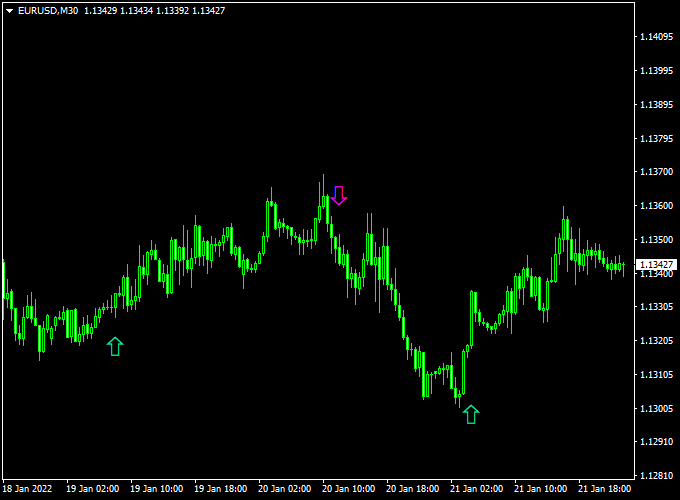
The chart shows the Nice Forex Scalper Indicator plotted in the main MT4 window with colored arrows.
Green arrows appear below the price to highlight potential buy setups, while magenta arrows appear above the price to signal sell opportunities.
These arrows reflect short-term momentum shifts, helping traders identify quick entry points aligned with intraday price movement.
Guide to Trade with Nice Forex Scalper Indicator
Buy Rules
- Apply the indicator to a lower timeframe chart such as M1, M5, or M15.
- Wait for a green arrow to appear below the price.
- Confirm that market conditions support short-term upward movement.
- Open a buy trade immediately after the signal candle closes.
Sell Rules
- Ensure the indicator is active on the selected chart.
- Wait for a magenta arrow to appear above the price.
- Check for short-term bearish momentum.
- Open a sell trade after the signal candle is completed.
Stop Loss
- Place the stop loss just beyond the most recent intraday swing.
- Keep stops tight to match the scalping nature of the strategy.
- Adjust stop distance based on spread and volatility.
- Never risk more than a small percentage per trade.
Take Profit
- Aim for a profit target between 7 and 30 pips per trade.
- Close trades quickly once the target is reached.
- Consider partial exits during fast price spikes.
- Exit early if momentum weakens near the target area.
Nice Scalper + BB MACD V6 Forex Scalping Strategy (MT4)
This scalping method combines the fast-reacting Nice Forex Scalper Indicator for MT4 with the reliable trend filter of the BB MACD V6 Forex Indicator for MT4.
The Nice Scalper provides instant buy and sell signals through green and magenta arrows, while the BB MACD V6 confirms the overall trend by displaying a histogram above or below the zero line.
This strategy works best on short timeframes such as M1, M5, or M15 for quick and consistent scalping opportunities.
Why This Strategy Works
Scalping success depends on combining a precise entry signal with a solid trend filter.
The Nice Scalper excels at pinpointing short-term turning points through its fast calculations and arrow alerts.
The BB MACD V6 confirms momentum strength — only when the histogram supports the arrow’s direction do we enter the trade.
This dual confirmation helps eliminate weak setups and allows traders to catch stronger, cleaner moves in volatile market sessions.
Buy Entry Rules
- Wait for a green arrow from the Nice Forex Scalper indicator.
- Confirm that the BB MACD V6 histogram is above the zero line (bullish momentum).
- Enter a buy trade at the opening of the next candle after both conditions align.
- Set the stop loss a few pips below the last swing low or below a recent support level.
- Take profit when:
- The BB MACD histogram drops below zero, or
- A magenta arrow appears (opposite signal), or
- A fixed pip target (10–25 pips) is reached.
Sell Entry Rules
- Wait for a magenta arrow from the Nice Forex Scalper indicator.
- Confirm that the BB MACD V6 histogram is below the zero line (bearish momentum).
- Enter a sell trade at the opening of the next candle after both signals align.
- Set the stop loss a few pips above the recent swing high or resistance level.
- Take profit when:
- The BB MACD histogram rises above zero, or
- A green arrow appears, or
- A fixed profit target (10–25 pips) is hit.
Advantages
- Simple setup with clear entry and exit signals.
- Filters out false arrows using MACD trend direction.
- Works on multiple pairs and short-term timeframes (M1–M15).
- Visual signals make it easy to follow without confusion.
- Perfect for traders who prefer fast, high-frequency setups.
Drawbacks
- Requires focus and fast execution due to the short timeframe nature.
- Spread and slippage can affect profit on lower timeframes.
- Frequent trades may cause overtrading if not disciplined.
Case Study 1: EURUSD M5
On the EURUSD 5-minute chart, a green arrow appeared at 1.0785 while the BB MACD V6 histogram was clearly above zero, confirming bullish momentum.
A buy order was placed at the next candle open with a stop loss at 1.0775.
Price climbed steadily, and a magenta arrow appeared at 1.0808, signaling an exit with +23 pips profit in under 40 minutes.
Case Study 2: USDJPY M1
On the USDJPY 1-minute chart, a magenta arrow appeared around 149.45 while the BB MACD histogram dropped below zero.
A sell order was triggered at 149.44 with a stop at 149.52.
Price fell sharply to 149.30 before the histogram turned positive again.
The scalp captured approximately +14 pips in 15 minutes — a quick, clean trade aligned with momentum.
Strategy Tips
- Use the strategy only during high-volatility sessions (London or New York).
- Always confirm arrow direction with the BB MACD histogram before entering.
- For risk control, use a fixed stop loss and avoid increasing lot size during drawdowns.
- On higher timeframes like M15, aim for slightly larger targets (25–40 pips).
- Test different currency pairs such as GBPUSD, EURJPY, and AUDUSD to find the best reaction patterns.
- Record trades to refine timing and improve consistency.
Download Now
Download the “NICE.mq4” indicator for Metatrader 4
FAQ
Which timeframe is best for the Nice Forex Scalper Indicator?
The indicator performs best on lower timeframes such as M1, M5, and M15, where scalping opportunities appear more frequently.
Is the indicator suitable for volatile sessions?
It works well during active sessions like London and New York, where price movement is strong enough to reach scalping targets.
Can beginners use this indicator?
The arrow-based signals make it beginner-friendly, though a basic understanding of risk management is still required.
Summary
The Nice Forex Scalper Indicator for MT4 is a simple yet effective tool for traders who prefer fast-paced trading and short-term profits.
Its buy and sell arrows provide immediate trade ideas without cluttering the chart.
The indicator is easy to use, efficient in system resources, and adaptable across currency pairs.
When combined with disciplined risk control and active market sessions, it can support consistent scalping performance and improve trade execution for both new and experienced traders.





