
About the Advanced Forex Market Info Indicator
The Advanced Forex Market Info indicator for MetaTrader 4 provides traders with a comprehensive dashboard showing essential market data at a glance.
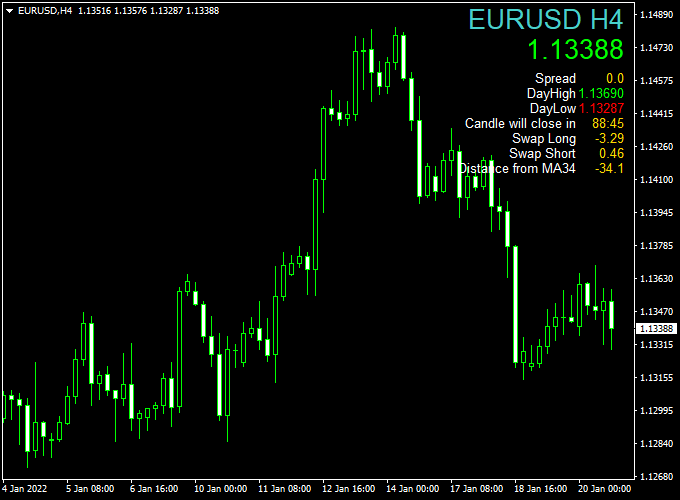
Once applied to the chart, it displays information such as the current price, spread, daily highs and lows, candle close, swap rates, and the distance from the 34-period moving average.
This indicator is designed to save time and improve decision-making by consolidating all key data in one easy-to-read panel.
Traders no longer need to check multiple charts or tools, as the dashboard provides a complete overview of the selected currency pair or instrument.
It is fully customizable, allowing users to adjust the dashboard’s position, text size, and displayed elements.
The Advanced Forex Market Info indicator works on Forex pairs, CFDs, indices, commodities, and cryptocurrencies, making it highly versatile for all types of traders.
Free Download
Download the “Milanese market info.mq4” indicator for MT4
Key Features
- Displays a fully detailed market dashboard directly on the MT4 chart.
- Shows current price, spread, daily high/low, candle close, swap rates, and MA 34 distance.
- Customizable display location and text size.
- Works on all trading instruments: Forex, CFDs, indices, commodities, and cryptocurrencies.
- Provides real-time updates to help traders make informed decisions quickly.
Indicator Chart
The chart shows the Advanced Forex Market Info indicator in action, with a dashboard that consolidates all essential market data.
Traders can quickly view price levels, spreads, and trend distances without switching charts or opening multiple tools.

Guide to Trade with Advanced Forex Market Info Indicator
Buy Rules
- Use the dashboard to identify pairs with tight spreads and favorable MA 34 alignment.
- Look for prices near daily support zones or lower MA 34 distance for potential bullish setups.
- Combine with trend confirmation from your preferred strategy before entering a buy trade.
Sell Rules
- Use the dashboard to identify pairs with tight spreads and bearish MA 34 alignment.
- Look for prices near daily resistance zones or higher MA 34 distance for potential sell setups.
- Combine with momentum confirmation from your preferred strategy before entering a sell trade.
Stop Loss
- For buy trades, place the stop loss a few pips below the most recent support.
- For sell trades, place the stop loss a few pips above the most recent resistance.
Take Profit
- Consider exiting trades near the next significant support/resistance level based on dashboard data.
- Partial exits can be taken when the MA 34 distance shows momentum weakening.
- Exit fully if the dashboard indicates the trend is stalling or reversing.
Practical Trading Tips
- Use the dashboard to quickly compare multiple currency pairs before selecting trades.
- Monitor spread and swap values to ensure cost-effective trading.
- Combine the MA 34 distance with your favorite trend or momentum strategy for stronger entries.
- Keep an eye on daily high and low levels to set realistic profit targets.
Advanced Forex Market Info and Zero Lag MACD Strategy
The MT4 Advanced Forex Market Info and Zero Lag MACD Strategy is designed for intraday trading on M5 and M15 charts.
This strategy combines detailed market insights from the Advanced Forex Market Info Indicator with momentum signals from the Zero Lag MACD Indicator.
The Advanced Forex Market Info Indicator provides a comprehensive dashboard displaying the Moving Average 34 distance.
The Zero Lag MACD Indicator uses a histogram: bars above 0 indicate a buy signal, while bars below 0 indicate a sell signal.
It is ideal for traders who want to align trades with current market conditions while confirming entries through a reliable momentum indicator.
Buy Entry Rules
- The Zero Lag MACD histogram rises above 0, indicating bullish momentum.
- The Advanced Forex Market Info dashboard shows a positive MA 34 distance supporting a bullish bias.
- Enter a buy trade at the next candle open.
- Place a stop loss below the most recent swing low or below the MA 34 level.
- Set take profit at the next resistance level or when the MACD histogram drops below 0.
Sell Entry Rules
- The Zero Lag MACD histogram falls below 0, indicating bearish momentum.
- The Advanced Forex Market Info dashboard shows a negative MA 34 distance supporting a bearish bias.
- Enter a sell trade at the next candle open.
- Place a stop loss above the most recent swing high or above the MA 34 level.
- Set take profit at the next support level or when the MACD histogram rises above 0.
Advantages
- Combines market condition overview with momentum confirmation.
- Helps traders choose the best currency pairs and time entries efficiently.
- Reduces false signals by checking both MACD and market info.
- Suitable for intraday trading on M5 and M15 charts.
- A visual dashboard simplifies the monitoring of multiple market factors simultaneously.
Drawbacks
- Performance can decline during low liquidity or high spread periods.
- Stop losses must be adjusted according to MA 34 and recent price action.
- Not ideal for scalping on M1 due to slower MACD reaction.
Case Study 1: EUR/USD M5
During the London session, the Zero Lag MACD histogram rose above 0, signaling bullish momentum.
The Advanced Forex Market Info dashboard confirmed a favorable spread and MA 34 distance.
A buy trade was entered at 1.0885 with a stop loss at 1.0875 and a take profit at 1.0900.
The price moved upward, capturing +15 pips within 20 minutes, illustrating the effectiveness of combining market info with momentum signals.
Case Study 2: GBP/JPY M15
During the New York session, the Zero Lag MACD histogram dropped below 0, indicating bearish momentum.
The Advanced Forex Market Info dashboard confirmed a downward MA 34 distance and a reasonable spread.
A sell trade was opened at 152.50 with a stop loss at 152.75 and a take profit at 152.20.
The trade achieved +30 pips in 40 minutes, demonstrating the strategy’s precision in intraday trading.
Strategy Tips
- Focus on high-volume sessions for stronger momentum and better trade execution.
- Only take trades when both the MACD histogram and the market info dashboard align.
- Place stop losses strategically based on the MA 34 distance and recent swing levels.
- Avoid trading during news releases to minimize slippage and unpredictable volatility.
- Monitor spread levels to ensure cost-effective entries.
Download Now
Download the “Milanese market info.mq4” indicator for Metatrader 4
FAQ
Can I move the dashboard on the chart?
Yes. You can reposition the dashboard to any corner of the chart and adjust text size for better visibility.
Does it work on instruments other than Forex?
Yes. The indicator works with CFDs, indices, commodities, and cryptocurrencies, making it versatile for all trading instruments.
Is the data updated in real time?
Yes. All values on the dashboard update in real time, giving traders an accurate view of the current market conditions.
Can I customize what the dashboard shows?
Yes. Users can enable or disable specific data points such as swap rates, candle close, and MA distance according to their preferences.
Summary
The Advanced Forex Market Info Indicator MT4 consolidates all critical market data into a single dashboard for quick and informed decision-making.
Traders can monitor spreads, daily highs/lows, swap rates, and MA distance at a glance, reducing the need to juggle multiple tools.
Its customizable display and compatibility with all instruments make it a versatile tool for both beginner and experienced traders.
Integrating the dashboard with strategic stops and profit targets allows traders to optimize trade timing, manage risk across positions, and stay aware of market changes.





