

About the Lukas 1 Arrows & Curves Indicator
The Lukas 1 Arrows & Curves Indicator for MT4 is a signal-based trading tool designed to highlight potential buy and sell opportunities using the arrows and curves trading formula.
It analyzes short-term price behavior and momentum changes to mark moments where the market is likely shifting direction.
The indicator plots blue and red arrows directly on the chart, making it easy to spot entry points without complex analysis.
Blue arrows indicate potential buy setups, while red arrows signal possible sell opportunities.
Curves help confirm the shift in short-term market direction, filtering out weaker signals.
Lukas 1 Arrows & Curves can be used as a standalone indicator for entries and exits or as a confirmation tool within an existing trading system.
It performs best on active market conditions and is suitable for scalping, day trading, and short-term swing trading across forex pairs.
Free Download
Download the “lukas1_Arrows_Curves.mq4” indicator for MT4
Key Features
- Buy and sell arrows based on the arrows and curves trading formula
- Blue arrows for buy signals and red arrows for sell signals
- Works on multiple timeframes and currency pairs
- Non-complex signals suitable for discretionary traders
- Can be used standalone or combined with other indicators
- Designed for short-term market opportunities
Indicator Chart
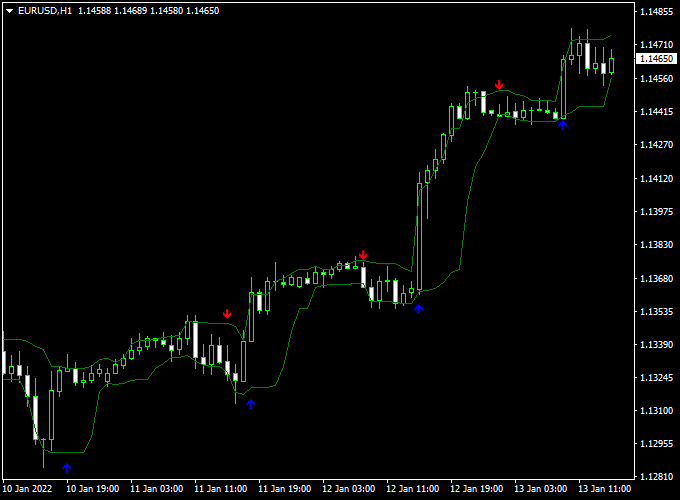
The chart below shows the Lukas 1 Arrows & Curves Indicator plotted on an MT4 price chart.
Blue arrows highlight buy signals during upward price moves, while red arrows mark sell signals during bearish shifts.
The arrows appear at points where short-term momentum changes are detected.
Guide to Trade with Lukas 1 Arrows & Curves Indicator
Buy Rules
- Wait for a blue arrow to appear on the chart
- Confirm price is not directly at a major resistance level
- Enter a buy trade at the opening of the next candle
Sell Rules
- Wait for a red arrow to appear on the chart
- Check that price is not sitting on strong support
- Enter a sell trade at the opening of the next candle
Stop Loss
- Place the stop loss below the most recent swing low for buy trades
- Place the stop loss above the most recent swing high for sell trades
- Keep risk consistent across all trades
Take Profit
- Target the next visible support or resistance level
- Use a fixed risk-to-reward ratio such as 1:1.5 or 1:2
- Partial profits can be taken when the price moves in your favor
Practical Tips
- Use the indicator during active market sessions for better follow-through
- Avoid trading during low-volatility or sideways conditions
- Combine signals with basic market context for stronger entries
Lukas 1 Arrows Curves & SuperTrend MTF MT4 Ultra-Fast Scalping Strategy
This ultra-fast scalping strategy uses the Lukas 1 Arrows Curves Indicator and the SuperTrend MTF Forex Signal Indicator to capture very short-term price movements.
The Lukas 1 indicator provides blue arrows for buy signals and red arrows for sell signals.
The SuperTrend MTF line shows the overall trend direction: green for bullish and red for bearish.
Take profit is set at the upper channel line for buy trades and the lower channel line for sell trades.
This strategy is ideal for 1-minute and 5-minute charts and targets quick profits between 3–10 pips.
Buy Entry Rules
- Ensure the SuperTrend MTF line is green, confirming a bullish trend.
- Wait for a blue arrow from the Lukas 1 Arrows Curves Indicator, signaling a buy.
- Enter a buy trade immediately after the arrow appears in alignment with the green SuperTrend line.
- Place a stop loss just below the most recent swing low.
- Set a take profit target at the upper boundary of the channel or 3–10 pips, whichever comes first.
- Close the trade immediately if the Lukas 1 arrow turns red or the SuperTrend line turns red.
Sell Entry Rules
- Ensure the SuperTrend MTF line is red, confirming a bearish trend.
- Wait for a red arrow from the Lukas 1 Arrows Curves Indicator, signaling a sell.
- Enter a sell trade immediately after the arrow appears in alignment with the red SuperTrend line.
- Place a stop loss just above the most recent swing high.
- Set a take profit target at the lower boundary of the channel or 3–10 pips, whichever comes first.
- Close the trade immediately if the Lukas 1 arrow turns blue or the SuperTrend line turns green.
Advantages
- Ultra-fast scalping captures small price movements efficiently.
- Combines reversal signals with trend confirmation for higher probability trades.
- Visual arrows and trend lines make entries and exits easy to spot.
- Channel-based take profit adapts to the current market structure.
- Suitable for multiple currency pairs like EUR/USD, GBP/USD, and AUD/USD.
Drawbacks
- Requires constant attention due to very fast trades.
- Stop losses may be triggered quickly during sudden spikes.
- Small pip targets require multiple trades to accumulate significant profits.
Case Study 1: EUR/USD 1-Minute Chart
The SuperTrend MTF line was green, indicating a bullish trend.
A blue arrow from the Lukas 1 indicator appeared, signaling a buy.
A buy trade was entered with a stop loss below the recent swing low.
The take profit was set at the upper channel line, achieving 6 pips quickly.
The trade was closed when the Lukas 1 arrow turned red, protecting remaining profits.
Case Study 2: AUD/USD 5-Minute Chart
The SuperTrend MTF line was red, showing a bearish trend.
A red arrow from the Lukas 1 indicator appeared, signaling a sell.
A sell trade was entered with a stop loss above the recent swing high.
Take profit was set at the lower channel line, achieving 8 pips.
The trade was closed when the Lukas 1 arrow turned blue, avoiding reversals.
Strategy Tips
- Use during high liquidity sessions for tighter spreads and better execution.
- Focus on the most active currency pairs like EUR/USD, GBP/USD, AUD/USD, and NZD/USD.
- Adjust lot sizes based on account balance and risk tolerance.
- Exit trades immediately on the arrow or SuperTrend line color change to protect profits.
- Keep target small (3–10 pips) and avoid overtrading.
Download Now
Download the “lukas1_Arrows_Curves.mq4” indicator for Metatrader 4
FAQ
Does the Lukas 1 Arrows & Curves Indicator repaint?
The arrows are based on completed price data.
Once a signal is confirmed on candle close, it remains fixed on the chart.
Which timeframe works best with this indicator?
The indicator can be used on all timeframes, but M15, M30, and H1 tend to offer a good balance between signal frequency and trade quality.
Can this indicator be used for exits as well?
Yes, opposite arrows can be used as exit signals, especially for short-term trades where momentum shifts quickly.
Summary
The Lukas 1 Arrows & Curves Indicator for MT4 offers a practical way to identify buy and sell opportunities using arrow-based signals derived from short-term price behavior.
Its simplicity allows traders to focus on execution rather than analysis.
When applied with proper risk management and market awareness, it can support consistent short-term trading decisions.





