About the Market Watch Gainers & Losers Indicator
The Market Watch Gainers & Losers indicator for MT4 calculates and displays the daily gain or loss for all currency pairs in your market watch.
It shows winners in green and losers in red by default, giving traders a clear visual overview of trending and sideways markets.
The colors and layout are fully customizable, allowing you to match the dashboard to your preferences.
This indicator is ideal for traders monitoring multiple pairs who want to quickly identify strong and weak performers in the market.
Free Download
Download the “h-bulls-n-bears-indicator.mq4” indicator for MT4
Key Features
- Displays daily percent change for all currency pairs in MT4
- Green highlights daily winners, red highlights daily losers
- Fully customizable colors and layout
- Appears as a dashboard on the main chart
- Helps quickly spot trending and sideways pairs
- Works on all timeframes
Indicator Chart
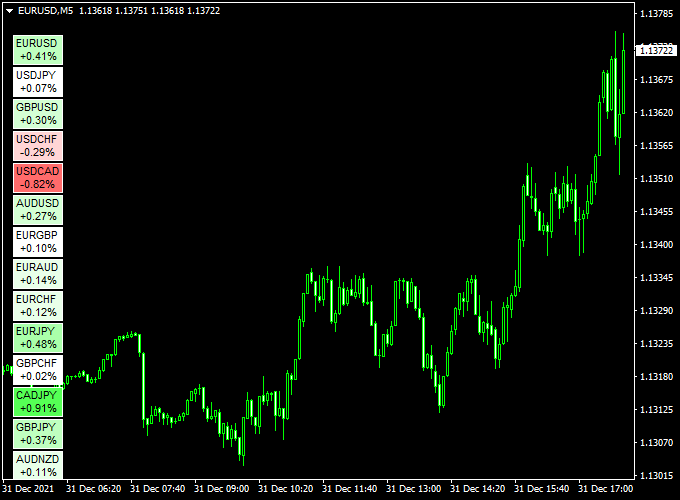
The chart shows the Market Watch Gainers & Losers dashboard on an MT4 chart.
Green pairs indicate strong bullish performance, while red pairs show bearish performance.
Traders can use this overview to focus on trending pairs or avoid weak/sideways markets.

Guide to Trade with Market Watch Gainers & Losers
Buy Rules
- Focus on pairs showing strong green daily gain
- Confirm trend using additional indicators or price action
- Enter long positions when momentum aligns
Sell Rules
- Focus on pairs showing strong red daily loss
- Confirm downward trend with other tools
- Enter short positions when multiple confirmations are present
Stop Loss
- Buy: stop a few pips below the last low
- Sell: stop a few pips above the last high
- Adjust for volatility
Take Profit
- Target the next support/resistance level
- Take partial profits when momentum slows
- Use trailing stops for strong trending pairs
Practical Tips
- Monitor strong green and red pairs to prioritize trades
- Avoid trading sideways or weak pairs
- Keep an eye on the spread and liquidity for each pair
- Use a trading journal to track entries and outcomes
Market Watch Gainers + Zero Lag MACD MT4 Strategy
This MT4 strategy combines the power of the Market Watch Gainers Losers Indicator (MT4) and the Zero Lag MACD Indicator (MT4) to identify high-probability trades.
By focusing on the biggest market gainers and using the Zero Lag MACD for timing, traders can enter positions with a strong trend momentum.
This strategy works on 15-minute to 1-hour charts and is suitable for traders who want to capture intraday swings with minimal lag.
Buy Entry Rules
- Identify the top gainers using the Market Watch Indicator.
- Confirm an uptrend with the Zero Lag MACD: the MACD line crosses above the signal line.
- Enter a buy trade at the close of the confirming candle.
- Set the stop loss below the nearest support level or recent swing low.
- Set the take profit at a 2:1 reward-to-risk ratio, or follow the MACD for exit signals when it crosses back below the signal line.
Sell Entry Rules
- Identify the top losers using the Market Watch Indicator.
- Confirm a downtrend with the Zero Lag MACD: the MACD line crosses below the signal line.
- Enter a sell trade at the close of the confirming candle.
- Set the stop loss above the nearest resistance level or recent swing high.
- Set the take profit at a 2:1 reward-to-risk ratio, or exit when the MACD crosses above the signal line.
Advantages
- Focuses on the strongest trending pairs for higher probability trades.
- Zero Lag MACD reduces delay, giving more accurate entries.
- Works on multiple timeframes, flexible for intraday trading.
- Simple to implement with clear buy and sell rules.
- Helps identify momentum in both bullish and bearish conditions.
Drawbacks
- It may give false signals in ranging markets.
- Stop loss placement is essential; poor risk management can lead to losses.
- Requires monitoring top gainers and losers actively.
- Not suitable for very short scalping trades due to occasional MACD lag.
Case Study 1
On the EUR/USD 1-hour chart, the Market Watch indicator highlighted EUR/USD as the top gainer of the session.
The Zero Lag MACD confirmed a bullish crossover.
Entering a buy trade at 1.0750 with a stop loss at 1.0725 and a take profit at 1.0800 resulted in a successful trade, capturing 50 pips in just three hours.
Case Study 2
On the GBP/JPY 30-minute chart, the Market Watch indicator identified GBP/JPY as the biggest loser.
The Zero Lag MACD confirmed a bearish crossover.
Entering a sell trade at 189.50 with a stop loss at 189.85 and a take profit at 188.80 captured 70 pips within four hours.
Strategy Tips
- Always confirm the trend using the Zero Lag MACD before entering trades.
- Focus only on the top 1-2 gainers or losers to maximize accuracy.
- Use proper risk management; never risk more than 1-2% of your account per trade.
- Combine with support and resistance levels to improve trade quality.
- Avoid trading during major news releases, as volatility spikes can trigger stop losses.
Download Now
Download the “h-bulls-n-bears-indicator.mq4” indicator for Metatrader 4
FAQ
Can I customize the colors?
Yes. You can adjust all colors, layout, and dashboard appearance in the indicator settings.
How often does it update?
It updates in real-time as prices change during the trading day.
Can it be combined with other indicators?
Yes. Using it with trend-following, momentum, or support/resistance tools improves trade selection and timing.
Summary
The Market Watch Gainers & Losers indicator for MT4 provides a quick, visual dashboard of which currency pairs are trending or moving sideways.
Green highlights winners, red highlights losers, allowing traders to focus on the strongest opportunities.
Combining this indicator with other trend or momentum tools increases trade accuracy and helps manage entries, exits, and risk across multiple pairs.





