
About the EES V Speed Indicator
The EES V Speed Indicator for MT4 is a technical tool that monitors market activity and calculates trading opportunities based on the V Speed algorithm.
Analyzing price dynamics and volatility helps traders identify high-probability trade setups.
Displayed in a separate MT4 chart window, the indicator uses a default V period of 5 to detect shifts in market activity.
It can be applied for both trade entries and exits, or as a supporting confirmation for other trading strategies.
By simplifying the analysis of market momentum, the EES V Speed Indicator allows traders to make quicker and more informed decisions.
Free Download
Download the “ees-v-speed-indicator.mq4” indicator for MT4
Key Features
- V Speed trading algorithm for precise trade identification
- Separate MT4 chart window display for clear visualization
- Default V period of 5 for detecting activity shifts
- Applicable for all currency pairs and multiple timeframes
- Can be used for entries, exits, or confirmation of other systems
- Helps assess market activity and momentum efficiently
Indicator Chart
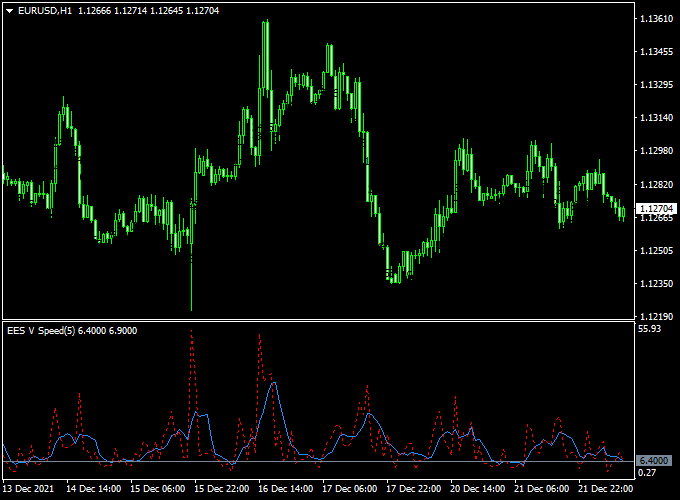
The chart below demonstrates the EES V Speed Indicator in its separate MT4 window.
It displays market activity levels and highlights potential trade signals based on the V Speed algorithm.
Traders can observe activity spikes and algorithm-driven signals to anticipate bullish or bearish momentum.
The visual display simplifies trade decision-making while aligning with overall market trends.
Guide to Trade with EES V Speed Indicator
Buy Rules
- Enter a buy trade when the indicator shows upward momentum according to the V Speed algorithm
- Confirm trend alignment on a higher timeframe if possible
- Use additional trend filters or support levels for higher probability entries
- Maintain the position until the indicator signals a potential reversal
Sell Rules
- Enter a sell trade when the indicator shows downward momentum according to the V Speed algorithm
- Confirm trend direction and overall market bias
- Check resistance or trend confirmation tools before entering
- Hold the position until the indicator signals a change in momentum
Stop Loss
- Place stop loss slightly beyond the nearest swing high for sells or swing low for buys
- Adjust based on market volatility and recent activity
- Allow sufficient buffer to prevent normal fluctuations from triggering the stop
Take Profit
- Target recent swing highs or lows or other key levels of price activity
- Consider partial exits if momentum slows near key levels
- Use a trailing stop if the trend continues in your favor
Practical Tips
- Use the indicator alongside trend or momentum filters for stronger confirmation
- Check higher timeframe signals to reduce false entries
- Monitor unusual spikes in activity for potential trend changes
- Avoid trading during low-volume periods to minimize false signals
EES-V Speed + Accelerator Oscillator MT4 Short-Term Strategy
This short-term trading strategy merges the EES-V Speed Forex Indicator with the Accelerator Oscillator.
EES-V Speed highlights potential dynamic momentum zones and speed of price moves.
The Accelerator helps confirm short bursts of momentum change.
Because this is short-term, use lower timeframes like M5, M15, and M30.
The approach aims to catch quick directional moves with defined risk, making it suitable for active traders who watch charts frequently.
Why It Works
EES-V Speed gives you zones or signals where the price is accelerating.
The Accelerator adds a filter to confirm momentum shifts before entering. The dual check helps you avoid weak runs and false breakouts.
Buy Entry Rules
- EES-V Speed must suggest a bullish momentum zone (e.g., a speed or zone marker indicating upcoming strength up).
- The Accelerator Oscillator should turn above zero.
- Enter on the close of the confirmation candle (i.e., after the first green bar following the shift).
- Stop loss: place below the recent swing low or a little below the EES-V speed zone boundary, whichever is safer.
- Take profit: aim for a reward of 1× to 2× risk (small short targets). Alternatively, exit when the Accelerator reverses or the price enters an opposite speed zone.
Sell Entry Rules
- EES-V Speed must suggest a bearish momentum zone (speed zone or marker favoring downside).
- The Accelerator Oscillator should turn below zero.
- Enter on the close of the confirmation candle (first red bar after shift).
- Stop loss: place above the recent swing high or just above the EES-V zone boundary.
- Take profit: aim for 1× to 2× risk. Or exit when the Accelerator flips or the price enters an opposite zone.
Advantages
- Quick entries and exits, suited to short-term trading.
- Dual confirmation helps reduce false signals and noise.
- Works on many currency pairs with tuning for volatility.
- Risk is defined and manageable for short bursts.
Drawbacks
- Because it’s short-term, spreads and slippage can reduce profits significantly.
- Requires active monitoring and discipline to exit when conditions change.
- Indicator lag may delay entries in fast reversals.
Example Case Study 1 — EURUSD M15
During the London overlap, EES-V Speed flagged a bullish zone.
The Accelerator turned above the zero level.
Entry was taken on the close of the confirmation candle.
Stop loss was 10 pips below entry, profit target 15 pips (RR 1.5).
The price ran to the target in about 30 minutes, and a clean exit was made before momentum faded.
Example Case Study 2 — GBPUSD M5
GBPUSD in a mild downtrend showed a bearish speed zone by EES-V.
The Accelerator flipped below the zero level.
A short entry was executed.
Stop loss was 8 pips above entry, target 12 pips.
The move hit the target within 15 minutes before a pullback entered.
Strategy Tips
- Use pairs with tight spreads like EURUSD, GBPUSD, and USDJPY to keep costs low.
- Avoid low-volatility hours when the price is flat; trade during the London and New York sessions.
- Adjust stop/target distances to match pair volatility and timeframe.
- Exit immediately if the Accelerator reverses or EES-V enters a conflicting zone.
Download Now
Download the “ees-v-speed-indicator.mq4” indicator for Metatrader 4
FAQ
What does the V Speed algorithm indicate?
The V Speed algorithm measures shifts in market activity and momentum, highlighting potential bullish or bearish trade setups.
Can it be applied to all currency pairs?
Yes, the indicator is compatible with major, minor, and exotic currency pairs and can be applied to multiple timeframes.
How should the default V period be used?
The default V period is set to 5, which works well in most market conditions, but traders can adjust it to better fit different volatility levels or trading styles.
Can it complement other indicators?
Yes, it can be combined with trend-following or support/resistance indicators to validate entries and improve overall trade accuracy.
Summary
The EES V Speed Indicator for MT4 provides traders with a clear view of market activity and momentum using the V Speed algorithm.
It helps identify trade opportunities efficiently while adapting to all currency pairs and timeframes.
Versatile in its application, the indicator can be used for primary trade entries, confirmations, or exit signals.





