
About the Chaos Zone Indicator
The Chaos Zone Indicator for MT5 is designed for scalpers seeking multiple daily trade opportunities in short-term timeframes.
It highlights potential market pressure using colored bars, helping traders identify short-term bullish and bearish momentum quickly.
Green bars indicate short-term bullish pressure and suggest potential buy trades. Purple bars indicate bearish pressure and suggest potential sell trades.
Gray bars represent neutral conditions, signaling periods where the market may be indecisive.
Traders can customize bar colors and styles to suit their charting preferences and trading strategy.
Free Download
Chaos zone.mq5 Indicator (MT5)
Key Features
- Short-term scalping signals with green, purple, and gray bars.
- Helps identify quick bullish or bearish market momentum.
- Customizable bar colors and styles for visual clarity.
- Works on multiple short-term timeframes for intraday trading.
Indicator Chart
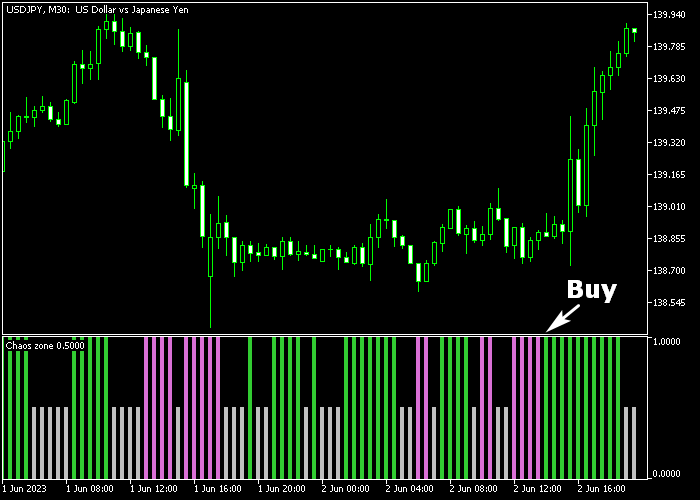
The Chaos Zone Indicator plots a series of colored bars beneath the main chart area.
Green bars indicate bullish momentum, purple bars indicate bearish momentum, and gray bars show neutral periods.
Traders can quickly gauge the short-term market pressure and align trades with these signals.
Guide to Trade with Chaos Zone Indicator
Buy Rules
- Wait for the first green bar to appear in a neutral-to-bullish zone.
- Open a buy position on the next candle following the green bar.
- Look for clusters of green bars for stronger short-term bullish signals.
Sell Rules
- Wait for the first purple bar to appear in a neutral-to-bearish zone.
- Open a sell position on the next candle following the purple bar.
- Look for clusters of purple bars for stronger short-term bearish signals.
Stop Loss
- For buy trades, place the stop slightly below the lowest point of the preceding bars.
- For sell trades, place the stop slightly above the highest point of the preceding bars.
- Keep stops tight enough for scalping but wide enough to avoid frequent premature exits.
Take Profit
- Close buy positions if a purple bar appears or after reaching a short-term target of 5-20 pips.
- Close sell positions if a green bar appears or after reaching a short-term target of 5-20 pips.
- Partial exits can be taken when minor support/resistance levels are reached within the scalping range.
Download Now
Chaos zone.mq5 Indicator (MT5)
FAQ
How does the Chaos Zone Indicator generate signals?
The indicator uses colored bars to reflect short-term market pressure: green for bullish, purple for bearish, and gray for neutral conditions.
Which currency pairs are ideal for the Chaos Zone?
It works on all pairs, but low-spread, highly liquid pairs provide the most consistent short-term signals.
Can I adjust the bar colors and styles?
Yes, you can modify the bar colors and visual style to suit your personal charting preferences.
Should this indicator be used alone?
It is recommended to combine the Chaos Zone with other confirmation tools, such as support/resistance levels or momentum indicators, to improve entry timing and reduce false signals.
Summary
The Chaos Zone Indicator is a scalping-friendly tool that highlights short-term bullish and bearish momentum with colored bars.
Green bars signal potential buy trades, purple bars signal potential sell trades, and gray bars indicate neutral periods.
By trading in alignment with the bars, monitoring minor support/resistance, and exiting positions when opposite bars appear, traders can capture quick gains of 5-20 pips per trade.
It is ideal for intraday traders and scalpers who want clear visual momentum signals on short-term charts.




