About the Color Spread Indicator
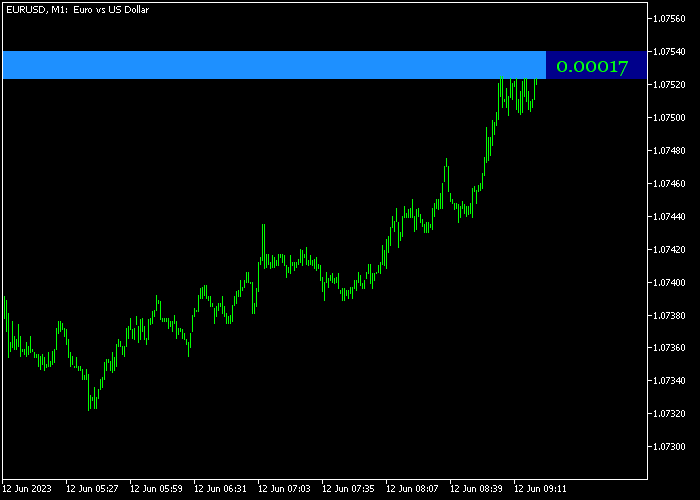
The Color Spread Indicator for MT5 displays the current spread of any currency pair directly on the main price chart in real-time.
Instead of checking the spread separately, you get a constant live readout overlaid on the chart itself, so you always know the trading cost before you enter a position.
By default, the spread value appears on a blue-colored background, making it easy to spot at a glance.
You can adjust the text color, background color, and font size to suit your chart setup or personal preference.
This makes it a practical tool for any trader who wants to stay aware of spread conditions, especially during news releases or low-liquidity sessions when spreads tend to widen.
Free Download
Color_Spread.mq5 Indicator (MT5)
Key Features
- Displays real-time spread directly on the price chart.
- Blue background by default for easy visibility.
- Fully customizable text color, background color, and font size.
- Helps traders avoid entering during high-spread periods.
- Works well alongside trend, signal, and entry indicators.
Indicator Chart
The chart below shows the Color Spread Indicator applied to the EURUSD M1 chart.
The live spread value is displayed in the upper corner on a colored background, updating tick by tick as market conditions change.
This gives you a clear view of the current trading cost at any moment during the session.

Guide to Trade with the Color Spread Indicator
Buy Rules
- Wait for your primary indicator or strategy to confirm a buy setup.
- Check the Color Spread Indicator to confirm the spread is within a normal, acceptable range for that pair.
- Avoid entering during spread spikes caused by news events or session gaps.
- Once spread returns to a stable level and the buy signal remains valid, place the trade.
Sell Rules
- Wait for your main trading strategy to give a confirmed sell signal.
- Check the spread readout to make sure conditions are suitable for entry.
- Hold off if the spread is unusually wide, as this increases cost and slippage risk.
- Enter the sell trade once the spread normalizes and the signal is still active.
Stop Loss
- Place the stop loss based on the rules of your primary strategy.
- Account for the current spread when calculating your stop distance to avoid premature exits.
Take Profit
- Set take profit targets using support and resistance levels or your preferred method.
- Factor in the spread value when targeting smaller price moves on lower timeframes.
Download Now
Color_Spread.mq5 Indicator (MT5)
FAQ
What does the Color Spread Indicator actually show on the chart?
It shows the live spread of the currency pair you are trading, displayed directly on the main price chart.
The value updates in real-time and is shown against a colored background so it is always visible without interrupting your chart analysis.
When is the spread most important to watch as a trader?
Spread tends to widen during major news releases, market open and close times, and low-liquidity sessions like late Friday afternoons.
Keeping an eye on the spread during these periods helps you avoid entering trades where the cost is disproportionately high relative to your expected profit.
Summary
The Color Spread Indicator is a simple but genuinely useful tool for any trader who cares about execution quality.
Knowing the spread at all times means fewer surprises when trades open, and it helps you make more informed decisions about when to enter and when to wait.
The customizable display options mean it fits into any trading setup without much effort.
While it does not generate signals on its own, pairing it with a solid entry strategy makes it a practical addition to your indicator toolkit.




