About the Currency Strength Index Indicator
The Currency Strength Index indicator for MT5 measures and displays the relative strength of the eight major currencies in the forex market.
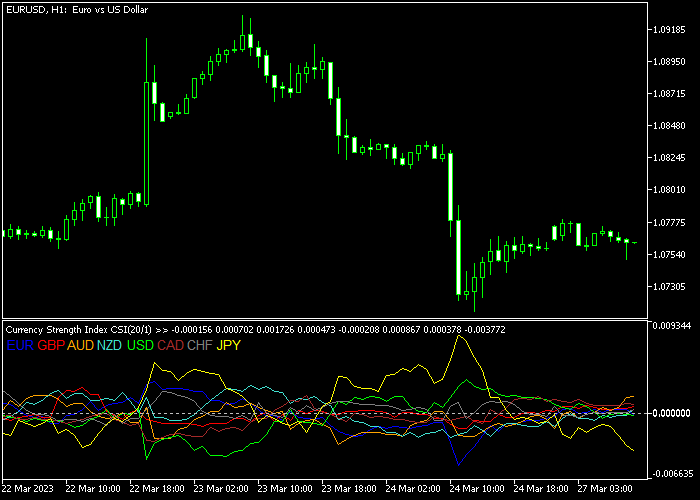
Each currency is displayed using a different color, making it easy to distinguish between them while monitoring market strength changes.
This visual representation helps traders quickly identify which currencies are gaining momentum and which ones are losing strength.
The main concept behind the indicator is simple. Traders look for the strongest currency and compare it with the weakest one.
This comparison often highlights pairs that may show stronger directional movement.
The indicator also allows traders to customize which currencies appear in the window.
Through the settings panel, individual currencies can be enabled or disabled depending on the trader’s preference or strategy.
Free Download
CURRENCY_STRENGTH_INDEX.mq5 Indicator (MT5)
Key Features
- Displays the strength of eight major currencies in one indicator window.
- Uses different colors for each currency for easy identification.
- Helps traders compare strong and weak currencies quickly.
- Supports customizable moving average calculation parameters.
- Allows traders to enable or disable specific currencies.
Indicator Chart
The Currency Strength Index indicator appears beneath the price area and shows eight colored lines that represent the strength of major currencies.
Traders monitor how these lines diverge or converge to identify strong currencies rising above weaker ones.

Guide to Trade with Currency Strength Index Indicator
Buy Rules
- Identify a currency that is showing strong upward strength on the indicator.
- Compare it with another currency that is displaying weaker performance.
- Select the currency pair that combines the strong currency with the weak one.
- Use your preferred technical analysis method to confirm the buy entry.
Sell Rules
- Find a currency that shows declining or weak strength on the indicator.
- Compare it with a currency that is currently stronger in the index.
- Choose the pair where the weak currency is placed against the strong one.
- Confirm the sell entry using additional technical indicators or price action.
Stop Loss
- Place the stop loss below the nearest support when opening buy trades.
- Place the stop loss above the nearest resistance when opening sell trades.
Take Profit
- Close the trade when the strength difference between the currencies begins narrowing.
- Exit the trade if the indicator shows momentum shifting in the opposite direction.
- Optionally, use a fixed pip profit target to exit your open trades.
Download Now
CURRENCY_STRENGTH_INDEX.mq5 Indicator (MT5)
FAQ
What does the Currency Strength Index measure?
The indicator measures the relative strength of the eight major currencies including EUR, GBP, AUD, NZD, USD, CAD, CHF, and JPY.
This helps traders compare market momentum across currencies.
Why is currency strength important in forex trading?
Currency strength analysis helps traders focus on pairs where a strong currency is paired against a weak one.
These combinations often produce clearer market movement.
Which parameters can be adjusted?
The indicator includes adjustable parameters such as moving average period, moving average delta, and individual currency display options.
Summary
The Currency Strength Index indicator provides a simple way to compare the relative strength of major currencies in the forex market.
By displaying multiple currencies in a single window, it helps traders quickly identify which currencies are gaining momentum and which are weakening.
This information can be useful when selecting currency pairs because strong versus weak combinations often produce more consistent market movement.
When combined with technical analysis or price action strategies, the Currency Strength Index indicator can help traders focus on pairs with stronger directional potential.




