About the Daily Lines Forex Indicator
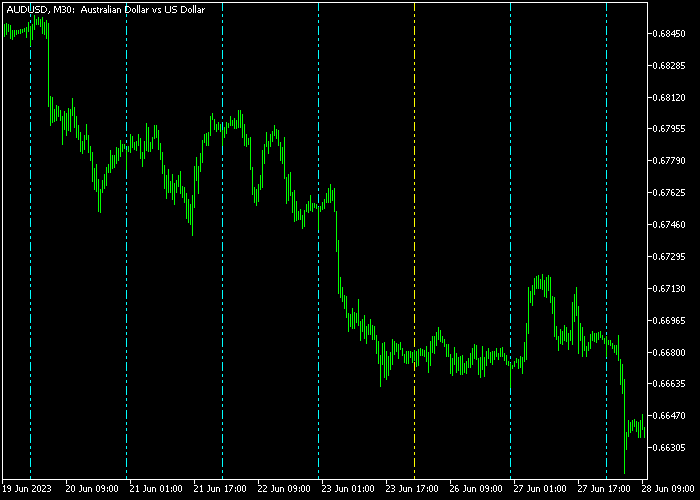
The Daily Lines Forex Indicator for MT5 helps traders monitor daily market behavior by displaying Monday through Friday as vertical dashed lines on the price chart.
This visual separation allows you to quickly analyze how trends develop over the trading week.
By tracking daily price movement, you can identify repeating patterns, opening ranges, and momentum shifts for each weekday.
The indicator supports customization of line colors, styles, text placement, fonts, and anchor positions to match your trading preferences.
Free Download
dailylines.mq5 Indicator (MT5)
Key Features
- Displays daily vertical lines for Monday through Friday directly on the chart.
- Helps visualize trend progression over the trading week.
- Customizable weekdays colors, line styles, text placement, and font options.
- Supports all Forex pairs on the daily timeframe.
- Ideal for planning entry and exit points based on daily trends.
- Can be combined with other trend-following or support/resistance tools for higher accuracy.
Indicator Chart
The Daily Lines Indicator plots vertical dashed lines for each trading day directly on the price chart.
You can instantly see how the price behaves during each weekday and evaluate the strength or weakness of trends over multiple days.
This makes it easier to plan trades based on weekday-specific patterns and market rhythm.
Guide to Trade with the Daily Lines Forex Indicator
Buy Rules
- Identify upward momentum within the current weekday’s vertical section.
- Open a buy trade when the price shows a strong daily trend moving higher.
- Confirm the entry with additional trend indicators or support levels.
- Avoid entering if the price is near strong resistance within the daily range.
Sell Rules
- Identify downward momentum within the current weekday’s vertical section.
- Open a sell trade when the price shows a clear daily downtrend.
- Confirm the entry with additional trend indicators or resistance levels.
- Avoid selling near strong support within the daily range.
Stop Loss
- For buy trades, place the stop loss below the low of the current weekday’s range.
- For sell trades, place the stop loss above the high of the current weekday’s range.
Take Profit
- Close buy trades when price approaches the upper boundary of the current weekday’s range.
- Close sell trades when price approaches the lower boundary of the current weekday’s range.
Download Now
dailylines.mq5 Indicator (MT5)
FAQ
Can I use the Daily Lines Indicator on intraday charts?
No. This indicator is designed specifically for the daily timeframe to track weekday trends accurately.
Can the colors and text be customized?
Yes. You can adjust line colors for each weekday, modify text placement, choose fonts, and select anchor positions to suit your chart layout.
Does it work with all Forex pairs?
Yes. The Daily Lines Indicator supports all currency pairs available on MT5.
How can it help my trading?
It allows you to visualize daily trend progression, plan entry and exit points, and combine weekday insights with other indicators for higher-confidence trades.
Summary
The Daily Lines Forex Indicator for MT5 provides clear daily visual separation, making it easy to monitor trends from Monday to Friday.
It helps traders identify strong weekday momentum, opening ranges, and potential price reversals.
Customizable lines, colors, and text options allow you to tailor the indicator to your chart preferences.
Used alongside trend confirmation tools, it can improve timing for buy and sell entries while helping manage stop loss and take profit levels based on the daily range.




