
About the Double Channel Forex Scalper Indicator
The Double Channel Forex Scalper Indicator for MetaTrader 4 is a trend-based scalping tool designed to capture short-term price movements with precision.
It relies on a double-channel trading concept that helps define directional bias and entry timing across multiple market conditions.
The indicator plots clear buy and sell arrows directly on the chart.
Green arrows indicate bullish scalping conditions, while red arrows signal bearish momentum.
This visual approach allows traders to react quickly without interpreting complex indicator readings.
The Double Channel Forex Scalper works on all currency pairs and timeframes.
While it is optimized for intraday trading, many traders apply it on M5 and higher charts to reduce noise.
It can also be used on H1, H4, and D1 charts for broader trend-following strategies with fewer signals.
Free Download
Download the “iDoubleChannel_v1.5.ex4” MT4 indicator
Key Features
- Arrow-based scalping signals for fast execution.
- Green arrows identify bullish scalping trends.
- Red arrows identify bearish scalping trends.
- Built on a double-channel trading methodology.
- Works on all currency pairs and MT4 symbols.
- Supports scalping, intraday, and higher timeframe trading.
Indicator Chart
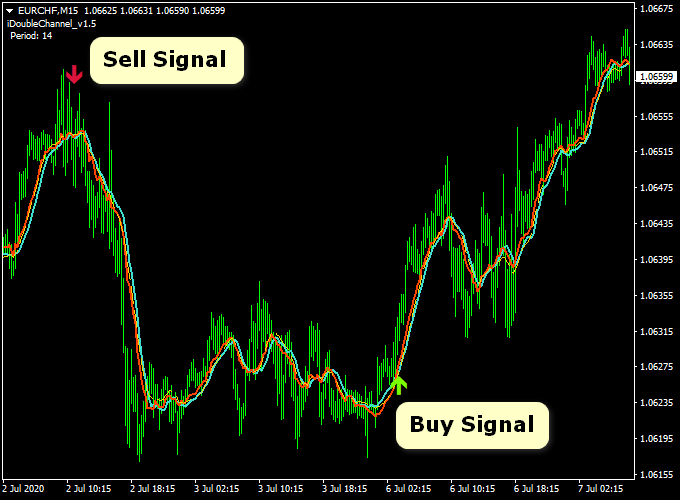
The chart below shows the Double Channel Forex Scalper Indicator applied to a forex pair.
Green and red arrows appear on the chart to signal potential trade entries.
These arrows reflect short-term trend direction and help traders spot momentum-based opportunities quickly.
Guide to Trade with Double Channel Forex Scalper Indicator
Buy Rules
- The indicator prints a green arrow on the chart.
- The scalping trend is pointing upward.
- Enter the trade at the opening of the next candle.
Sell Rules
- The indicator prints a red arrow on the chart.
- The scalping trend is pointing downward.
- Enter the trade at the opening of the next candle.
Stop Loss
- Place the stop loss 1 pip below support for buy trades.
- Place the stop loss 1 pip above resistance for sell trades.
- Traders may also apply a personal stop loss approach.
Take Profit
- Exit the trade when an opposite arrow appears.
- Use a fixed pip target based on the timeframe.
- For example, 25 pips on M15 or 20 pips on M5.
Double Channel Scalper + Winning Super Trend Forex Strategy
This forex strategy combines the Double Channel Forex Scalper MT4 Indicator with the Winning Super Trend Forex Indicator for MT4.
The Double Channel Scalper generates direct buy and sell signals with green arrows for buy and red arrows for sell, making entries clear and immediate.
The Winning Super Trend indicator identifies the overall trend using green lines for bullish and red lines for bearish trends.
Combining these indicators helps traders filter entries according to the prevailing trend, improving the accuracy of scalping trades on M5 and M15 charts.
Buy Entry Rules
- The Double Channel Scalper displays a green arrow, signaling a buy opportunity.
- The Winning Super Trend line is green, confirming the bullish trend.
- Enter a buy trade at the close of the candle that generates the green arrow.
- Place a stop loss 5–8 pips below the recent swing low on M5, 10–15 pips on M15.
- Set take profit 10–15 pips on M5, 20–25 pips on M15, or exit when the arrow disappears or the Super Trend line turns red.
Sell Entry Rules
- The Double Channel Scalper shows a red arrow, signaling a sell opportunity.
- The Winning Super Trend line is red, confirming the bearish trend.
- Enter a sell trade at the close of the candle that generates the red arrow.
- Place a stop loss 5–8 pips above the recent swing high on M5, 10–15 pips on M15.
- Take profit 10–15 pips on M5, 20–25 pips on M15, or exit when the arrow disappears or the Super Trend line turns green.
Advantages
- Clear visual signals make it easy to spot entry points without additional analysis.
- Combines immediate entry signals with trend confirmation for higher probability trades.
- Works well on M5 and M15 charts for intraday scalping.
- Suitable for multiple major currency pairs with good liquidity.
- Helps traders avoid counter-trend trades and focus on following momentum.
Drawbacks
- M5 charts can be noisy, causing false arrows or premature exits.
- Some currency pairs may generate more false signals than others, especially during low liquidity periods.
- Scalping multiple trades per day increases the risk of overtrading without strict risk management.
Case Study 1: EURUSD M5 Trade
During the London session, the Double Channel Scalper showed a green arrow while the Super Trend line was green.
A buy entry at 1.1025 with a 6-pip stop loss moved to 1.1035, capturing 10 pips before the arrow disappeared, signaling an exit.
The trade lasted under 15 minutes, illustrating the speed of this scalping approach.
Case Study 2: GBPUSD M15 Trade
In the New York session, the Double Channel Scalper generated a red arrow, and the Super Trend line was red.
A sell entry at 1.2460 with a 12-pip stop loss dropped to 1.2440, securing 20 pips before the arrow disappeared, and the Super Trend line remained red.
This confirmed a successful trend-aligned scalp on a slightly higher timeframe.
Strategy Tips
- Use M5 for quick scalps and M15 for slightly longer trades with more trend confirmation.
- Check higher timeframes, such as H1 or H4, to ensure the trade aligns with the overall trend before entering.
- Exit trades early if the arrow disappears or the Super Trend line changes color, even if the take profit has not been reached.
- Keep a trading journal to track which pairs and sessions produce the most reliable signals.
- Combine this strategy with support and resistance levels for higher probability setups.
- Use partial profit-taking if the trade moves quickly, especially on M5 charts.
Download Now
Download the “iDoubleChannel_v1.5.ex4” Metatrader 4 indicator
FAQ
What makes the Double Channel Forex Scalper different from other scalping indicators?
The indicator combines channel-based trend logic with arrow signals, which helps reduce hesitation and speeds up decision-making.
Which timeframe offers the best balance between accuracy and frequency?
M5 and M15 charts are commonly used, as they provide enough signals without excessive market noise.
Can this indicator be used on higher timeframes?
Yes, it works on H1, H4, and D1 charts for traders who prefer fewer but more stable trend-based setups.
Is it suitable for beginners?
Yes, the arrow-based signals are easy to follow, making it accessible for traders who are new to scalping strategies.
Summary
The Double Channel Forex Scalper Indicator for MT4 delivers straightforward scalping signals using a proven channel-based method.
Its visual arrows help traders react quickly to short-term momentum shifts.
With flexibility across timeframes and currency pairs, the indicator adapts well to different trading styles.
When paired with proper risk management and disciplined execution, it can be an effective tool for capturing intraday price movements.





