About the Floating Pivot Point HTF Indicator
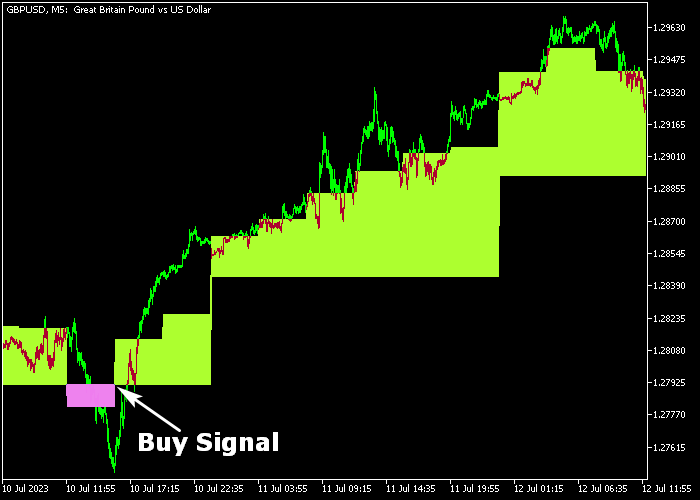
The Floating Pivot Point HTF Indicator for MT5 plots colored buy and sell blocks directly on the price window.
These blocks act as visual trading signals based on higher timeframe pivot calculations.
A green block represents bullish conditions and signals potential long opportunities.
A magenta block represents bearish conditions and signals potential short setups.
The blocks do not repaint once formed, which helps traders maintain confidence in their signals.
The indicator allows customization of the chart period and color settings to match your trading style.
Both beginners and experienced traders can integrate it into scalping or intraday strategies.
Free Download
prevdayandfloatingpivot_htf.mq5 Indicator (MT5)
Key Features
- Displays green and magenta trading blocks directly on the price window.
- Green block signals bullish market conditions.
- Magenta block signals bearish market conditions.
- Non-repainting signal blocks.
- Customizable chart period and color settings.
- Suitable for scalping and short-term trading.
Indicator Chart
The Floating Pivot Point HTF Indicator appears directly in the main price window, marking buy and sell zones with colored blocks.
Green blocks indicate bullish momentum and potential long entries. Magenta blocks indicate bearish pressure and potential short entries.
Traders monitor the formation of new blocks to time their trades.

Guide to Trade with Floating Pivot Point HTF Indicator
Buy Rules
- Wait for a green block to appear on the price chart.
- Confirm price shows upward momentum after the block forms.
- Enter a buy trade at the close of the signal candle.
- Prioritize setups during active London or New York sessions.
Sell Rules
- Wait for a magenta block to appear on the price chart.
- Confirm price shows downward momentum after the block forms.
- Enter a sell trade at the close of the signal candle.
- Focus on pairs with lower spreads to reduce trading costs.
Stop Loss
- Place the stop loss below the green block for buy trades.
- Place the stop loss above the magenta block for sell trades.
Take Profit
- Close buy trades if a magenta block appears.
- Close sell trades if a green block appears.
- Alternatively, use a fixed pip target based on market volatility.
Floating Pivot Point HTF Indicator Scalping Strategy for MT5
This scalping strategy combines higher timeframe bias with precise entry timing.
It uses the Floating Pivot Point HTF Indicator for MT5 to define the overall market direction, while the Triangular Moving Average Indicator for MT5 provides fast entry signals.
The concept is straightforward. Trade in the direction of the dominant trend shown by the colored blocks, and use moving average signals to enter at the right moment.
This approach filters out weak setups and focuses only on trades aligned with momentum.
This strategy works best on M1 and M5 timeframes. It is ideal for scalpers who want quick entries with clear confirmation.
Buy Entry Rules
- Wait for the Floating Pivot Point HTF Indicator to show a green block, confirming a bullish trend.
- Look for the Triangular Moving Average Indicator to display a medium sea green line.
- Enter a buy trade at the open of the next candle after the signal appears.
- Place a stop loss just below the recent short-term support or the nearest swing low.
- Take profit when a deep pink line appears or when price reaches a nearby resistance level.
Sell Entry Rules
- Wait for the Floating Pivot Point HTF Indicator to show a magenta block, confirming a bearish trend.
- Look for the Triangular Moving Average Indicator to display a deep pink line.
- Enter a sell trade at the open of the next candle after the signal appears.
- Place a stop loss just above the recent short-term resistance or the nearest swing high.
- Take profit when a medium sea green line appears or when price reaches a support level.
Case Study 1
On EURUSD M5, the Floating Pivot Point HTF Indicator showed a green block, indicating a bullish trend.
Price pulled back slightly during the London session before resuming upward movement.
The Triangular Moving Average Indicator printed a medium sea green line shortly after the pullback.
A buy trade was entered at the next candle open. Stop loss was placed below the recent low.
Price moved upward with steady momentum.
The trade was closed when a deep pink line appeared, signaling a potential reversal.
The position captured a quick 19 pip scalping gain within a short time window.
Case Study 2
On GBPUSD M1, the Floating Pivot Point HTF Indicator showed a magenta block, confirming a bearish trend.
Price consolidated briefly before breaking lower.
The Triangular Moving Average Indicator displayed a deep pink line, signaling a sell opportunity.
A trade was opened at the next candle. Stop loss was set above the recent high.
Price dropped quickly with strong momentum.
The short trade was closed when a medium sea green line appeared, indicating a possible reversal.
Download Now
prevdayandfloatingpivot_htf.mq5 Indicator (MT5)
FAQ
Does the Floating Pivot Point HTF Indicator repaint?
No. Once a green or magenta block is formed, it remains fixed and does not repaint.
Which sessions are best for scalping with this indicator?
The London and New York sessions provide higher liquidity and stronger momentum, which improves signal reliability.
Should I use it on high spread pairs?
It is better to apply the indicator on currency pairs with lower spreads to reduce trading costs and improve net results.
Summary
The Floating Pivot Point HTF Indicator delivers straightforward buy and sell signals through non-repainting colored blocks.
Green blocks highlight bullish opportunities, while magenta blocks identify bearish setups.
For traders who prefer higher timeframe pivot logic combined with simple execution rules, this indicator offers a disciplined and practical trading approach.




