
About the Forex Market Hours and Sessions Indicator
The Forex Market Hours and Sessions Indicator for MetaTrader 4 displays the active trading sessions directly on your platform.
It helps traders see when major financial centers are open or closed, providing better awareness of market activity throughout the day.
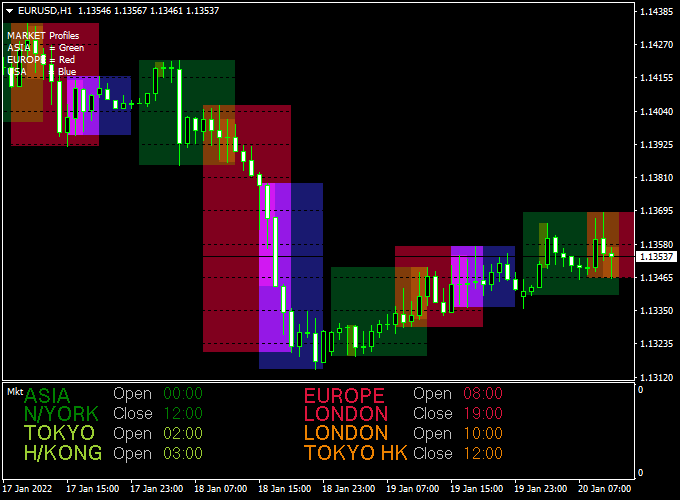
The indicator shows the Asia, Tokyo, Europe, London, New York, and Hong Kong sessions in a dedicated bottom window.
Each session is clearly marked with its open and close times, allowing traders to align their strategies with periods of higher liquidity and volatility.
This tool is especially useful for intraday traders and scalpers who rely on session-based price behavior.
By understanding when sessions overlap or transition, traders can avoid slow market periods and focus on times when price movement is more consistent.
Free Download
Download the “Market hours.ex4” indicator for MT4
Key Features
- Displays major forex market sessions on MT4
- Shows open and close times for each session
- Includes Asia, Tokyo, Europe, London, New York, and Hong Kong
- Displayed in a separate bottom window for clarity
- Works on all currency pairs and timeframes
Indicator Chart
The chart below shows the Forex Market Hours and Sessions Indicator running on an MT4 chart.
The different trading sessions are displayed in the bottom window, clearly marking when each market opens and closes.
This overview helps traders quickly identify active sessions and session overlaps while monitoring price action on the main chart.
Guide to Trade with the Forex Market Hours and Sessions Indicator
Buy Rules
- Focus on buy setups during active sessions such as London or New York
- Prefer entries near session opens when volatility typically increases
- Confirm buy price direction using your primary strategy before entry
Sell Rules
- Look for sell opportunities during strong session momentum
- Trade breakouts or reversals near major session opens
- Confirm sell price direction using your primary strategy before entry
Stop Loss
- Place stop loss beyond recent session highs or lows
- Allow slightly wider stops during volatile session opens
- Reduce position size during overlapping sessions if volatility spikes
Take Profit
- Target session highs or lows as natural profit zones
- Close trades before the end of a session to avoid slow periods
- Secure partial profits during strong session-driven moves
Practical Tips
- London and New York overlap often offers the best trading conditions
- Avoid overtrading during Asian session if volatility is low
- Use the indicator to plan your trading day in advance
- Combine session timing with technical confirmation for higher-quality trades
MT4 Forex Market Hours and Awesome Indicator Strategy
The MT4 Forex Market Hours and Awesome Indicator Strategy helps traders align their trades with the most active sessions and momentum signals.
By combining market session awareness with a momentum-based oscillator, this strategy aims to capture high-probability trades when volume and volatility are at their best.
The Forex Market Hours and Sessions Indicator displays global trading sessions — Asia, Tokyo, London, Europe, Hong Kong, and New York — directly on the MT4 chart.
This helps traders know exactly when each market opens and closes, which is crucial for timing trades.
The Awesome Forex Indicator complements it by showing a histogram that measures market momentum: when the histogram is above zero, it indicates bullish strength; when it’s below zero, bearish pressure dominates.
This strategy works best on the M1 and M15 timeframes and is suitable for scalpers and short-term traders who want to trade only during active hours.
It focuses on entering trades when a strong session begins and momentum aligns with it.
Buy Entry Rules
- Identify an active session, such as the London or New York session, using the Forex Market Hours and Sessions Indicator.
- Wait for the Awesome Indicator histogram to move above the zero line, confirming bullish momentum.
- Open a buy trade at the next candle open.
- Set a stop loss 10 to 15 pips below the recent swing low on M1–M15 charts.
- Take profit between 15 and 30 pips, depending on volatility or when the histogram begins to weaken.
Sell Entry Rules
- Identify an active market session with high liquidity, such as London or New York overlap.
- Wait for the Awesome Indicator histogram to drop below the zero line, confirming bearish momentum.
- Enter a sell trade at the next candle open.
- Place a stop loss 10 to 15 pips above the latest swing high.
- Take profit between 15 and 30 pips or when the histogram starts to fade in color.
Advantages
- Combines session awareness with momentum for optimal timing.
- Works on multiple short-term timeframes, especially M1 and M15.
- A clear visual display of sessions helps avoid low-volume hours.
- Simple histogram confirmation for easy trade decisions.
- Perfect for traders who prefer structured entries during volatile hours.
Drawbacks
- Less effective during quiet Asian hours with limited volatility.
- False signals are possible if momentum changes rapidly at session opens.
- May produce fewer signals during consolidating markets.
Case Study 1: EUR/USD M1
During the London open, the Forex Market Hours Indicator showed the start of the session at 08:00 GMT.
The Awesome Indicator turned positive just after, with the histogram moving above zero as EUR/USD broke out of its overnight range.
A buy trade was opened at 1.0864 with a 10-pip stop loss.
Within 10 minutes, the price reached 1.0878 for a gain of +14 pips.
The histogram began to flatten afterward, signaling a good time to close the trade.
This example highlights how combining session timing with momentum confirmation can catch fast scalping moves.
Case Study 2: GBP/USD M15
On GBP/USD during the New York session, the Forex Market Hours Indicator showed both London and New York sessions overlapping — a high-volume period.
The Awesome Indicator histogram turned red and crossed below zero at 1.2655.
A sell position was entered at 1.2653 with a 15-pip stop loss.
Over the next 45 minutes, the price dropped to 1.2625, producing a +28 pip gain.
As the histogram started to turn lighter, the trade was exited.
This case shows how aligning trades with active market hours helps capture sustained price movement.
Strategy Tips
- Focus on session overlaps, such as London–New York, for the strongest momentum.
- Avoid trading during session transitions when volume temporarily drops.
- Use the Awesome Indicator zero-line crossover as your main confirmation signal.
- Keep trades short and disciplined, especially on the M1 timeframe.
- Combine with a simple trend filter or moving average for extra confirmation.
- Backtest each currency pair to understand its best-performing session and volatility range.
Download Now
Download the “Market hours.ex4” indicator for Metatrader 4
FAQ
Why are trading sessions important in forex?
Forex price movement changes depending on which global markets are open. Active sessions usually bring higher volume and more reliable price behavior.
Does this indicator adjust for broker time?
Yes. The session times are calculated based on your broker’s server time, ensuring accurate session display on your MT4 platform.
Can this indicator be used for scalping?
Yes. Scalpers often rely on session opens and overlaps, where spreads tighten and price movement increases.
Does the indicator generate trading signals?
No. It is a timing and awareness tool designed to support better decision-making, not to generate buy or sell signals.
Summary
The Forex Market Hours and Sessions Indicator for MT4 helps traders understand when the market is most active by clearly displaying global trading sessions.
This awareness supports better timing, improved trade selection, and more consistent execution.
By visualizing session opens, closes, and overlaps, the indicator fits naturally into intraday and session-based strategies.
For traders who value timing as much as technical analysis, it is a practical addition to any MT4 trading setup.





