About the Fractals Alert MT4 Indicator
The Fractals Alert MT4 indicator is a practical trading tool designed to notify traders when a bullish or bearish fractal appears on the MetaTrader 4 chart.
The indicator automatically detects fractal formations and sends on-screen and email alerts as soon as a signal is confirmed.
It works by analyzing recent price highs and lows to identify potential reversal points.
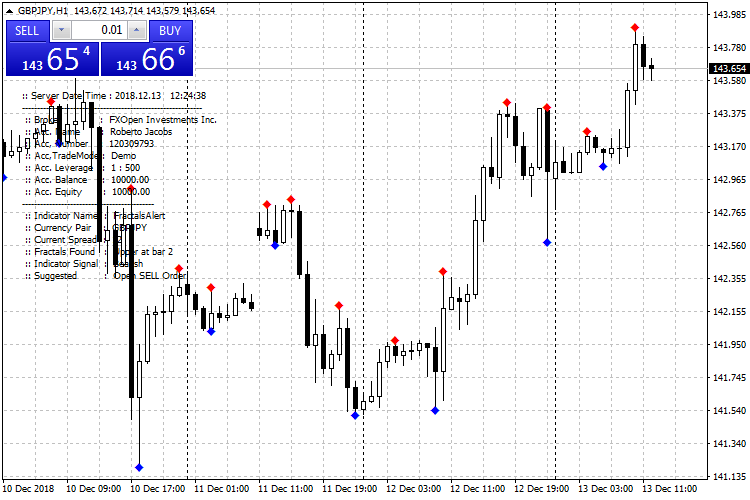
When a valid fractal forms, it clearly labels the signal as bullish or bearish in the lower left corner of the chart.
Based on this information, the indicator suggests whether a buy or sell trade should be considered.
The Fractals Alert MT4 indicator is especially popular among scalpers who need fast notifications and timely entries.
It also displays optional account information such as broker name, leverage, balance, and equity, which can be disabled in the settings.
For best results, traders often combine fractal signals with price action or additional indicators.
Free Download
Download the “FractalsAlert.mq4” MT4 indicator
Key Features
- Automatic detection of bullish and bearish fractal signals.
- On-screen alerts when a new buy or sell fractal appears.
- Email alerts to stay informed away from the trading platform.
- Clear trade direction suggestions based on fractal type.
- Optional display of account details directly on the chart.
- Suitable for scalping and short-term trading strategies.
Indicator Chart
The Fractals Alert MT4 indicator chart shows buy and sell fractal signals directly on the price chart.
Bullish fractals highlight potential upward reversals, while bearish fractals point to possible downward moves.
The chart helps traders quickly spot scalp opportunities and understand short-term market direction without delay.

Guide to Trade with Fractals Alert MT4 Indicator
Buy Rules
- Wait for a bullish fractal alert to appear on the chart.
- Confirm the signal with recent price action or trend bias.
- Ensure price is not reacting strongly against nearby resistance.
- Open a buy trade after the alert candle is closed.
Sell Rules
- Wait for a bearish fractal alert to appear on the chart.
- Check that price aligns with short-term bearish momentum.
- Avoid selling directly into strong support zones.
- Open a sell trade after the alert candle is closed.
Stop Loss
- Set the stop loss a few pips beyond the fractal signal that triggered the trade.
- Use a fixed pip stop based on the average volatility of the selected timeframe.
- Place the stop outside nearby consolidation or range boundaries.
- Adjust the stop loss to breakeven once price moves favorably.
Take Profit
- Target the nearest intraday support or resistance level.
- Use a fixed pip target suitable for scalping conditions.
- Consider partial profits on quick price spikes.
- Exit trades early if price shows strong rejection.
MT4 Fractals Alert + Winning Super Trend Scalping Strategy
This scalping strategy combines the Fractals Alert MT4 Forex Indicator with the Winning Super Trend MT4 Indicator.
The Fractals Alert indicates scalp entries directly: it signals a buy scalp when a buy order is suggested and a sell scalp when a sell order is suggested.
The Winning Super Trend indicator confirms the overall market trend with a green line for bullish trends and a red line for bearish trends.
By entering trades only when the scalp alert aligns with the trend, this strategy filters out low-probability trades.
It is designed for very short timeframes like M1 and M5 and is ideal for scalpers seeking quick intraday moves.
Buy Entry Rules
- Winning Super Trend line must be green, indicating a bullish trend.
- Fractals Alert must indicate a buy scalp.
- Enter long at the open of the next candle after the buy scalp alert appears while the trend line remains green.
- Place a stop loss below the most recent swing low or support level.
- Set take profit at 1.5 to 2 times the stop-loss distance, or exit if the trend line turns red or a sell scalp alert occurs.
Sell Entry Rules
- Winning Super Trend line must be red, indicating a bearish trend.
- Fractals Alert must indicate a sell scalp.
- Enter short at the open of the next candle after the sell scalp alert appears while the trend line remains red.
- Place a stop loss above the most recent swing high or resistance level.
- Set take profit at 1.5 to 2 times the stop-loss distance, or exit if the trend line turns green or a buy scalp alert occurs.
Advantages
- Combines precise scalp alerts with trend confirmation for higher probability trades.
- Works on very short timeframes like M1 and M5 for multiple intraday opportunities.
- Clear buy and sell signals reduce subjectivity in trade entries.
- Defined stop loss and take profit levels improve risk management.
- Suitable for multiple liquid currency pairs for flexible trading.
- Helps traders avoid countertrend scalps by confirming the trend direction.
Drawbacks
- Frequent signals on short timeframes may cause false entries during choppy or sideways markets.
- Requires constant attention due to fast-paced price movements on M1 and M5 charts.
- Small pip targets require multiple trades to achieve meaningful profits.
- Scalping can be affected by spreads and slippage, particularly on less liquid pairs.
Case Study 1
On EURUSD M1 during the London session, the Winning Super Trend line was green, indicating a bullish trend.
The Fractals Alert suggested a buy scalp.
The trader entered long at the next candle with a stop loss of 5 pips below the recent swing low and a take profit of 10 pips above.
Price moved up steadily and reached the take profit within 12 minutes.
Both indicators remained aligned throughout, resulting in a successful scalp trade.
Case Study 2
On USDJPY M5 during the New York session, the Winning Super Trend line was red, indicating a bearish trend.
The Fractals Alert suggested a sell scalp.
The trader entered short at the next candle with a stop loss of 8 pips above the recent swing high and a take profit of 16 pips below.
Price dropped consistently over the next 20 minutes and hit the take profit target.
The trend line remained red, confirming the bearish trend and validating the trade.
Strategy Tips
- Use this strategy only on high-liquidity pairs to reduce spreads and slippage.
- Focus on trading during times of strong market activity for more reliable scalp entries.
- Wait for clear alignment of both indicators before entering a trade to improve accuracy.
- Consider setting alerts for the Fractals indicator to catch opportunities without staring at the screen constantly.
- Combine with short-term support and resistance levels to filter entries and exits more effectively.
- Limit the number of trades per session to avoid overtrading and reduce stress.
- Keep a trading journal to track which pairs and sessions produce the most profitable setups.
- Adjust stop loss and take profit dynamically based on recent market volatility to protect gains and reduce losses.
Download Now
Download the “FractalsAlert.mq4” Metatrader 4 indicator
FAQ
Can I disable the account information display?
Yes, all account details such as balance, equity, and broker name can be turned off in the indicator inputs.
Should I trade fractal signals alone?
It is recommended to confirm fractal signals with price action or another technical indicator for higher accuracy.
Summary
The Fractals Alert MT4 indicator is a reliable tool for traders who want instant notifications of potential market reversals.
Its alert system helps reduce screen time while keeping traders informed of new opportunities.
With clear bullish and bearish fractal signals, flexible alert settings, and optional account data display, this indicator fits well into many scalping strategies.





