
About the Hull Levels Indicator
The Hull Levels Indicator for MT5 is a trend-following tool that uses the Hull moving average to create clear trading zones on the price chart.
It simplifies market analysis by turning trend direction into visual green and deep pink zones.
Green zones signal bullish momentum, suggesting potential buy opportunities, while deep pink zones indicate bearish momentum and possible sell setups.
The indicator adjusts in real-time as price moves, helping traders identify trend shifts quickly.
Suitable for scalping, day trading, and swing trading, Hull Levels can be used alone or combined with other tools for trade confirmation.
Its flexibility allows traders to apply it to any timeframe or currency pair.
All key parameters are adjustable, including the Hull period, speed, levels period, and filled zone display.
Free Download
Hull levels.mq5 Indicator (MT5)
Key Features
- Uses the Hull moving average to detect market trends.
- Displays colored filled zones for buy and sell signals.
- Adjustable period, speed, and levels settings.
- Customizable filled zone display for visual clarity.
- Works on all timeframes and trading instruments.
Indicator Chart
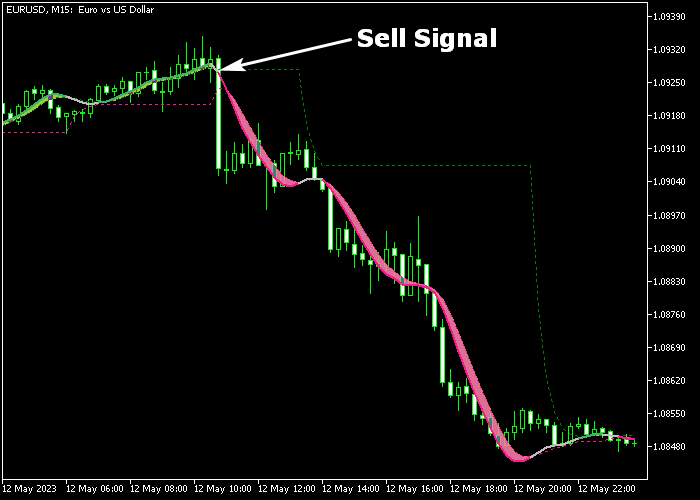
The Hull Levels Indicator displays on the main price chart as colored zones filled in green and deep pink.
Green zones emerge when bullish momentum strengthens, while deep pink zones form as bearish pressure grows, helping traders identify potential entry and exit points with clarity.
Guide to Trade with Hull Levels Indicator
Buy Rules
- Look for the appearance of the green Hull Levels line on the chart.
- This signals that bullish momentum may be starting.
- Open a buy trade when the green line appears.
- Monitor price action and trend continuation for confirmation.
Sell Rules
- Watch for the deep pink Hull Levels line to appear.
- This indicates that bearish momentum may be increasing.
- Open a sell trade once the deep pink line is displayed.
- Confirm trend direction using additional market analysis if needed.
Stop Loss
- For buy trades, place the stop slightly below the lower boundary of the green zone.
- For sell trades, place the stop slightly above the upper boundary of the deep pink zone.
Take Profit
- Close buy trades if the indicator changes from green to deep pink.
- Close sell trades if the indicator switches from deep pink to green.
- Traders can also trail stops along the Hull Levels zones to capture extended trends.
Download Now
Hull levels.mq5 Indicator (MT5)
FAQ
How does the Hull Levels indicator generate signals?
The indicator uses Hull moving average calculations to create colored zones.
Green zones suggest bullish conditions, while deep pink zones indicate bearish momentum.
Can the indicator be used with other tools?
Yes. Many traders combine it with oscillators, trend indicators, or support/resistance levels to improve signal confirmation and trading accuracy.
What settings can I customize?
Traders can adjust the period, speed, levels period, price source, and whether to display filled zones.
These settings allow the indicator to adapt to various market conditions and trading strategies.
Summary
The Hull Levels Indicator offers a clear way to track bullish and bearish trends using filled Hull moving average zones.
Its visual representation helps traders identify potential trade entries and exits effectively.
With customizable parameters and compatibility with other trading tools, Hull Levels can support a wide range of trading strategies.
The green and deep pink zones provide intuitive guidance for managing trades and following market momentum across any timeframe.




