
About the Kalman Filter Indicator
The Kalman Filter Indicator for MT4 is an adaptive trend-following tool designed to track price direction with high responsiveness.
It plots a dual-colored line directly on the chart, adjusting dynamically as market conditions change.
Unlike traditional moving averages that rely on fixed calculations, this indicator continuously updates its internal estimates to stay aligned with real-time price action.
The indicator alternates between turquoise and orange to reflect bullish and bearish conditions.
A turquoise line signals upward momentum, while an orange line signals downward pressure.
This color-based logic makes it easy to read trend shifts without lag-heavy confirmations.
The Kalman Filter focuses on reducing noise while preserving sensitivity, which helps traders stay in trends longer and exit earlier when conditions change.
Traders can use the Kalman Filter as a standalone signal tool or combine it with momentum indicators like MACD or Stochastics for added confirmation.
It works across multiple timeframes and currency pairs, making it flexible for both intraday and swing trading approaches.
Free Download
Download the “kalman-filter-indicator.ex4” MT4 indicator
Key Features
- An adaptive trend line that adjusts to changing market conditions.
- Dual-color system showing bullish and bearish momentum.
- Reduced lag compared to standard moving averages.
- Suitable for standalone use or indicator combinations.
Indicator Chart
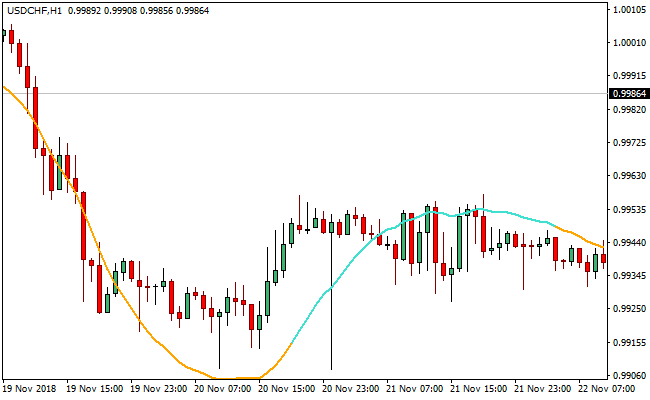
The Kalman Filter Indicator chart displays a smooth, dual-colored line plotted over price action.
The line shifts between turquoise and orange to highlight trend direction and potential buy or sell signals.
Traders can quickly identify active trends and spot reversals when the line changes color.
Guide to Trade with Kalman Filter Indicator
Buy Rules
- Wait for the Kalman Filter line to turn turquoise.
- Confirm that price is moving above the indicator line.
- Enter a buy trade at the close of the signal candle.
- Trade in the direction of the dominant higher timeframe trend.
Sell Rules
- Wait for the Kalman Filter line to turn orange.
- Confirm that price is moving below the indicator line.
- Enter a sell trade at the close of the signal candle.
- Align trades with bearish higher timeframe conditions.
Stop Loss
- Place the stop loss a few pips beyond the Kalman Filter line.
- Move the stop closer as price extends in your favor.
- Exit the trade if price closes firmly against the indicator color.
Take Profit
- Set the first target at the nearest opposite Kalman Filter color change.
- Hold the position while the indicator maintains the same color.
- Lock profits by moving the stop loss to break even after strong momentum.
- Exit the trade when price closes on the opposite side of the indicator line.
Kalman Filter + Waddah Attar Indicator Forex Scalping Strategy for MT4
This MT4 strategy combines the smoothing power of the Kalman Filter Indicator for MT4 with the momentum confirmation from the Waddah Attar Scalping Indicator for MT4.
The Kalman Filter provides a clean trend signal by showing a turquoise line in uptrends and an orange line in downtrends.
The Waddah Attar histogram reacts quickly to price bursts, highlighting buying momentum with green bars and selling momentum with red bars.
This setup is ideal for scalpers who want fast trend confirmation without receiving noisy signals.
It performs well on the M1, M5, and M15 charts.
The strategy is simple to follow, stable during steady market conditions, and ideal for traders who want clear visual signals.
Because both tools react quickly to market shifts, entries happen early in the trend.
Buy Entry Rules
- The Kalman Filter shows a turquoise line to confirm an active buy trend.
- The Waddah Attar histogram turns green to confirm buying momentum.
- Enter long when both indicators agree on the same candle.
- Stop loss is placed five to ten pips below the recent swing low.
- Take profit is set at 10 to 15 pips or when the Waddah histogram weakens.
Sell Entry Rules
- The Kalman Filter shows an orange line to confirm a sell trend.
- The Waddah Attar histogram turns red to confirm selling pressure.
- Enter short when both indicators agree on the same candle.
- Stop loss is placed five to ten pips above the recent swing high.
- Take profit is set at 10 to 15 pips or when the Waddah histogram starts to fade.
Advantages
- The Kalman Filter helps reduce noise and avoids many false spikes.
- Both indicators react quickly, which is ideal for scalping fast markets.
- Clear color-based signals make execution simple for beginners.
- The strategy adapts well to major forex pairs with tight spreads.
Drawbacks
- Fast-moving news candles can cause unexpected reversals.
- Requires discipline to follow stop loss rules closely.
Case Study 1: EURUSD M5
During a calm London morning session, the Kalman Filter shifted into a turquoise line as EURUSD started climbing.
A few candles later, the Waddah Attar histogram turned green and held steady.
A long position was taken with a small stop under the recent wick.
The pair moved smoothly upward, delivering a 12 pip gain before the histogram weakened.
Case Study 2: GBPJPY M1
In a fast Asian session move, GBPJPY produced a strong orange signal line from the Kalman Filter.
The Waddah Attar histogram quickly turned red, showing a burst of selling pressure.
A short entry was taken once both tools matched.
GBPJPY dropped sharply for about 15 pips before flattening out.
The fast reaction of the histogram made it possible to catch the early part of the move, even on a one-minute chart.
Strategy Tips
- Focus on liquid pairs like EURUSD, GBPUSD, and USDJPY for tighter spreads.
- If the turquoise or orange line changes direction suddenly, exit the trade early.
- Use the strategy only during active sessions for cleaner momentum.
- Do not hold trades for long because the method is designed for quick scalps.
Download Now
Download the “kalman-filter-indicator.ex4” Metatrader 4 indicator
FAQ
How does the Kalman Filter Indicator differ from moving averages?
The Kalman Filter adapts to price changes by recalculating its internal error estimates, which allows it to react faster than fixed-period moving averages while filtering out noise.
Can I combine the Kalman Filter with other indicators?
Yes. It pairs well with MACD, RSI, or Stochastics to confirm momentum and reduce false entries during ranging markets.
Summary
The Kalman Filter Indicator for MT4 delivers adaptive trend signals through a simple and intuitive color-changing line.
It helps traders identify trend direction, stay aligned with momentum, and react faster to market changes.
Its flexibility across timeframes and compatibility with other indicators make it a practical choice for many trading styles.





