
About the MA Channels Forex Indicator
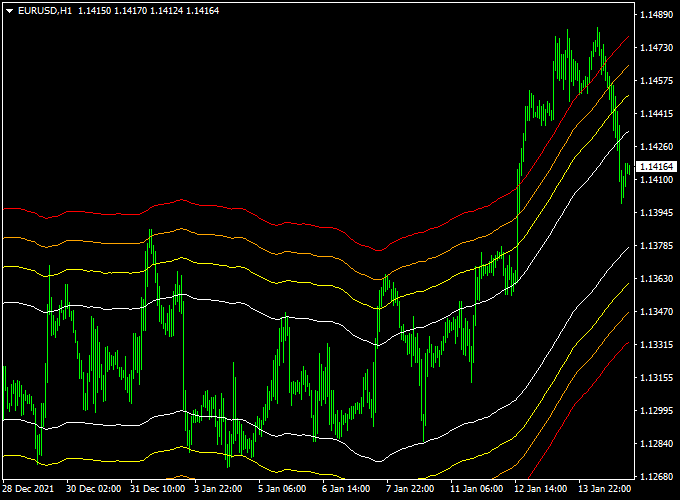
The MA Channels Forex Indicator for MT4 draws a trend channel around the candlesticks using multiple moving averages.
It appears directly in the main MT4 chart window and consists of four upper channel lines and four lower channel lines.
This setup allows traders to identify trend direction, support and resistance zones, and potential entry points with ease.
By analyzing the slope of the channels and the position of the candlesticks, traders can make informed decisions about when to enter or exit trades.
Its visual channels help reduce market noise, giving clear signals for both buying and selling opportunities.
Free Download
Download the “Ma channels.mq4” indicator for MT4
Key Features
- Draws multiple upper and lower channel lines around price movements
- Identifies trend direction based on channel slope
- Signals potential buy and sell opportunities at channel touch points
- Works on any timeframe for versatile trading
- Compatible with other MT4 indicators for strategy combinations
Indicator Chart
The MA Channels chart shows four upper and four lower channel lines surrounding the candlesticks.
When the candlesticks touch a lower channel line and the channels are sloping up, it indicates a buy opportunity.
Conversely, when the candlesticks touch an upper channel line and the channels are sloping down, it signals a potential sell.
Guide to Trade with MA Channels Forex Indicator
Buy Rules
- Open a buy trade when the candlestick touches one of the lower channel lines and the channels are sloping upwards.
- Confirm the entry with additional trend confirmation if needed.
- Check recent support levels to strengthen the trade setup.
Sell Rules
- Open a sell trade when the candlestick touches one of the upper channel lines and the channels are sloping downwards.
- Confirm the entry with other momentum indicators to avoid false signals.
- Check recent resistance levels before opening the trade.
Stop Loss
- For buy trades, place a stop loss slightly below the nearest lower channel line or recent swing low.
- For sell trades, place a stop loss slightly above the nearest upper channel line or recent swing high.
Take Profit
- Set take profit targets near the opposite channel line or next key support/resistance level.
- Consider partially closing positions if the trend slows or shows signs of reversal.
- Use trailing stops along the channel to capture extended trend moves and lock in profits dynamically.
Practical Tips
- Focus on high-liquidity currency pairs for the most reliable channel signals.
- Combine with momentum indicators for additional confirmation when channels are flat or in choppy markets.
- Adjust channel sensitivity based on your preferred timeframe and trading style.
MA Channels & Sibbet Demand Index Indicator Forex Strategy
This MT4 strategy combines the MA Channels Forex Indicator and the Sibbet Demand Index Divergence Indicator to identify high-probability buy and sell trades.
A rising channel in the MA Channels indicator signals a bullish trend, while a falling channel signals a bearish trend.
The Sibbet Demand Index confirms entries with a green histogram above 0 for buys and a red histogram below 0 for sells.
Take profit levels are placed at the upper channel line for buy trades and the lower channel line for sell trades.
This strategy works well on M15, H1, and H4 charts for major currency pairs such as EUR/USD, GBP/USD, and USD/JPY.
Buy Entry Rules
- Confirm the MA Channels indicator shows a rising channel, indicating a bullish trend.
- Wait for the Sibbet Demand Index histogram to be green and above 0.
- Enter a buy trade at the opening of the next candle after both conditions align.
- Place a stop loss below the recent swing low.
- Set the take profit at the upper red channel line of the MA Channels indicator.
- Close the trade immediately if the histogram turns red below 0 or the channel starts falling.
Sell Entry Rules
- Confirm the MA Channels indicator shows a falling channel, indicating a bearish trend.
- Wait for the Sibbet Demand Index histogram to be red and below 0.
- Enter a sell trade at the opening of the next candle after both conditions align.
- Place a stop loss above the recent swing high.
- Set the take profit at the lower red channel line of the MA Channels indicator.
- Close the trade immediately if the histogram turns green above 0 or the channel starts rising.
Advantages
- Combines trend channels with momentum divergence for high-probability entries.
- Clear take profit levels using the MA channel lines.
- Works on multiple timeframes: M15, H1, H4.
- Suitable for major currency pairs with strong trending behavior.
- Visual indicators make it easy to identify entries and exits.
Drawbacks
- Take profit targets may not always be reached in choppy market conditions.
- Short-term scalpers may find trades too slow during minor pullbacks within trends.
- Requires experience to accurately read channel slopes and histogram signals together.
Case Study 1: EUR/USD H1 Chart
The MA Channels indicator showed a rising channel, confirming a bullish trend.
The Sibbet Demand Index histogram turned green above 0.
A buy trade was entered at the next candle with a stop loss below the recent swing low and a take profit at the upper red channel line.
The trade reached the target and was closed as planned.
Case Study 2: GBP/USD M15 Chart
The MA Channels indicator showed a falling channel, confirming a bearish trend.
The Sibbet Demand Index histogram turned red below 0.
A sell trade was entered at the next candle with a stop loss above the recent swing high and take profit at the lower red channel line.
The trade reached the target and was closed as planned.
Strategy Tips
- Trade during high liquidity sessions for tighter spreads and better execution.
- Close trades immediately if the histogram reverses or the channel trend changes direction.
- Test the strategy on a demo account first to familiarize yourself with the indicators and timing.
- Focus on major pairs like EUR/USD, GBP/USD, and USD/JPY for the most reliable signals.
- Do not chase trades during sideways or low-volatility periods to avoid false signals.
Download Now
Download the “Ma channels.mq4” indicator for Metatrader 4
FAQ
Can the MA Channels indicator be used on all timeframes?
Yes, it works across all MT4 timeframes, but it is most effective when used to trade short-term and medium-term trends where the channel slopes are clearly defined.
Does the MA Channels indicator repaint signals?
No, the MA Channels indicator generates signals based on current channel slopes and candlestick positions and does not repaint past signals.
Can I combine MA Channels with other indicators?
Yes, it works well with trend-following or momentum indicators to confirm entries and avoid false signals.
Which currency pairs work best with MA Channels?
High-liquidity pairs like EUR/USD, GBP/USD, and USD/JPY tend to provide the clearest signals, but the indicator can be applied to most Forex pairs.
Summary
The MA Channels Forex Indicator is a practical MT4 tool for traders looking to trade trends with precision.
Drawing multiple moving average channels around the candlesticks helps identify trend direction, support and resistance levels, and optimal entry points.
Its visual channels make it easier to spot buy and sell opportunities while dynamic stop loss and take profit management helps protect profits.
MA Channels is suitable for traders of all levels who want a reliable trend-following indicator for consistent trading decisions.





