About the MA Trend Indicator
The MA Trend Indicator for MT5 converts a traditional moving average calculation into a colored trend bar system that helps traders quickly identify market direction.
Instead of displaying a standard moving average line, the indicator presents colored bars that reflect whether the market is leaning bullish or bearish.
When the market begins shifting direction, the color of the bars changes and signals a possible trading opportunity.
Because the indicator is based on moving average calculations, it follows the prevailing market trend and filters minor price fluctuations.
Short-term traders often apply it to lower timeframes, especially during the London and New York sessions when market activity is stronger.
Several parameters can be adjusted including the period begin value, step settings, moving average method, and applied price.
Free Download
Key Features
- Transforms moving average calculations into colored trend bars.
- Blue bars highlight bullish market direction.
- Red bars highlight bearish market conditions.
- Helps identify potential trend continuation or reversal points.
- Simple visual signals directly on the price chart.
- Customizable moving average parameters.
- Often used during active trading sessions for better momentum.
Indicator Chart
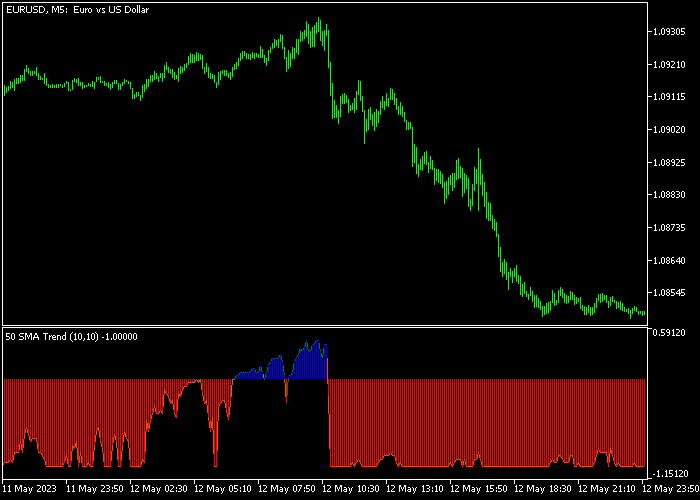
The MA Trend Indicator appears beneath the price chart as colored bars that follow market direction.
In the example, blue bars form during bullish momentum while red bars appear when the market begins moving lower, helping traders recognize potential trend shifts.

Guide to Trade with the MA Trend Indicator
Buy Rules
- Watch the price chart for the first blue MA Trend bar to appear.
- This color shift suggests that bullish momentum may be starting.
- Confirm that price begins moving upward with the new trend.
- Open a buy trade after the bullish bar forms.
Sell Rules
- Observe the chart for the first red MA Trend bar.
- This color change signals that bearish pressure may be increasing.
- Confirm that price begins moving lower.
- Open a sell trade once the bearish bar appears.
Stop Loss
- Place the stop loss slightly below the most recent support level for buy trades.
- Place the stop loss slightly above the most recent resistance level for sell trades.
Take Profit
- Close the buy trade if the indicator changes from blue to red.
- Close the sell trade if the indicator changes from red to blue.
- Traders may also trail the stop as long as the trend bars remain in the same direction.
Download Now
FAQ
What does the MA Trend indicator actually measure?
The indicator analyzes moving average calculations and converts them into colored bars that reflect the prevailing market direction.
This allows traders to quickly see whether bullish or bearish momentum is dominant.
Which trading sessions work best for this indicator?
Many traders prefer using the indicator during the London and New York sessions because these periods typically produce stronger price movement and clearer trend signals.
Can the MA Trend indicator be combined with other tools?
Yes. Traders often combine it with support and resistance analysis, oscillators, or price action methods to confirm potential entries.
Summary
The MA Trend Indicator provides a simple way to follow market direction by transforming moving average data into easy-to-read trend bars.
The color changes allow traders to quickly recognize whether bullish or bearish momentum is active.
Because the indicator follows the underlying trend, it can be useful for traders who prefer momentum-based strategies.
The adjustable settings also allow it to adapt to different trading styles and market conditions.




