
About the Plombiers Indicator
The Plombiers Indicator for MT5 is a channel-based scalping tool designed to deliver precise trade entries, stop placement, and profit targets.
It is built primarily for scalpers and day traders who focus on short-term price movements.
The indicator draws a trading channel that includes a blue middle line and two outer green lines.
The slope of this channel defines the market bias.
When the channel slopes upward, the market is in a bullish phase. When it slopes downward, the market is in a bearish phase.
It also includes advanced settings such as data length, curve order, oscillator display, averaging method, and stochastic price value.
Free Download
Key Features
- Displays a dynamic trading channel with three key lines.
- The blue middle line acts as an internal target level.
- Outer green lines define retracement zones.
- Channel slope identifies bullish or bearish bias.
- Includes customizable technical parameters.
- Designed specifically for scalping and intraday trading.
- Can be used alone or combined with other strategies.
Indicator Chart
The Plombiers Indicator appears directly in the main price window, forming a sloping channel around price action.
An upward-sloping channel signals bullish conditions and pullback buying opportunities.
A downward-sloping channel signals bearish conditions and rally selling opportunities.
Traders focus on retracements toward the outer green lines for entries.
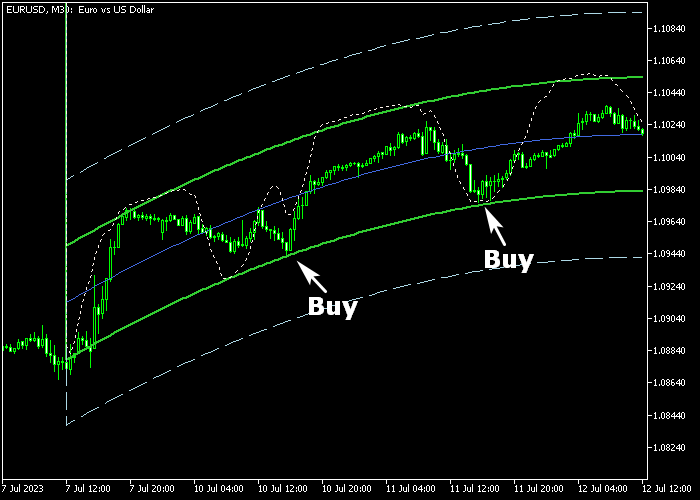
Guide to Trade with Plombiers Indicator
Buy Rules
- Confirm that the Plombiers channel is sloping upward.
- Wait for the price to retrace toward the lower green channel line.
- Enter a buy trade as price reacts from the lower boundary.
- Trade in line with short-term bullish momentum.
Sell Rules
- Confirm that the Plombiers channel is sloping downward.
- Wait for price to rally toward the upper green channel line.
- Enter a sell trade as price reacts from the upper boundary.
- Trade in line with short-term bearish pressure.
Stop Loss
- Place the stop below the gray dashed lower line for buy trades.
- Place the stop above the gray dashed upper line for sell trades.
Take Profit
- For buy trades, close the position when price reaches the blue middle line.
- Alternatively, target the upper green channel line in strong trends.
- For sell trades, close the position at the blue middle line.
- Alternatively, target the lower green channel line in strong moves.
Plombiers Indicator Trend Scalping Strategy for MT5
This scalping strategy combines channel trend analysis with oscillator confirmation.
It uses the Plombiers Indicator MT5 to identify bullish and bearish trends via channel slope, while the DeMarker Indicator MT5 provides precise buy and sell signals based on oversold and overbought levels.
The method focuses on entering trades that align with the channel direction, then using the oscillator to fine-tune entries.
This approach is ideal for scalpers looking to capture fast moves within strong intraday trends.
This strategy works best on M5 and M15 timeframes.
Major pairs provide reliable signals due to good liquidity.
Buy Entry Rules
- Wait for the Plombiers Indicator to form an upward sloping channel, indicating a bullish trend.
- Confirm a buy with the DeMarker Indicator crossing back above 30 from below.
- Enter a buy trade at the opening of the next candle after the signal appears.
- Place a stop loss below the lower side of the channel or recent swing low.
- Take profit at the upper side of the channel.
Sell Entry Rules
- Wait for the Plombiers Indicator to show a downward sloping channel, indicating a bearish trend.
- Confirm a sell with the DeMarker Indicator crossing back below 70 from above.
- Enter a sell trade at the opening of the next candle after the signal appears.
- Place stop loss above the upper side of the channel or recent swing high.
- Take profit at the lower side of the channel.
Case Study 1
On EURUSD M5, the Plombiers Indicator showed an upward sloping channel.
Price pulled back slightly before resuming the bullish trend.
The DeMarker Indicator crossed back above 30 from below, confirming a buy signal.
A trade was entered at the next candle open with a stop loss below the lower side of the channel.
Price rose steadily and reached the upper side of the trading channel where the trade was closed for a 19 pip profit.
Case Study 2
On GBPUSD M15, the Plombiers Indicator displayed a downward sloping channel. Price consolidated briefly before a bearish continuation.
The DeMarker Indicator crossed back below 70 from above, giving a sell signal.
A trade was opened at the next candle with a stop loss above the upper side of the channel.
Price fell slowly but didn’t reach the lower side of the channel.
The trade was closed for a small loss in this case.
Download Now
FAQ
Is the Plombiers Indicator suitable for swing trading?
No. It is primarily designed for scalpers and day traders focusing on short-term price movements.
What does the channel slope represent?
The slope defines market bias. An upward slope signals bullish conditions, while a downward slope signals bearish conditions.
Can I customize the indicator settings?
Yes. You can adjust data length, curve order, oscillator visibility, averaging method, and stochastic price values.
Should I test this indicator before live trading?
Yes. It is recommended to test the indicator thoroughly on a demo account to understand its behavior in different market conditions.
Summary
The Plombiers Indicator offers a structured channel-based approach for scalpers and intraday traders.
By using the channel slope to define bias and retracements for entries, traders can execute disciplined short-term trades with defined targets.
For active traders who prefer pullback strategies within trending conditions, this indicator provides a focused and practical trading method.





