About the Starc Bands Indicator
The Starc Bands Indicator for MT4, developed by Manning Stoller, is a channel-based technical tool used to define the boundaries of normal price action.
The name is an acronym for Stoller Average Range Channels.
Unlike Bollinger Bands, which use standard deviation, this indicator utilizes a short-term Simple Moving Average as a base and adds or subtracts the Average True Range (ATR) to create the upper and lower bands.
This calculation ensures that the bands expand and contract based on actual market volatility rather than just price variance.
Traders utilize these bands to gauge the level of risk associated with a trade and to identify when a currency pair has moved too far from its mean.
It helps market participants stay on the right side of the trend while avoiding entries during overextended conditions.
Free Download
Download the “starc-bands.ex4” MT4 indicator
Key Features
- Calculates channel width based on Average True Range to account for real-time market volatility.
- Includes a central purple Simple Moving Average that serves as the primary trend pivot.
- Provides a structured environment to identify overbought and oversold zones in various market cycles.
- Allows for sensitivity adjustments by modifying the ATR multiplier and the SMA period.
- Works effectively for risk assessment by showing the statistical distance price has traveled from the average.
- Supplies a clean visual representation of potential breakout points and trend exhaustion levels.
Indicator Chart
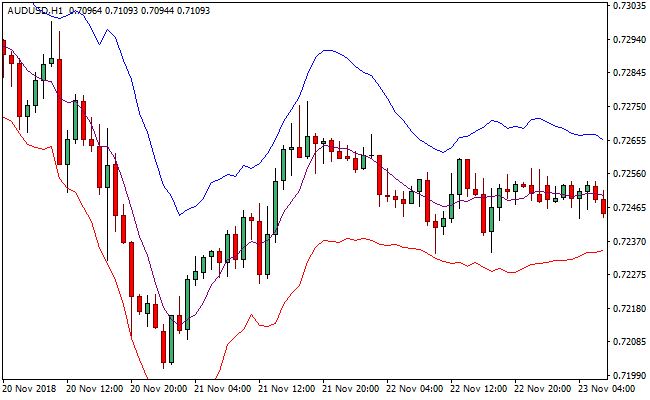
The chart displays the Starc Bands Indicator wrapping the price action within three distinct lines.
The purple middle line acts as the trend filter, while the outer bands define the expected range of movement.
When the price opens and closes outside this central line, it signals a shift in momentum that traders can exploit for entries.

Guide to Trade with Starc Bands Indicator
Buy Rules
- Monitor the price action relative to the central purple middle line of the indicator.
- Wait for a price bar to open and close completely above this purple middle line.
- Check the slope of the bands to ensure the market is not in a sharp bearish decline.
- Initiate the long position only after the bullish candle close confirms the breakout.
Sell Rules
- Monitor the price action relative to the central purple middle line of the indicator.
- Wait for a price bar to open and close completely below this purple middle line.
- Ensure the bands are beginning to tilt downward to support the bearish momentum.
- Execute the short trade once the bearish candle close validates the change in trend direction.
Stop Loss
- Place the stop loss a few pips below the lower Starc Band for a buy position.
- Set the protective stop just above the upper Starc Band when entering a sell trade.
- Adjust the stop loss to the middle purple line once the price reaches the outer band.
- Vary the stop distance based on current ATR values to avoid being stopped out by noise.
Take Profit
- Close all buy orders if the price opens and closes back below the purple middle band.
- Close all sell orders if the price opens and closes back above the purple middle band.
- Take partial profits when the price touches the outer bands to lock in gains during volatility.
STARC Bands + Ultimate Pro Scalper MT4 Scalping Strategy
This strategy uses the STARC Bands MT4 Forex Indicator together with the Ultimate Pro Scalper MT4 Forex Indicator.
STARC Bands help you define the prevailing short‑term market volatility and trend envelope based on ATR and a simple moving average.
The Ultimate Pro Scalper gives simple entry signals via green (buy) and red (sell) dots.
Using both together helps you trade with the trend while catching short-term momentum moves.
This makes it suitable for scalping on M5, M15, or H1 charts for traders who are watching their charts actively and want to catch intraday moves with defined risk.
Buy Entry Rules
- STARC Bands show an upward‑sloping channel (the middle band is sloping up, indicating bullish bias).
- The price is either near the lower band of the STARC envelope or within the lower half of the channel (not extended to the upper band yet).
- The Ultimate Pro Scalper appears as a green dot (buy signal).
- Enter long at or just after the candle where the green dot appears, if the above conditions are valid.
- Place a stop loss a few pips below the lower band of STARC or below a recent minor swing low inside the channel.
- Set take profit at or just under the upper STARC band, or a fixed target — e.g. aim for 1:1 or 1:1.5 reward/risk, depending on volatility and pair behavior.
Sell Entry Rules
- STARC Bands show a downward‑sloping channel (middle band sloping down, indicating bearish bias).
- The price is near the upper band of the STARC envelope or in the upper half of the channel.
- The Ultimate Pro Scalper appears as a red dot (sell signal).
- Enter short at or just after the candle with the red dot, provided the conditions hold.
- Place a stop loss a few pips above the upper STARC band or above a recent minor swing high inside the channel.
- Take profit near or just above the lower STARC band, or use a fixed target with 1:1 or 1:1.5 reward/risk, depending on volatility and pair.
Advantages
- Combines volatility‑based channel (STARC) with a clear signal indicator (Ultimate Pro Scalper).
- Helps avoid counter‑trend entries by using channel slope as a trend filter.
- Scalping‑friendly: works on lower timeframes (M5, M15, H1) for quick trades.
- Dynamic stop loss and profit zones defined by channel bands — adapts to volatility.
- Relatively simple to read and execute, even during busy intraday sessions.
Drawbacks
- In sideways or low‑volatility markets, STARC Bands may be flat and signals less reliable, increasing the risk of false entries.
- During sharp news or spikes, the price may spike beyond bands, causing slippage or invalidating target/stop zones.
Case Study 1: EURUSD on M15
During a London session, STARC Bands sloped upwards on EURUSD. Price dipped near the lower band.
The Ultimate Pro Scalper showed a green dot, and a long position was entered at 1.1015.
The stop loss was set at 1.1008, and the take profit at 1.1040.
Price moved upward and reached the target within 20 minutes, resulting in a profit of approximately 25 pips.
Case Study 2: USDJPY on M5
In a short-term downtrend, STARC Bands sloped downward. Price retraced to the upper band.
The Ultimate Pro Scalper displayed a red dot, and a short position was entered at 149.25.
The stop loss was placed at 149.30, and the take profit at 148.95.
Price moved downward and hit the take profit within 15 minutes, resulting in a profit of approximately 30 pips.
Strategy Tips
- Trade major pairs to reduce spread and slippage during scalping.
- Skip trades when STARC Bands are flat because the market is ranging and signals may be unreliable.
- Focus on active sessions such as London or New York because price movements are stronger and more predictable.
- Use proper position sizing and risk only a small portion of your account per trade.
- Avoid chaining too many trades and focus on quality over quantity.
- Combine entries with minor support and resistance levels to improve precision for entry and exit points.
Download Now
Download the “starc-bands.ex4” Metatrader 4 indicator
FAQ
How do Starc Bands differ from Bollinger Bands in a live trading environment?
While both are channel indicators, Starc Bands use the Average True Range to determine the distance from the moving average, whereas Bollinger Bands use standard deviation.
This means Starc Bands are often more consistent in their width and provide a more accurate reflection of price volatility rather than just sudden price spikes, making them a preferred tool for risk-focused traders.
Can I change the color of the purple middle line in the MT4 settings?
Yes, you can customize the appearance of the Starc Bands Indicator within the “Colors” tab of the indicator inputs in Metatrader 4.
While the default is often purple for the median, changing the color or thickness of the lines can help you distinguish the signal line more easily against your specific chart background or other applied tools.
Summary
The Starc Bands Indicator is a robust tool for traders who want to combine trend following with volatility analysis.
By utilizing the ATR to set its boundaries, it provides a realistic view of where the price is likely to trade under normal conditions.
The indicator’s strength lies in its ability to pinpoint momentum shifts as price crosses the central purple line, offering a mechanical approach to entries and exits.
While it provides excellent signals on its own, its usability is greatly enhanced when paired with a volume indicator to confirm breakouts.






