About the Super Trend HTF Indicator
The Super Trend HTF indicator for MT5 is designed to display higher timeframe trend direction directly on your active chart.
It helps traders align with the dominant market bias without constantly switching between timeframes.
The indicator plots a colored trend line on the main price window.
A green line reflects bullish market sentiment, while a red line signals bearish conditions.
Because it operates on higher timeframe data, it filters out minor fluctuations and focuses on broader trend direction.
All signals are 100% non-repaint, which ensures consistency during both backtesting and live trading.
This makes the tool accessible for beginners while remaining practical for experienced traders.
It works effectively for scalpers, day traders, and swing traders who want confirmation from a stronger timeframe trend.
Free Download
super_trend_htf.mq5 Indicator (MT5)
Key Features
- Displays higher timeframe Super Trend directly on your chart.
- Green line signals bullish market sentiment.
- Red line signals bearish market sentiment.
- 100% non-repaint signals.
- Helps align lower timeframe entries with broader trends.
Indicator Chart
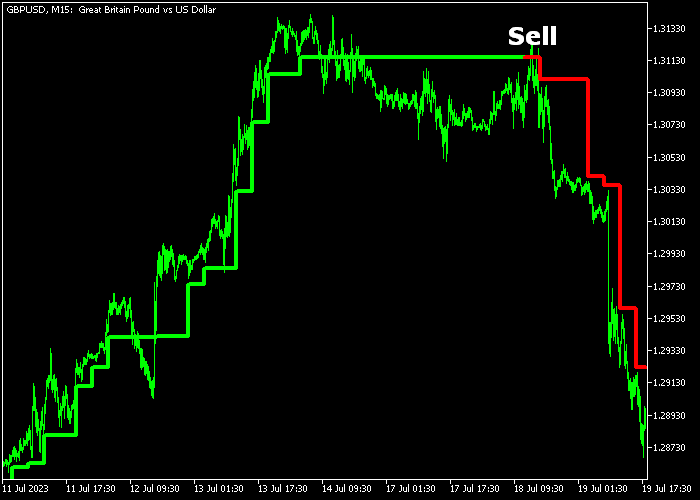
The Super Trend HTF indicator appears as a dynamic colored line integrated into the main price window.
The line reflects the direction of a selected higher timeframe trend.
When the line turns green, the broader market bias is bullish. When it turns red, the broader sentiment shifts bearish.
Traders can use this information to filter trades and avoid counter-trend setups.

Guide to Trade with Super Trend HTF Indicator
Buy Rules
- Wait for the Super Trend HTF line to turn green.
- Confirm that price is trading above the green line.
- Look for pullbacks within the bullish trend.
- Open a buy trade in alignment with the higher timeframe direction.
Sell Rules
- Wait for the Super Trend HTF line to turn red.
- Confirm that price is trading below the red line.
- Look for retracements within the bearish trend.
- Open a sell trade in alignment with the higher timeframe direction.
Stop Loss
- For buy trades, place the stop loss a few pips below the green line.
- For sell trades, place the stop loss a few pips above the red line.
- Alternatively, use a recent swing high or swing low level.
Take Profits
- Close buy trades when the line switches from green to red.
- Close sell trades when the line switches from red to green.
- Advanced traders may trail profits along the active trend line.
Download Now
super_trend_htf.mq5 Indicator (MT5)
FAQ
What is the advantage of using a higher timeframe filter?
A higher timeframe filter reduces noise from small price fluctuations.
It helps traders focus on the dominant direction instead of reacting to minor intraday movements.
Can this indicator reduce false signals?
Yes. By aligning trades with broader trend direction, it filters many counter-trend setups that typically result in premature exits or small losses.
Is it useful for swing trading?
Yes. Swing traders can use daily or four-hour trend direction as confirmation while entering on lower timeframes for improved timing.
Does it work in ranging markets?
It performs best in trending environments.
During sideways conditions, traders should combine it with additional analysis to avoid frequent color shifts.
Summary
The Super Trend HTF indicator gives traders a structured way to trade in line with higher timeframe momentum.
Its non-repaint design ensures dependable signals once confirmed.
By filtering trades through broader market direction, it strengthens discipline and improves trade selection.
When combined with proper trade management and patience, it becomes a valuable trend confirmation tool across different trading styles.




