

About the Symbol Changer Indicator
The Symbol Changer indicator is a practical MT4 tool designed to speed up chart navigation.
Instead of searching through the Market Watch window, this indicator lets you switch currency pairs and symbols directly from the active chart with a single mouse click.
Once attached, the indicator displays a list of selected symbols on the chart.
Clicking any symbol instantly loads it on the same chart.
This allows traders to scan multiple markets without opening new charts or changing templates.
Timeframe switching is also supported, making the workflow even faster.
The Symbol Changer is especially useful for traders who monitor many pairs or rotate through markets during active sessions.
Free Download
Download the “!!!-MT4 X-LIST.ex4” MT4 indicator
Key Features
- Instant symbol switching directly from the chart.
- Supports all MT4-supported instruments.
- Allows quick timeframe changes.
- Customizable symbol list via indicator inputs.
- Reduces chart clutter and manual navigation.
Indicator Chart
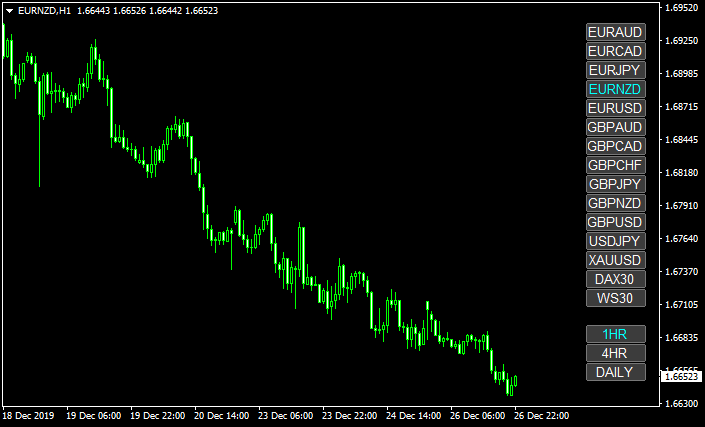
The chart shows the Symbol Changer indicator placed on the price chart, displaying a clickable list of currency pairs.
Each click loads the selected symbol immediately, allowing fast market scanning without opening additional charts.
Guide to Trade with Symbol Changer Indicator
Buy Rules
- Select the desired currency pair using the Symbol Changer panel.
- Switch to the preferred timeframe for analysis.
- Apply your buy strategy once market conditions align.
Sell Rules
- Use the Symbol Changer to load another symbol for comparison.
- Adjust the timeframe to confirm bearish conditions.
- Execute sell trades based on your existing trading system.
Stop Loss
- Define stop loss levels according to the active trading strategy.
- Re-evaluate stop placement when switching symbols.
- Maintain consistent risk rules across all pairs.
Take Profit
- Set take profit targets based on the selected market structure.
- Adjust targets when changing timeframes.
- Monitor multiple symbols efficiently for exit opportunities.
Symbol Changer + Smoothed HMA MT4 Forex Strategy
This MT4 strategy uses the Symbol Changer together with the Smoothed Hull Moving Average (HMA).
The Symbol Changer lets you switch pairs and timeframes quickly from the chart itself, which is perfect for day traders who monitor multiple markets.
The Smoothed HMA gives green histogram bars for bullish momentum and orange bars for bearish momentum.
Using both together lets you scalp efficiently while staying aligned with smooth trend signals.
Buy Entry Rules
- Use the Symbol Changer to navigate to a pair and timeframe with good volatility.
- Confirm that the Smoothed HMA histogram shows a green bar, signaling bullish trend strength.
- Enter a long position when the first green bar appears.
- Place your stop loss just under a recent swing low (for example, 10–20 pips on M5, 20–35 pips on M15).
- Set a take profit target of 15–30 pips on M5 or 30–60 pips on M15, or exit when the HMA flips to orange.
Sell Entry Rules
- Navigate to your selected pair/time frame using the Symbol Changer.
- Wait for the Smoothed HMA histogram to print an orange bar, indicating bearish strength.
- Open a sell trade as soon as that orange bar forms.
- Place a stop loss just above a recent swing high (10–20 pips on M5, 20–35 pips on M15).
- Take profit between 15–30 pips on M5, or 30–60 pips on M15, or close when the HMA turns green again.
Advantages
- Rapid pair and timeframe switching thanks to the Symbol Changer.
- Smooth trend signals from the HMA minimize noise while capturing meaningful moves.
- Good flexibility for both scalping (M5) and slightly longer day trades (M15).
- Simple entry and exit logic based solely on HMA bar colors.
- Less whipsaw risk compared to faster-moving indicators.
Drawbacks
- HMA histogram lags slightly compared to price‑action alone.
- Orange/green flips may come late in very fast-moving markets.
- Stop losses may be hit if the price wicks sharply before moving in your direction.
Example Case Study 1
Imagine trading EURUSD on the M5 chart. You use the Symbol Changer to load GBPUSD M5 quickly.
The Smoothed HMA histogram turns green after a small dip, signaling a possible bullish turn.
You open a buy trade at 1.3050. You place a stop loss at 1.3038 (12 pips) under the recent low.
You aim for a take‑profit of 25 pips at 1.3075.
Over the next few candles, price rises smoothly, and the trade closes around 1.3074 for +24 pips just before the HMA begins to fade.
Example Case Study 2
On EURJPY M15, you switch using the Symbol Changer. The HMA histogram turns orange after a strong rally, indicating bearish strength.
You open a sell trade at 146.20. You set a stop loss at 146.45 (25 pips) above a swing high, and target 145.80 (40 pips) for your take profit.
The pair drifts downward over a few 15-minute bars, and the trade closes at 145.81, giving you +39 pips.
Strategy Tips
- Use the Symbol Changer to scan multiple pairs fast and pick the most active ones.
- Avoid entering just after big economic news; wait for clear HMA bar colour confirmation.
- Consider using a small trailing stop once the price is 50–70% into your target to lock in profit.
- If the HMA histogram flips color before reaching the full target, consider exiting early.
- Test this strategy on a demo account to find the best stop-loss and take-profit settings for your broker.
Download Now
Download the “!!!-MT4 X-LIST.ex4” Metatrader 4 indicator
FAQ
Does the Symbol Changer generate trading signals?
No, this indicator does not provide buy or sell signals. It is a chart navigation tool designed to improve trading workflow.
Can I add custom symbols to the list?
Yes, symbols can be added or removed through the indicator input settings. This allows full control over which markets are displayed.
Does it support indices and commodities?
The Symbol Changer supports all instruments available in MT4, including indices, commodities, and synthetic symbols.
Will switching symbols affect my indicators?
All indicators applied to the chart remain active when switching symbols, which helps maintain consistent analysis.
Summary
The Symbol Changer indicator is a simple yet powerful productivity tool for MT4 traders.
It eliminates unnecessary steps when switching between currency pairs and timeframes.
By improving speed and focus, it allows traders to spend more time analyzing price action and less time managing charts.
While it does not replace a strategy, it significantly enhances day-to-day trading efficiency.





