
About the Trend Manager indicator
The Trend Manager indicator is a technical analysis tool for MetaTrader 5 designed to identify and track market momentum with high precision.
It operates by analyzing price action through smoothed moving average calculations to determine the prevailing market bias.
This indicator provides non-repaint signals, ensuring that once a trend bar is printed on the chart, its position remains fixed.
It is particularly helpful for trend-following strategies, as it guides you to stay in profitable positions for longer durations.
This tool acts as a consistent guide for market direction across any timeframe or asset class.
Free Download
trend_manager.mq5 Indicator (MT5)
Key Features
- Provides non-repaint trading signals for consistent backtesting and live execution.
- Uses sea-green and magenta bars to represent bullish and bearish momentum.
- Features adjustable fast and slow moving average periods for customized sensitivity.
- Includes smoothing methods and price type parameters to refine trend detection.
- Works efficiently as a standalone system or a confirmation filter for other strategies.
Indicator Chart
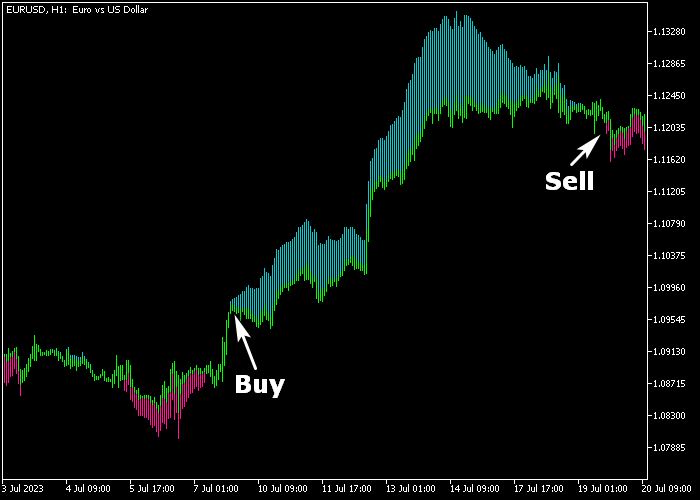
The Trend Manager indicator chart features a series of consecutive colored bars that track the price action.
Sea-green bars appear when the market enters a bullish phase, while magenta bars signal a bearish shift.
The chart demonstrates how the indicator stays aligned with the trend, providing entries as soon as the color transition occurs.
Guide to Trade with the Trend Manager indicator
Buy Rules
- Wait for the indicator to switch from magenta to sea-green trend bars.
- Confirm the first sea-green bar has fully closed before entering the trade.
- Execute a buy transaction at the opening of the following candle.
- Ensure the price is trading above a recent psychological support level.
Sell Rules
- Monitor the chart for a change from sea-green to magenta colored bars.
- Verify that the first magenta trend bar is locked in on the close.
- Initiate a sell transaction to capitalize on the emerging downtrend.
- Avoid selling if the market is currently stuck in a tight horizontal range.
Stop Loss
- For buy orders, place the stop loss just below the most recent swing low.
- For sell orders, position the stop loss above the most recent swing high.
- Consider moving the stop to break-even once the trade reaches a 1:1 ratio.
Take Profits
- Exit the trade manually when the indicator bars change to the opposite color.
- Set a fixed profit target based on local resistance or support zones.
- Close the position if price action shows signs of significant exhaustion.
Download Now
trend_manager.mq5 Indicator (MT5)
FAQ
Can I modify the sensitivity of the trend detection?
Yes, you can adjust the fast and slow Moving Average periods in the settings.
Decreasing the periods makes the indicator more sensitive to minor price shifts, while increasing them creates a smoother line that follows long-term trends more effectively.
How do I filter out false signals during a ranging market?
In a sideways market, any trend indicator can produce frequent color changes.
To improve accuracy, you can increase the “limit in points” parameter or only take signals that align with the trend on a higher timeframe, such as the Daily or H4 chart.
Summary
The Trend Manager indicator is a reliable trading tool that provides non-repaint buy and sell signals to traders.
It excels at simplifying trend identification by using an intuitive color-coded system that appears directly on the price chart.
With its flexible settings and ability to work across various instruments, it serves as a robust foundation for any momentum-based strategy.
Improving your results with this tool is often a matter of fine-tuning the moving average periods to match the specific volatility of your preferred currency pairs.




