About the Ultimate Oscillator Indicator
The Ultimate Oscillator Indicator for MT5 is a momentum-based tool that measures overbought and oversold levels to help traders spot potential reversal points.
By combining three different momentum periods, it reduces false signals common in single-period oscillators.
The indicator oscillates between the oversold 30 level and the overbought 70 level, providing clear reference points for potential buy and sell opportunities.
Traders often combine it with a trend-following tool to align trades with the overall market direction.
When the oscillator reaches 30, it signals oversold conditions, suggesting a potential buying opportunity if the trend is upward.
Conversely, readings near 70 indicate overbought conditions, signaling a possible sell if the trend is downward.
The indicator includes customizable parameters such as first, second, and third momentum periods, along with adjustable overbought and oversold levels.
Free Download
Ultimate_Oscillator.mq5 Indicator (MT5)
Key Features
- Momentum-driven oscillator for overbought and oversold conditions.
- Combines three momentum periods to filter false signals.
- Oscillates between 30 (oversold) and 70 (overbought) levels.
- Helps traders identify potential reversal points in trending markets.
- Works best when combined with trend-following indicators.
- Customizable momentum periods and overbought/oversold levels.
Indicator Chart
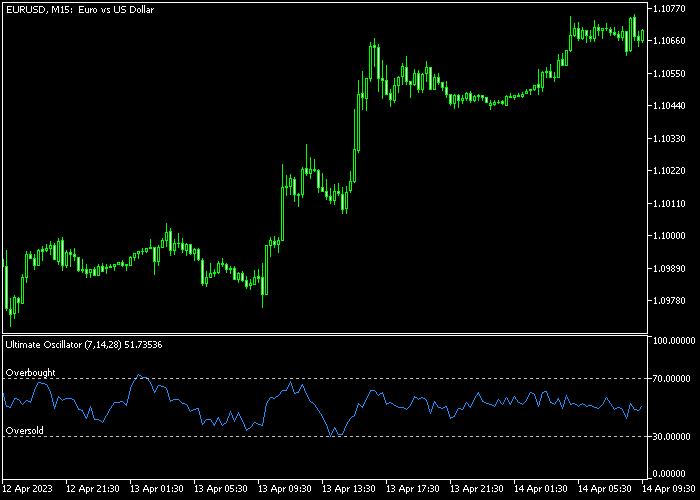
The Ultimate Oscillator appears beneath the main price area as a histogram that moves between the 30 and 70 levels.
Bars near 30 indicate oversold conditions, while bars near 70 indicate overbought conditions, helping traders time potential entries and exits.
Guide to Trade with the Ultimate Oscillator Indicator
Buy Rules
- Wait for the oscillator to touch or approach the 30 oversold level.
- Confirm that the overall trend is upward using a trend indicator.
- Open a buy trade when momentum begins turning upward from the oversold area.
- Avoid entering if price is near major resistance or market conditions are choppy.
Sell Rules
- Wait for the oscillator to reach the 70 overbought level.
- Confirm that the overall trend is downward using a trend indicator.
- Open a sell trade when momentum begins turning downward from the overbought area.
- Avoid selling near major support zones or during consolidation periods.
Stop Loss
- Place the stop loss a few pips below the most recent swing low for buy trades.
- Place the stop loss a few pips above the most recent swing high for sell trades.
- Consider using trend lines or moving averages as dynamic stop loss references.
Take Profit
- Close buy trades near key resistance or when the oscillator reaches overbought levels.
- Close sell trades near key support or when the oscillator reaches oversold levels.
- Optionally exit trades when the oscillator reverses direction from extreme levels.
Download Now
Ultimate_Oscillator.mq5 Indicator (MT5)
FAQ
Can the Ultimate Oscillator be used alone?
It works best when combined with a trend indicator to ensure trades align with the overall market direction.
Can I customize the momentum periods?
Yes. The indicator allows you to adjust the first, second, and third momentum periods as well as the overbought and oversold thresholds.
Which timeframe works best?
The indicator can be applied to all timeframes, but traders often combine it with intraday charts for precise entry timing.
Summary
The Ultimate Oscillator Indicator helps traders identify overbought and oversold conditions using three momentum periods for more reliable signals.
By combining momentum readings with trend analysis, it allows traders to enter and exit trades more effectively.
The indicator can be used to confirm trends, spot reversals, and optimize trade timing across different Forex pairs and timeframes.




