

About the TrendLord Indicator
The TrendLord for MT5 is a Forex oscillator designed to provide accurate buy and sell signals across any currency pair.
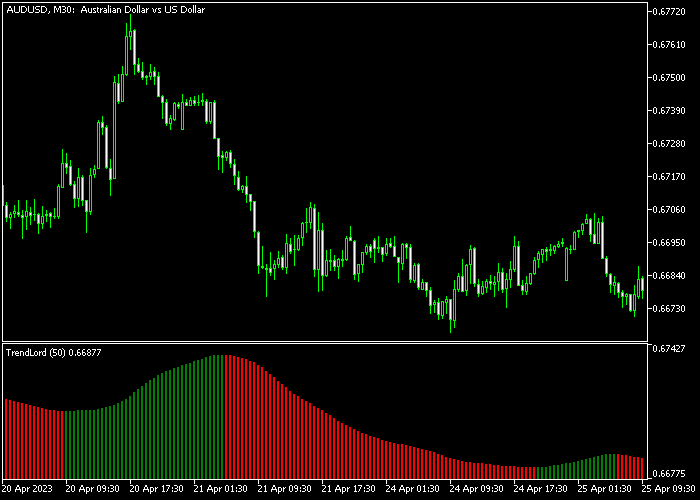
The indicator appears in a separate window below the main price area as colored histogram bars, allowing traders to easily follow market trends.
Green bars indicate bullish momentum, while red bars indicate bearish momentum.
By observing the color changes, traders can align their positions with the prevailing market trend and anticipate potential reversals or trend continuations.
The indicator’s inputs, such as TrendLord period and applied price, can be customized to fit different trading styles, timeframes, and currency pairs.
Its simplicity makes it suitable for both new and experienced traders.
Free Download
Key Features
- An oscillator that visually represents bullish and bearish market momentum.
- Green bars signal bullish conditions, red bars signal bearish conditions.
- Customizable TrendLord period and applied price.
- Works on any timeframe and any Forex pair.
- Easy to interpret for fast trading decisions.
- Suitable for both novice and advanced traders.
Indicator Chart
The TrendLord indicator displays as green and red histogram bars in a separate window below the price chart.
Each bar represents the current market direction, helping traders spot bullish or bearish momentum.
Traders can use these bars to confirm trends and time their entries and exits more efficiently.
Guide to Trade with TrendLord
Buy Rules
- Wait for the first green histogram bar to appear.
- Confirm that the market trend supports bullish conditions.
- Open a buy trade when the green bar appears.
- Maintain the trade while the bars remain green.
Sell Rules
- Wait for the first red histogram bar to appear.
- Confirm that the market trend supports bearish conditions.
- Open a sell trade when the red bar appears.
- Maintain the trade while the bars remain red.
Stop Loss
- Set stops at a level that respects recent market swings and structure.
- Place stop loss slightly below recent support for buy trades.
- Place stop loss slightly above recent resistance for sell trades.
Take Profit
- Close all buy trades when the green histogram bar turns red.
- Close all sell trades when the red histogram bar turns green.
- Consider monitoring momentum strength to exit early if the trend shows signs of weakening.
- Use trend confirmation or additional indicators to refine exit timing if needed.
TrendLord Indicator Scalping Strategy for MT5
This scalping strategy combines the TrendLord Indicator with the Simple Trend Bar Indicator with Signal to build a fast and clean trend-following system for M1 and M5 charts.
It focuses on aligning broader momentum direction with precise entry confirmation for short-term trades.
The TrendLord indicator uses a histogram style representation of market direction.
Consecutive green bars show that buyers are in control and a bullish trend is developing.
Consecutive red bars show that sellers dominate and bearish momentum is active.
The Simple Trend Bar Indicator provides direct entry confirmation using colored trend bars.
A green bar signals a buy entry, while a red bar signals a sell entry.
This strategy is designed for M1 and M5 charts during the London and New York sessions.
Buy Entry Rules
- Confirm that TrendLord shows consecutive green histogram bars, indicating a strong bullish trend.
- Wait for a green trend bar from the Simple Trend Bar Indicator.
- Enter a buy trade at the close of the signal candle.
- Place the stop loss below the most recent swing low or below the latest cluster of red histogram bars.
- Close the trade when TrendLord turns red or when a red trend bar appears.
Sell Entry Rules
- Confirm that TrendLord shows consecutive red histogram bars, indicating a strong bearish trend.
- Wait for a red trend bar from the Simple Trend Bar Indicator.
- Enter a sell trade at the close of the signal candle.
- Place a stop loss above the most recent swing high or above the latest cluster of green histogram bars.
- Close the trade when TrendLord turns green or when a green trend bar appears.
Case Study 1: EURUSD M1 London Session Buy Trade
On EURUSD M1 during the London session, TrendLord printed consecutive green histogram bars, showing a steady bullish trend building in the market.
After a minor pullback, the Simple Trend Bar Indicator printed a green bar confirming entry.
A buy trade was opened at the close of the signal candle.
The stop loss was placed below the most recent swing low where price previously reacted, ensuring protection against short-term volatility.
53 min later, the long trade was closed when TrendLord shifted from green to red bars, indicating that bullish momentum had ended and selling pressure was increasing.
Case Study 2: GBPJPY M5 New York Session Sell Trade
On GBPJPY M5 during the New York session, TrendLord showed consecutive red histogram bars, confirming strong bearish momentum.
A red trend bar appeared from the Simple Trend Bar Indicator during a small retracement upward, signaling a sell entry.
A sell trade was opened at the close of the signal candle.
The stop loss was placed above the recent swing high and above the last green histogram cluster to allow normal price movement.
About 2 hours later, the short trade was closed when a green trend bar appeared and TrendLord began printing green histogram bars, showing that bearish pressure had weakened and the market was reversing.
Download Now
FAQ
Which timeframe is best for the TrendLord indicator?
The TrendLord works on any timeframe, but it is most effective on active charts where momentum shifts are frequent.
Can the settings be customized?
Yes. Traders can adjust the TrendLord period and applied price to suit different trading styles and instruments.
Does it provide reliable entry signals for beginners?
Yes. The green and red histogram bars provide clear visual cues, making it easy for beginners to interpret market trends.
Is it suitable for all Forex pairs?
Yes. The TrendLord oscillator can be applied to any currency pair available in MT5.
Summary
The TrendLord indicator is a simple yet powerful tool for following market trends.
Green and red histogram bars provide clear buy and sell signals, allowing traders to quickly identify bullish and bearish conditions.
Using the bar color change to close trades ensures alignment with market momentum.
With customizable inputs and flexibility across timeframes and instruments, TrendLord is suitable for both novice and experienced traders seeking reliable trend signals.





