
About the Candlestick Analyzer Indicator
The Candlestick Analyzer Indicator for MT5 scans the price chart and identifies bullish and bearish candlestick patterns, helping traders detect potential market reversals or trend continuations.
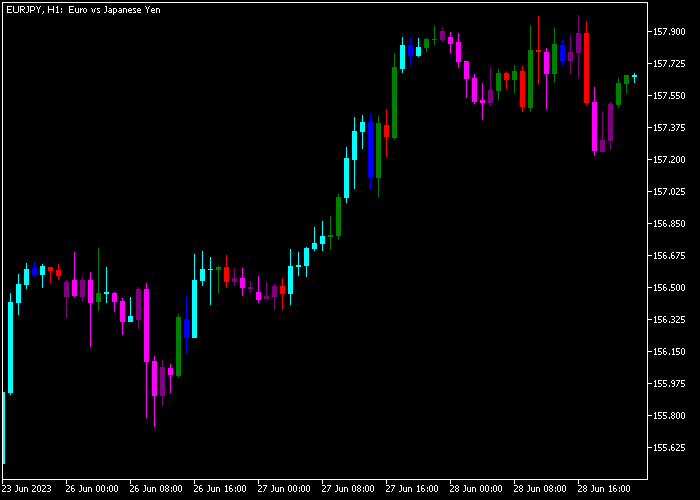
Bullish candlesticks are shown in light-blue, blue, or green, while bearish candles appear in purple, pink, or red.
These color-coded signals make it easier to visually assess momentum and align trades with the prevailing trend.
Customizable settings allow traders to adjust candlestick colors and styles to suit personal preferences or chart themes.
Testing on a demo account is recommended before live trading to understand the indicator’s responsiveness and pattern reliability.
Free Download
CandlesticksBW.mq5 Indicator (MT5)
Key Features
- Identifies bullish and bearish candlestick patterns automatically.
- Color-coded candlesticks for quick trend assessment.
- Customizable colors and candlestick style.
- Supports trend-aligned trading strategies.
- Helps improve timing for entries and exits.
Indicator Chart
The Candlestick Analyzer Indicator overlays on the main chart and highlights candlestick patterns using color-coded signals.
Light-blue, blue, and green candles signal bullish conditions, while purple, pink, and red candles indicate bearish momentum.
These colored candles help traders quickly identify high-probability setups in line with the market trend.
Guide to Trade with Candlestick Analyzer Indicator
Buy Rules
- Confirm the market is clearly trending up.
- Wait for a light-blue candlestick to appear on the chart.
- Open a buy trade at the close of the signal candle.
Sell Rules
- Confirm the market is in a clear downtrend.
- Wait for a pink candlestick to appear on the chart.
- Open a sell trade at the close of the signal candle.
Stop Loss
- For buy trades, place the stop loss 2-3 pips below the most recent swing low.
- For sell trades, place the stop loss 2-3 pips above the most recent swing high.
- Consider slightly wider stops during volatile sessions to avoid premature exits.
Take Profit
- Close trades when the risk-to-reward ratio reaches at least 1.5.
- Alternatively, hold positions until a reversal signal is generated.
- Partial exits can be used to lock in profits while letting the remainder run.
- Adjust take profit according to support, resistance, and overall trend strength.
Candlestick Analyzer Scalping Strategy for MT5
This scalping strategy combines the Candlestick Analyzer Indicator with the Zero Lag Hull Moving Average Indicator to capture fast-moving price action.
The Candlestick Analyzer highlights short-term trade opportunities with colored candlesticks while the Hull Moving Average confirms trend direction with minimal lag.
When both indicators align, trades can be executed with high probability and tight risk management.
This strategy is ideal for M1, M5, and M15 charts.
It’s built for traders who want quick entries and exits and prefer following the trend while filtering weak signals.
Buy Entry Rules
- Wait for the Hull Moving Average line to turn green, indicating a bullish trend.
- Look for a light-blue candlestick from the Candlestick Analyzer, signaling a buy opportunity.
- Enter a buy trade at the close of the light-blue candle.
- Place the stop loss below the low of the signal candlestick.
- Close the trade when the Hull Moving Average changes to violet or when a pink candlestick appears.
- Alternatively, target the next short-term resistance level.
Sell Entry Rules
- Wait for the Hull Moving Average line to turn violet, indicating a bearish trend.
- Look for a pink candlestick from the Candlestick Analyzer, signaling a sell opportunity.
- Enter a sell trade at the close of the pink candle.
- Place the stop loss above the high of the signal candlestick.
- Close the trade when the Hull Moving Average changes to green or when a light-blue candlestick appears.
- Alternatively, aim for the next short-term support level.
Case Study 1: EURUSD M5
On EURUSD M5, a green Hull Moving Average line confirmed a bullish trend.
Shortly after, a light-blue candlestick appeared on the Candlestick Analyzer, signaling a buy entry.
The combination of trend confirmation and candlestick signal created a high-probability setup.
A buy trade was opened at the close of the light-blue candle with the stop loss just below the candlestick low.
Price moved upward quickly, and the trade was closed for 31 pips profit when a pink candlestick appeared, locking in profit from the short-term momentum.
Case Study 2: GBPUSD M1
On GBPUSD M1, the Hull Moving Average line turned violet, indicating a bearish trend.
A pink candlestick then appeared on the Candlestick Analyzer, signaling a sell opportunity.
A sell trade was entered at the close of the pink candle, with the stop loss above the candle high.
Price dropped steadily as the trend continued, and the trade was closed for a 10 pip loss when the Hull line turned green
Download Now
CandlesticksBW.mq5 Indicator (MT5)
FAQ
Can I change the candlestick colors?
Yes. Users can customize the colors for bullish and bearish candlesticks to match personal preferences or chart themes.
How should I trade with this indicator?
It is recommended to trade only in the direction of the prevailing trend to improve signal reliability and reduce risk.
Can I use it alone for trading?
Yes, the indicator can generate trades on its own, though combining it with trend analysis or other indicators can increase accuracy.
Summary
The Candlestick Analyzer Indicator for MT5 highlights bullish and bearish candlestick patterns with clear color-coded signals, helping traders identify trend-aligned entries and exits.
By focusing on the prevailing trend and monitoring light-blue and pink candles, traders can spot high-probability setups and improve trade timing.
Customizable appearance and settings make it easy to integrate into any chart layout, enhancing visual clarity and decision-making in live markets.






