
About the Day of Week Highlighter Indicator
The Day of Week Highlighter Indicator for MT5 is a simple but practical tool that visually marks a selected weekday directly on the price window.
It helps traders focus on recurring market behavior linked to specific trading days.
The chosen day is highlighted in blue, making it easy to spot historical patterns and compare performance across weeks.
By default, the indicator highlights Friday, but you can select any day from Sunday to Saturday.
This tool is especially useful for traders who analyze weekly volatility cycles, news-driven sessions, or end-of-week positioning.
Instead of manually checking the calendar, the indicator keeps your preferred trading day clearly visible.
Free Download
i-dayofweek.mq5 Indicator (MT5)
Key Features
- Highlights a selected weekday directly on the price window.
- The default setting highlights Friday.
- Option to choose any day from Sunday to Saturday.
- Blue color marking for strong visual identification.
- Helps analyze recurring weekly price behavior.
- Simple parameter control with the show week day setting.
Indicator Chart
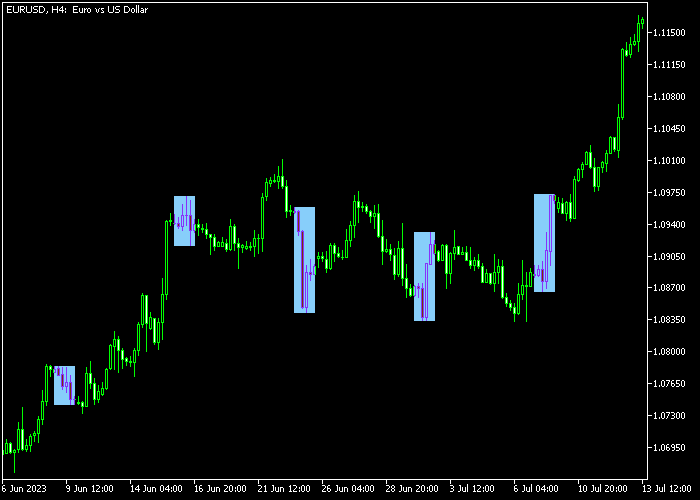
The Day of Week Highlighter Indicator appears directly in the main price window, marking the selected weekday with a blue background highlight.
This visual separation allows traders to quickly identify how price behaved on that specific day across multiple weeks.
It becomes easier to compare volatility, trend strength, and reversal tendencies linked to that weekday.
Guide to Trade with Day of Week Highlighter Indicator
Buy Rules
- Select a weekday known for bullish volatility patterns.
- Wait for bullish price action during the highlighted session.
- Enter a buy trade in line with your primary strategy.
- Use the highlighted day to confirm timing rather than direction.
Sell Rules
- Select a weekday known for bearish market behavior.
- Monitor price action during the highlighted session.
- Enter a sell trade based on your core trading setup.
- Use the highlighted day as timing confirmation.
Stop Loss
- Place stop loss according to your main trading system rules.
- Position stops beyond recent swing highs or lows.
- Avoid tightening stops during high-volatility sessions.
Take Profit
- Close trades based on your predefined risk to reward ratio.
- Consider exiting before the major session closes.
- Secure profits if volatility spikes sharply.
- Follow your structured exit plan without emotional decisions.
Day of Week Highlighter Indicator Trading Strategy for MT5
This strategy combines momentum and timing to create clear trading opportunities.
It uses the Power Trend Forex Indicator for MT5 to identify trend direction and entry signals, while the Day of Week Highlighter Indicator helps focus on the most active trading days.
The idea is simple. Trade only on selected high-probability days and follow confirmed trend signals.
This reduces noise and avoids overtrading. It works especially well for day traders who want structured entries during active sessions.
This approach performs strongly on M15 and H1 timeframes.
Major pairs like EURUSD, GBPUSD, and AUDUSD tend to give the best results due to their liquidity.
Buy Entry Rules
- Select a trading day using the Day of Week Highlighter Indicator.
- Confirm an uptrend with the Power Trend Forex Indicator showing a blue power dot.
- Enter a buy trade at the opening of the next candle after the signal appears.
- Place a stop loss below the most recent minor support level or recent swing low.
- Take profit when the indicator prints an opposite red dot or when price reaches a nearby resistance level.
Sell Entry Rules
- Choose a trading day using the Day of Week Highlighter Indicator.
- Confirm a downtrend with the Power Trend Forex Indicator showing a red power dot.
- Enter a sell trade at the opening of the next candle after the signal appears.
- Place the stop loss above the most recent minor resistance level or recent swing high.
- Take profit when the indicator prints an opposite blue dot or when price approaches a support level.
Case Study 1
The Day of Week Highlighter Indicator is a simple but practical tool that visually marks a selected weekday directly on the price window.
On EURUSD M15, Tuesday was highlighted as a preferred trading day. Price showed steady movement during the London session.
A blue power dot appeared shortly after a pullback within an uptrend.
The trade was entered at the next candle open. Stop loss was placed below the recent low.
Price continued upward with momentum and reached a resistance level.
The trade was closed in profit when a red dot appeared, confirming weakening momentum.
Case Study 2
On GBPUSD M15, Thursday was highlighted. During the New York session, a red power dot appeared after a consolidation phase. This indicated a potential bearish move.
A sell trade was opened on the next candle. Stop loss was set above the recent high. Price dropped steadily as momentum increased.
The trade was closed when a blue dot appeared, signaling a possible reversal.
Download Now
i-dayofweek.mq5 Indicator (MT5)
FAQ
Which day should I highlight?
That depends on your trading strategy.
Many traders focus on Friday due to end-of-week volatility, while others analyze Monday or Tuesday for trend continuation patterns.
Does the indicator affect price data?
No. It only highlights the selected weekday visually and does not alter price calculations.
Can I switch between different weekdays?
Yes. You can select any day from Sunday to Saturday through the show week day parameter.
Is this indicator suitable for all timeframes?
Yes. It works on all timeframes and helps traders study daily behavior across short-term and long-term charts.
Summary
The Day of Week Highlighter Indicator helps traders isolate and study price behavior tied to specific weekdays.
By marking the selected day in blue, it simplifies weekly pattern recognition and session-based planning.
For traders who rely on recurring weekly tendencies, this tool adds timing precision and improves overall market awareness.





