About the Cronex Impulse Indicator
The Cronex Impulse Indicator for Metatrader 4 is an advanced momentum tool that builds upon the foundational logic of the traditional MACD.
It distinguishes itself by utilizing Simple Moving Averages rather than exponential ones, providing a different perspective on price acceleration and trend development.
The system is configured with a 34-period slow moving average, a 14-period fast moving average, and a 9-period signal line by default.
These settings are specifically tuned to identify the core impulse of a price move while smoothing out minor market fluctuations that often lead to false entries.
This indicator functions in a separate window and provides a central zero line that serves as the primary pivot for bullish and bearish sentiment.
Its main benefit lies in its ability to highlight the beginning of a new trend phase as momentum crosses the zero threshold.
By focusing on these impulse shifts, traders can identify high-probability entry points that align with the underlying market flow.
It is particularly effective when used as a confirmation tool alongside a long-term trend filter to ensure maximum precision.
Free Download
Download the “cronex-impulse-cd.mq4” MT4 indicator
Key Features
- The indicator utilizes Simple Moving Averages for a unique momentum calculation.
- It features a 34, 14, and 9 period configuration for balanced signal detection.
- The zero-line crossover provides a definitive trigger for trend changes.
- The layout allows for easy monitoring of price impulse and exhaustion.
- All period settings are fully adjustable to suit various market volatilities.
- The tool is optimized for trend-following strategies on any currency pair.
Indicator Chart
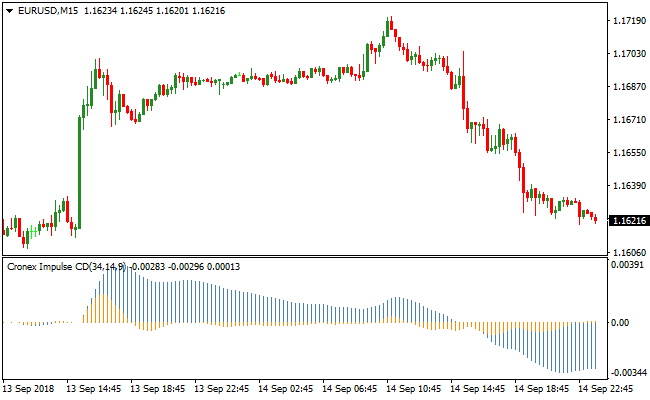
The chart shows the Cronex Impulse Indicator plotted in the sub-window, where it oscillates around the 0.00 level.
You can see how the indicator bars and lines react as price gains momentum.
When the indicator pushes above the zero line, it signals an increase in bullish pressure.
Conversely, when it drops below the zero line, it highlights a bearish impulse, making it easy to see when a trend is gaining strength or losing steam.
Guide to Trade with Cronex Impulse Indicator
Buy Rules
- Confirm the primary market trend is currently heading upward.
- Wait for the Cronex Impulse Indicator to move above the 0.00 zero line from below.
- Initiate a buy trade once the indicator settles firmly in the positive zone.
- Ensure the crossover occurs during a high-volume trading session.
Sell Rules
- Confirm the primary market trend is currently heading downward.
- Wait for the Cronex Impulse Indicator to move below the 0.00 zero line from above.
- Open a sell trade once the indicator settles firmly in the negative zone.
- Verify that price action on the main chart supports the bearish momentum.
Stop Loss
- Place the stop loss a few pips below the most recent swing low for buy orders.
- Position the stop loss a few pips above the most recent swing high for sell orders.
- Maintain a risk level that accounts for the typical daily range of the pair.
Take Profit
- Close the position when the indicator starts moving back toward the zero line.
- Exit the trade if the indicator crosses to the opposite side of the 0.00 level.
- Consider a 1:2 risk-to-reward ratio to lock in consistent profits.
Cronex Impulse + Bar Trader Buy/Sell Signals MT4 Strategy
This strategy uses two MT4 indicators to help capture trend‑aligned entries with clear signals.
The Cronex Impulse indicator shows momentum direction: the histogram above zero signals bullish pressure while the histogram below zero signals bearish pressure.
The Bar Trader Buy/Sell Signals indicator shows the short‑term trend with a blue histogram for bullish and red histogram for bearish.
By combining momentum and trend filters, the system helps you enter trades that match both forces, increasing the chance of capturing clean moves.
This method works best on M5 and M15 timeframes, making it suitable for day trading and quick breakout moves.
It is designed for traders who prefer straightforward entries without too many indicators.
The combination of momentum and trend helps reduce noise and false entries common in lower timeframes.
Buy Entry Rules
- Cronex Impulse histogram must be above zero, signaling bullish momentum.
- Bar Trader histogram must be blue, showing a bullish trend.
- Enter a buy trade at the close of the confirming candle.
- Place a stop loss below the recent minor swing low or a few pips below the signal candle.
- Take profit at a short‑term resistance level or after price moves a set number of pips based on volatility (for example, 12–25 pips on M15 or 8–18 pips on M5).
Sell Entry Rules
- Cronex Impulse histogram must be below zero, signaling bearish momentum.
- Bar Trader histogram must be red, showing a bearish trend.
- Enter a sell trade at the close of the confirming candle.
- Place a stop loss above the recent minor swing high or a few pips above the signal candle.
- Take profit at a short‑term support level or after price moves a set number of pips based on volatility (for example, 12–25 pips on M15 or 8–18 pips on M5).
Advantages
- Using both momentum and trend increases the chance of entering quality setups.
- Clear histogram signals make it easy to read entries and exits.
- Works on multiple timeframes, giving flexibility for different trading styles.
- Suitable for traders who want a mechanical method without too many filters.
- Quick profit targets help lock in moves before reversals occur.
Drawbacks
- Smaller pip targets mean multiple trades are needed for larger gains.
- Requires active monitoring on shorter timeframes to catch fast moves.
Example Case Study 1
On EURUSD M5 during the London session, the Cronex Impulse histogram climbed above zero, indicating bullish momentum.
At the same time, the Bar Trader Buy/Sell Signals histogram turned blue.
A buy trade was placed at 1.1082 with a stop loss at 1.1076.
Price continued upward and hit a short‑term resistance at 1.1104, netting 22 pips before price slowed and reversed.
The trade was closed for profit before the next signal appeared.
Example Case Study 2
On USDJPY M15 during the New York session, Cronex Impulse showed the histogram below zero, and the Bar Trader histogram was red, confirming a bearish trend.
A sell trade was taken at 148.25 with a stop loss at 148.40.
Price headed lower and reached 148.00, capturing 25 pips before consolidation began.
The trade was closed for a strong intraday move.
Strategy Tips
- Trade major pairs like EURUSD, USDJPY, and GBPUSD for tighter spreads and cleaner moves.
- Adjust take profit levels based on current market volatility to avoid exiting too early or too late.
- Be patient and wait for both momentum and trend to align before entering trades.
Download Now
Download the “cronex-impulse-cd.mq4” Metatrader 4 indicator
FAQ
How does this differ from the standard MACD?
The Cronex Impulse Indicator uses Simple Moving Averages instead of Exponential ones.
This change makes the indicator react differently to price cycles, often providing a smoother representation of the trend impulse compared to the more volatile standard MACD.
Is it necessary to use a trend filter?
Yes, it is recommended to pair this with a long-term moving average.
Trading only the signals that match the overall trend direction significantly increases the win rate and helps you stay out of choppy, sideways markets.
Can I change the slow and fast MA periods?
Yes, all settings are fully adjustable in the inputs tab.
You can shorten the periods for a more sensitive signal or lengthen them to filter out more noise, depending on your personal trading style.
Summary
The Cronex Impulse Indicator is an efficient tool for traders seeking a reliable way to measure market momentum.
By focusing on the zero-line crossover, it provides a straightforward method for identifying new trend impulses as they form.
Its use of Simple Moving Averages offers a clean look at price action that many professional traders find superior to standard oscillators.
While easy to interpret, it remains a powerful tool when combined with a solid risk management plan and trend alignment.





