
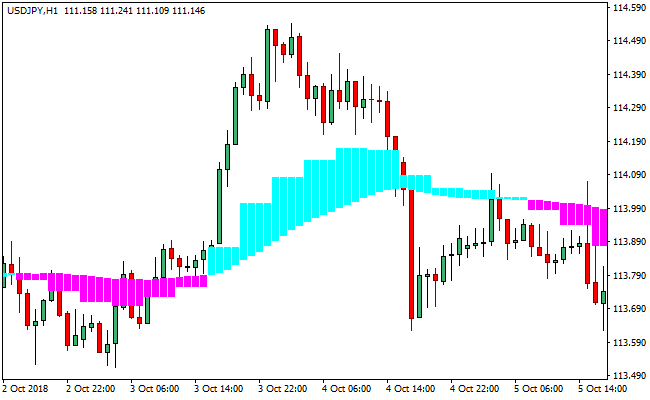
About the Real Cloud Indicator
The Real Cloud indicator is a trend and momentum analysis tool that combines two moving averages to form a dynamic price cloud on the chart.
This cloud visually represents market direction, strength, and potential areas of support and resistance.
The indicator uses color-coded clouds to reflect market sentiment.
Aqua clouds indicate bullish conditions, while magenta clouds signal bearish pressure.
The position of price relative to the cloud helps traders quickly determine whether buyers or sellers are in control.
The distance between price and the cloud also plays an important role.
When price moves farther away from the cloud, momentum strengthens.
When price stays close to the cloud, momentum weakens or consolidates.
This makes the Real Cloud indicator effective for trend-following and momentum-based strategies across multiple timeframes.
Free Download
Download the “real-cloud.ex4” MT4 indicator
Key Features
- Creates a visual cloud using two moving averages.
- Uses color changes to identify bullish and bearish trends.
- Helps gauge momentum based on price distance from the cloud.
- Acts as dynamic support and resistance.
- Performs strongly across scalping, intraday, and swing trading.
Indicator Chart
The chart displays the Real Cloud indicator plotted directly on price.
Aqua and magenta clouds highlight trend direction, momentum strength, and potential buy or sell zones.
Guide to Trade with Real Cloud Indicator
Buy Rules
- Wait for an aqua-colored cloud to form.
- Confirm that the cloud is positioned below the candlesticks.
- Enter a buy trade when price holds above the cloud.
- Focus on trades where price continues to expand away from the cloud.
Sell Rules
- Wait for a magenta-colored cloud to form.
- Confirm that the cloud is positioned above the candlesticks.
- Enter a sell trade when price holds below the cloud.
- Focus on trades where price continues to move away from the cloud.
Stop Loss
- Place the stop loss just beyond the opposite side of the cloud.
- Use recent price compression near the cloud as a reference.
- Apply a fixed pip stop aligned with timeframe volatility.
- Exit early if price re-enters the cloud area.
Take Profit
- Target extended price movement away from the cloud.
- Scale out profits as momentum begins to slow.
- Trail profits while the cloud color remains unchanged.
- Close the trade when the cloud flips color.
Real Cloud + Best Forex Scalping MT4 Indicator Strategy
This scalping strategy combines the Real Cloud MT4 Indicator with the Best Forex Scalping Indicator MT4 to capture short-term Forex moves.
The Real Cloud indicator shows trend direction: an aqua cloud signals a bullish trend, while a magenta cloud signals a bearish trend.
The Best Forex Scalping Indicator adds precise entry signals with blue arrows for buys and red arrows for sells.
This combination is ideal for M1, M5, and M15 charts, making it suitable for fast scalping sessions on major Forex pairs such as EURUSD, GBPUSD, USDJPY, and AUDUSD.
Buy Entry Rules
- Real Cloud displays an aqua cloud, indicating an uptrend.
- The Best Forex Scalping Indicator shows a blue arrow, confirming a buy entry.
- Enter a buy trade at the close of the confirming candle.
- Place stop loss below the most recent swing low or the lower edge of the cloud.
- Take profit or exit the trade when either the Best Forex Scalping arrow changes color to red or the Real Cloud turns magenta.
Sell Entry Rules
- Real Cloud displays a magenta cloud, indicating a downtrend.
- The Best Forex Scalping Indicator shows a red arrow, confirming a sell entry.
- Enter a sell trade at the close of the confirming candle.
- Place a stop loss above the most recent swing high or the upper edge of the cloud.
- Take profit or exit the trade when either the Best Forex Scalping arrow changes color to blue or the Real Cloud turns aqua.
Advantages
- The cloud structure helps filter out counter-trend signals, improving overall trade accuracy.
- Arrow signals appear early in the move, allowing traders to enter at favorable prices.
- The combination works well even in fast-moving markets where many indicators lag.
- Highly visual setup makes it suitable for beginners and advanced scalpers alike.
- The cloud acts as dynamic support or resistance, helping traders define logical stop-loss levels.
- Minimal chart clutter keeps analysis simple and easy to follow during quick scalping sessions.
- The system adapts well across multiple pairs, including majors, minors, and even gold.
Drawbacks
- Rapid trend changes may trigger early exits or stop losses.
- Requires quick decision-making, especially on M1 and M5 charts.
- Not suitable for traders who cannot monitor charts continuously.
- Extreme news events can cause sudden cloud or arrow reversals.
Case Study 1: GBPJPY M5 Scalping Move
GBPJPY presented a clear buy opportunity during the London session.
The Real Cloud indicator shifted from magenta to aqua, signaling the beginning of a bullish trend.
A few candles later, a blue arrow from the Best Forex Scalping Indicator appeared, confirming upward momentum.
The pair quickly gained speed, climbing more than 28 pips within minutes.
The move remained intact until the blue arrow switched to red near a minor resistance zone.
At that point, the signal changed direction, and the exit condition was met, closing the trade with a clean profit before the market corrected downward.
Case Study 2: NZDCHF M15 Trend Continuation
NZDCHF offered a strong sell setup during the New York session.
Price had been drifting lower, and the Real Cloud indicator displayed a solid magenta cloud, confirming bearish pressure.
Shortly after, a red arrow printed from the scalping indicator, signaling an ideal short entry.
The pair continued sliding smoothly for roughly 22 pips before momentum slowed.
When a blue arrow formed against the trend, the strategy exit condition triggered.
Closing the trade at that moment locked in gains and protected the position from a potential short-term pullback.
Strategy Tips
- Only take trades when both the cloud and arrow confirm the direction.
- Prefer major pairs with tight spreads to minimize cost on small scalps.
- Trade during high-volatility sessions for faster moves and exits.
- Avoid trading in consolidating markets where clouds and arrows frequently flip.
- Always use proper risk management, risking 0.5–1% of the account balance per trade.
- Use this strategy on M1, M5, or M15 charts for the best scalping results.
Download Now
Download the “real-cloud.ex4” Metatrader 4 indicator
FAQ
What does the cloud color change indicate?
A color change signals a potential shift in market direction from bullish to bearish or vice versa.
Can the Real Cloud indicator be used alone?
Yes, it fits traders who prefer visual trend confirmation without additional indicators.
Does the indicator lag price?
Like all moving average–based tools, it reacts after price moves, but the cloud structure helps filter minor fluctuations.
Which timeframe works best?
The indicator performs well on all timeframes, with higher timeframes offering more stable trend signals.
Summary
The Real Cloud indicator provides a clean visual approach to trading trends and momentum using colored price clouds.
It highlights direction, strength, and potential support or resistance zones in a single view.
Clear cloud positioning and color changes help traders stay aligned with prevailing market conditions.
Its flexibility makes it a solid choice for traders who rely on visual trend confirmation rather than complex calculations.





