About the Lowest Low Bars Indicator
The Lowest Low Bars Indicator for MT5 is a practical tool that notifies traders when the market price hits a predefined level.
It helps you monitor key price points without constant chart watching.
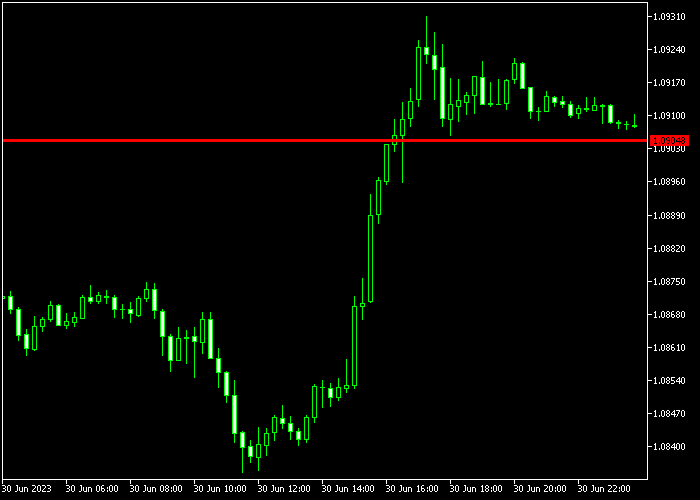
The indicator displays a red line directly on the chart that can be moved vertically to the desired price level by clicking and dragging.
Once set, it alerts you whenever the market touches the specified level, allowing timely trading decisions.
You can customize several parameters, including the level search period, starting bar, line color, line style, and trigger level.
This flexibility ensures the indicator fits your trading style and strategy.
Free Download
lowest_low_value.mq5 Indicator (MT5)
Key Features
- Alerts when the market reaches a predefined price level.
- Red adjustable line for clear visualization.
- Customizable search period and starting bar.
- Adjustable line color, style, and trigger level.
- Easy to use and suitable for traders of all levels.
- Supports monitoring multiple levels for precise entries and exits.
Indicator Chart
The Lowest Low Bars Indicator appears on the main price area as a movable red line.
Position the line at the price you want to monitor.
When the market touches the line, the indicator signals an alert, helping traders identify potential entry or exit points efficiently.

Guide to Trade with the Lowest Low Bars Indicator
Buy Rules
- Place the red line at a key support level below the current market price.
- Wait for the market price to touch the line from above.
- Open a buy trade when the alert triggers.
- Confirm the price action and momentum before entering.
Sell Rules
- Place the red line at a key resistance level above the current market price.
- Wait for the market price to touch the line from below.
- Open a sell trade when the alert triggers.
- Confirm the price action and momentum before entering.
Stop Loss
- Set the stop loss a few pips beyond the nearest swing high or low.
- For buy trades, position below the level line.
- For sell trades, position above the level line.
Take Profit
- Close trades when the market approaches the next significant support or resistance level.
- Alternatively, define a fixed pip target based on your strategy.
- Optional: trail profits as the market moves favorably.
Download Now
lowest_low_value.mq5 Indicator (MT5)
FAQ
What is the main function of the Lowest Low Bars Indicator?
It alerts traders when the market reaches a user-defined price level, helping identify key entry and exit points.
Can I adjust the indicator line?
Yes. You can click and drag the red line vertically to the price level you want to monitor.
Which parameters can be customized?
You can set the level search period, starting bar, line color, line style, and trigger level to match your trading needs.
Is this indicator suitable for beginners?
Yes. Its simple setup and visual alerts make it easy for beginners to monitor price levels without complex analysis.
Summary
The Lowest Low Bars Indicator is a user-friendly tool for monitoring specific price levels.
Its adjustable red line provides clear alerts when the market reaches your desired level, supporting timely trading decisions.
With customizable settings and simple operation, it is practical for both beginners and experienced traders who want to efficiently track key price points on any timeframe.





