
About the Forex Trend Manager Indicator
The Forex Trend Manager indicator for Metatrader 4 is a free, powerful buy/sell trading system that can be used by any currency trader.
The indicator appears in the main MT4 chart window and draws blue and red clouds on the screen, creating a definitive zone that separates bullish and bearish market phases.
By utilizing a cloud-based approach, the indicator filters out minor price fluctuations and focuses on sustained momentum.
It serves as both an entry tool and a directional filter, helping you stay on the right side of the market while avoiding the pitfalls of trading against a strong trend.
Its intuitive design makes it a versatile addition to any trading desk.
Free Download
Download the “Trend manager.mq4” indicator for MT4
Key Features
- Provides a clear visual of market sentiment through color-coded cloud zones.
- Acts as a dynamic support and resistance area during trending market conditions.
- Simplifies trend identification, allowing traders to focus on execution rather than complex calculations.
Indicator Chart
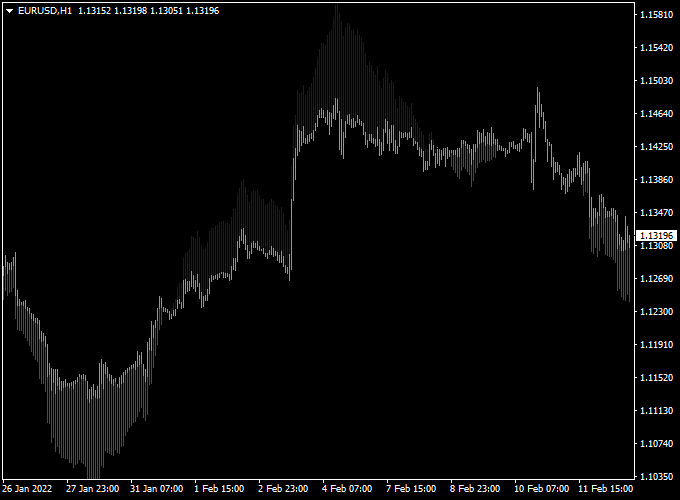
The chart displays the Forex Trend Manager indicator forming a directional cloud around the price action.
You can observe how the blue cloud marks periods of bullish dominance, while the red cloud highlights bearish momentum.
The thickness and slope of the cloud offer additional insight into the strength of the current trend, helping you visualize where the market has the most room to run.
Guide to Trade with the Forex Trend Manager Indicator
To maximize the effectiveness of this system, traders should look for entries where price bounces from or breaks through the cloud boundaries.
Buy Rules
- Open a long trade when the blue cloud appears on the chart.
- Ensure the candle that triggered the blue cloud closes above the cloud’s upper boundary.
Sell Rules
- Open a short trade when the red cloud appears on the chart.
- Confirm that the signal candle has closed firmly below the red cloud zone.
Stop Loss
- For buy positions, place your stop loss just below the lower edge of the blue cloud.
- For sell positions, place your stop loss just above the upper edge of the red cloud.
- Maintaining a stop loss outside the cloud zone provides a buffer against minor price retracements.
Take Profit
- Close the trade when the cloud changes color, indicating a potential trend reversal.
- Set a target at the next major pivot point or Fibonacci extension level.
- Aim for a risk-to-reward ratio of 1:2 to ensure a sustainable trading performance.
Trend Manager Cloud Indicator + Waddah Attar Histogram Forex Scalping Strategy
This scalping strategy pairs the Trend Manager Forex Indicator MT4 (blue cloud = buy trend, red cloud = sell trend) with the Waddah Attar Forex Scalping Indicator MT4 (green histogram = buy momentum, red histogram = sell momentum).
Enter trades when both trend direction and momentum signal align. Best used on 5‑minute or 15‑minute charts for major forex pairs.
Buy Entry Rules
- Trend Manager cloud is blue, and Waddah Attar’s histogram is green.
- Open a buy trade when both signals align.
- Stop loss: a few pips below the recent swing low.
- Take profit: set at 1.5× the stop loss or use a trailing stop as the price moves in your favour.
Sell Entry Rules
- Trend Manager cloud is red, and Waddah Attar’s histogram is red.
- Open a sell trade when both signals align.
- Stop loss: a few pips above the recent swing high.
- Take profit: set at 1.5× the stop loss or use a trailing stop as the price moves in your favour.
Advantages
- Combines trend direction and momentum for higher-probability scalps.
- Short-term focus allows multiple opportunities per session.
- Flexible take profit options adapt to price movement.
Drawbacks
- Frequent trades with tight stops can accumulate small losses.
- Needs a low-spread broker for best performance.
Case Study 1: EUR/GBP 5‑Minute Chart
The Trend Manager cloud turned blue, and the Waddah Attar histogram turned green.
Buy trade opened at 0.8580 with stop loss at 0.8570 and take profit at 0.8595 (1.5× risk).
Trade hit the target quickly, gaining 15 pips.
Case Study 2: USD/CAD 15‑Minute Chart
The Trend Manager cloud turned red, and the Waddah Attar histogram turned red.
Sell trade opened at 1.3500 with stop loss at 1.3512 and take profit at 1.3478 (1.5× risk).
Price moved in favour and trade captured ~30 pips using a trailing stop.
Strategy Tips
- Use currency pairs with tight spreads.
- Trade on 5‑minute or 15‑minute charts for fast setups.
- Enter only when the cloud and histogram align.
- Monitor histogram bar height: stronger bars indicate stronger momentum.
- Trail stop once price moves in your favour to lock profits.
- Keep a trading journal to refine performance.
Download Now
Download the “Trend manager.mq4” indicator for Metatrader 4
FAQ
How does the Forex Trend Manager cloud differ from a standard moving average?
While moving averages provide a single line, the Forex Trend Manager draws a cloud that accounts for both price direction and volatility.
This creates a more robust zone of support and resistance, helping traders stay in a trend during minor pullbacks that might otherwise hit a tight stop loss.
Can I use this indicator for scalping on the 5-minute chart?
Yes, it is highly effective for scalping. Many traders use the M5 or M15 clouds to catch quick momentum moves.
To improve accuracy, it is recommended to only take M5 signals that align with the color of the H1 cloud.
Does the indicator provide sound alerts?
The Forex Trend Manager can be configured to trigger alerts when the cloud changes color.
This is useful for traders who monitor multiple pairs and cannot watch every chart simultaneously for a new trend setup.
How do I handle a market that is moving sideways?
In a ranging market, the cloud may become narrow and change colors more frequently.
During these periods, it is best to wait for the cloud to widen and slope in a clear direction, which signifies that a breakout has occurred and a new trend is forming.
Summary
The indicator’s non-repaint nature provides the reliability needed for high-stakes trading environments.
Visualizing the trend as a zone rather than a single line gives price action the room it needs to develop while keeping your risk managed.
It is an excellent tool for anyone looking to professionalize their trend-following approach.





