
About the Account Equity Analyzer Indicator
The Account Equity Analyzer for MT4 provides traders with real-time account information directly on the chart.
It displays essential metrics such as balance, equity, free margin, margin level, and profit in an easy-to-read mini dashboard.
By keeping key account stats visible at all times, this indicator helps traders monitor risk, manage positions, and make smarter trading decisions without switching windows.
It works on any currency pair and timeframe and is suitable for beginners and experienced traders alike.
Free Download
Download the “account_info_vertical.mq4” indicator for MT4
Key Features
- Shows account balance, equity, and free margin in real-time
- Displays margin and margin level to track risk exposure
- Shows current profit/loss for active trades
- Compact dashboard in the lower-left corner of the chart
- Works on all MT4 accounts and symbols
- Helps improve risk management and position sizing
Indicator Chart
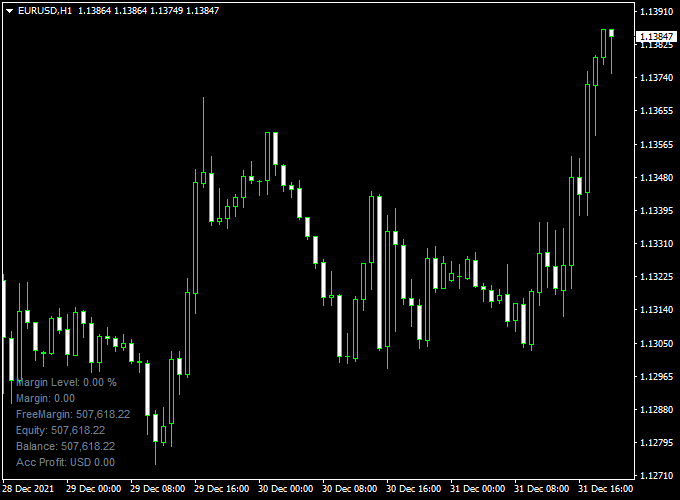
The chart shows the Account Equity Analyzer dashboard at the bottom-left corner of the MT4 chart.
Traders can quickly see their balance, equity, free margin, and profit without opening separate windows, keeping focus on the market.

Account Equity Analyzer + Entry Take Profit Forex Winner MT4 Strategy
This general Forex strategy combines the Account Equity Analyzer Indicator and the Entry Take Profit Forex Winner Indicator to manage trades efficiently while monitoring account health.
The Account Equity Analyzer provides live information about margin level, equity, free margin, balance, and profit.
The Entry Take Profit Forex Winner Indicator generates blue arrows for buy signals and red arrows for sell signals.
This strategy is suitable for intraday trading and can be applied to multiple timeframes.
Buy Entry Rules
- Check the Account Equity Analyzer to ensure sufficient free margin and a healthy margin level.
- Wait for a blue arrow from the Entry Take Profit Forex Winner Indicator, signaling a buy.
- Enter a buy trade at the close of the candle, confirming the signal.
- Set a stop loss below the recent swing low or a nearby support level.
- Set take profit at a 1:1.5 reward-to-risk ratio, or exit if a red arrow appears.
Sell Entry Rules
- Check the Account Equity Analyzer to confirm sufficient free margin and account health.
- Wait for a red arrow from the Entry Take Profit Forex Winner Indicator, signaling a sell.
- Enter a sell trade at the close of the candle, confirming the signal.
- Set a stop loss above the recent swing high or a nearby resistance level.
- Set take profit at a 1:1.5 reward-to-risk ratio, or exit if a blue arrow appears.
Advantages
- Real-time account monitoring helps avoid margin issues and manage risk.
- Clear buy and sell signals improve decision-making and efficiency.
- Works on multiple timeframes and currency pairs.
- Combines technical entries with account monitoring for safer trading.
- Helps traders maintain discipline and manage risk effectively.
Drawbacks
- Requires active monitoring of both account metrics and trade signals.
- High spreads or slippage can reduce profitability.
- Overtrading may happen if multiple signals appear in a short period.
Case Study 1
On the AUD/USD 15-minute chart, the Account Equity Analyzer showed a healthy margin level and free margin.
A blue arrow appeared from the Entry Take Profit Forex Winner Indicator.
A buy trade was entered at 0.6710, with a stop loss at 0.6700 and a take profit at 0.6725.
The trade reached the take profit target in 25 minutes, yielding a 15-pip gain.
Case Study 2
On the USD/CAD 30-minute chart, the Account Equity Analyzer confirmed sufficient free margin.
A red arrow appeared from the Entry Take Profit Forex Winner Indicator.
A sell trade was entered at 1.3510, with a stop loss at 1.3530 and take profit at 1.3490.
The trade reached take profit in 35 minutes, capturing a 20-pip gain.
Strategy Tips
- Always check account health before entering trades to avoid margin issues.
- Focus on currency pairs with tighter spreads like AUD/USD, USD/CAD, EUR/JPY, and GBP/USD.
- Use support and resistance levels to confirm signals and reduce false entries.
- Monitor economic news to avoid unexpected volatility affecting trades.
- Adjust take profit and stop loss according to market volatility.
Download Now
Download the “account_info_vertical.mq4” indicator for Metatrader 4
FAQ
Does it update in real-time?
Yes. All account metrics update instantly with each market movement and trade.
Will it work on any account type?
Yes. Compatible with all MT4 account types and brokers.
Can I move the dashboard?
Yes. You can reposition it anywhere on the chart to suit your preference.
Does it affect trading performance?
No. The dashboard is lightweight and won’t slow down MT4 even with multiple charts open.
Can I track multiple accounts?
It shows only the account currently attached to the chart. Multiple charts can be used for multiple accounts.
Summary
The Account Equity Analyzer for MT4 gives traders a convenient way to monitor key account metrics directly on the chart.
It tracks balance, equity, free margin, margin level, and profit in real-time, helping manage risk and make informed decisions.
Compact, lightweight, and easy to use, this indicator is suitable for all traders.
Keeping account information visible at all times enhances workflow and supports better trade management.





