
About the Forex Trend Filter Indicator
The Forex Trend Filter Indicator for MT4 is a straightforward trend-following tool designed to help traders identify bullish and bearish market conditions.
Applying a digital filter to price movements provides a clear and reliable trend signal that is easy to interpret.
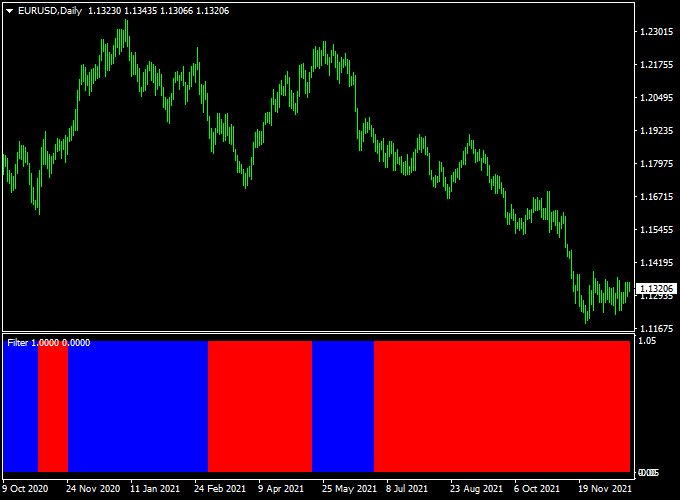
Displayed as a colored histogram in a separate MT4 window, the indicator shows red bars for bearish trends and blue bars for bullish trends.
Traders can use it to enter trades in the direction of the trend and exit or reverse positions when the histogram changes color.
Its simple design makes it suitable for both beginners who want easy-to-follow signals and experienced traders looking for a quick confirmation of market direction.
Free Download
Download the “Filter.ex4” indicator for MT4
Key Features
- Colored trend histogram with red (sell) and blue (buy) bars
- Digital filter to reduce noise and improve trend accuracy
- Easy-to-follow buy and sell signals suitable for beginners
- Signals work in real time with no repainting
- Helps traders identify trend reversals and continuation patterns
Indicator Chart
The chart example shows the trend histogram with red and blue bars indicating bearish and bullish trends.
Traders can quickly identify the current market trend and potential entry points.
The color change signals when to exit or reverse a trade, making it simple to manage positions efficiently.

Guide to Trade with the Forex Trend Filter Indicator
Buy Rules
- Open a buy trade as soon as the first blue bar appears on the histogram.
- Ensure the price aligns with higher timeframe trends if possible.
- Maintain the position while blue bars continue, exiting or reversing when a red bar appears.
Sell Rules
- Open a sell trade when the first red bar is displayed.
- Confirm that price momentum is consistent with the downward trend.
- Hold the position until the histogram turns blue, signaling a potential reversal.
Stop Loss Placement
- Place stops below recent swing lows for buy trades.
- Place stops above recent swing highs for sell trades.
Take Profit Targets
- Final take profit can be taken at significant support/resistance levels or upon color change.
- Trailing stops can help maximize profits during strong trends.
Practical Trading Tips
- Use this indicator in combination with support/resistance zones or pivot points to filter entries.
- Confirm signals with higher timeframe trends for improved accuracy.
- Adjust histogram colors and display settings for optimal clarity.
Forex Trend Filter + Tether Line Day Trading Strategy for MT4
This day trading strategy combines the Forex Trend Filter Indicator with the Tether Line Forex Signals Indicator for MT4.
It is designed for traders who want clear color-coded signals to enter and exit positions on H1 or H4 timeframes.
The Forex Trend Filter identifies the dominant trend with blue and red bars, while the Tether Line Indicator confirms trades with its red or blue signal line.
Together, they provide a straightforward way to capture intraday swings with defined entry and exit points.
Buy Entry Rules
- Wait for the first blue bar to appear on the Forex Trend Filter Indicator.
- Confirm that the Tether Line Indicator is displaying a red signal line (buy confirmation).
- Enter a buy trade at the next candle open after both conditions are met.
- Place a stop loss just below the most recent swing low or 25–35 pips on H1.
- Take profit when the Forex Trend Filter bar changes from blue to red or at a fixed pip target, such as 50–70 pips on H1.
Sell Entry Rules
- Wait for the first red bar to appear on the Forex Trend Filter Indicator.
- Confirm that the Tether Line Indicator is displaying a blue signal line (sell confirmation).
- Enter a sell trade at the next candle open after both conditions are met.
- Place a stop loss just above the most recent swing high or 25–35 pips on H1.
- Take profit when the Forex Trend Filter bar changes from red to blue or at a fixed pip target, such as 50–70 pips on H1.
Advantages
- Clear, color-coded signals make decision-making easier.
- Combines trend identification with signal confirmation for higher accuracy.
- Works well on H1 and H4 charts for day trading setups.
- Can be adapted for swing trading with larger stops and targets.
Drawbacks
- False signals may occur during news events or sideways markets.
- Requires discipline to wait for both indicators to align before entering trades.
- Longer timeframes mean fewer but more significant setups.
Case Study 1 – EUR/USD H1
On the EUR/USD H1 chart, the Forex Trend Filter printed its first blue bar at 1.0740 while the Tether Line showed a red signal line.
A buy trade was opened at 1.0745 with a stop loss at 1.0715 and a take profit at 1.0810 when the Trend Filter bar changed to red.
This trade delivered a 65-pip gain in about 6 hours.
Case Study 2 – GBP/JPY H4
On the GBP/JPY 4-hour chart, the Forex Trend Filter displayed its first red bar at 184.90, and the Tether Line confirmed with a blue signal line.
A sell trade was initiated at 184.80 with a stop loss at 185.40 and a take profit at 183.20.
The move captured 160 pips of profit over two trading sessions.
Strategy Tips
- Focus on major currency pairs during active market hours for better results.
- Check higher timeframes like D1 to align with the broader trend before taking signals.
- Avoid trading during high-impact news events to reduce whipsaws.
- Use a trailing stop to lock in profits when the price moves strongly in your favor.
Download Now
Download the “Filter.ex4” indicator for Metatrader 4
FAQ
How are trade signals generated?
The indicator uses a digital trend filter to display colored bars—blue for bullish trends and red for bearish trends.
Signals appear when the market momentum aligns with the current trend direction.
Can this indicator be used for scalping?
Yes. Its real-time histogram makes it suitable for scalping, intraday, and short-term swing trades, helping traders quickly spot trend changes.
Does it repaint after a signal appears?
No. Once a bar is displayed, its color remains fixed, providing a reliable reference for entries, exits, or reversals.
Summary
The Forex Trend Filter Indicator for MT4 is an intuitive tool that clearly highlights trend direction using a digital histogram.
Blue bars signal bullish momentum, while red bars indicate bearish momentum, helping traders make timely entry and exit decisions.
Ideal for both new and experienced traders, it can be used alone or alongside other tools for added confirmation.
By following the histogram and aligning trades with the prevailing trend, traders can manage risk more effectively, capture profitable moves, and reduce exposure to false signals.





