
About the Advanced Currency Meter Indicator with Signals
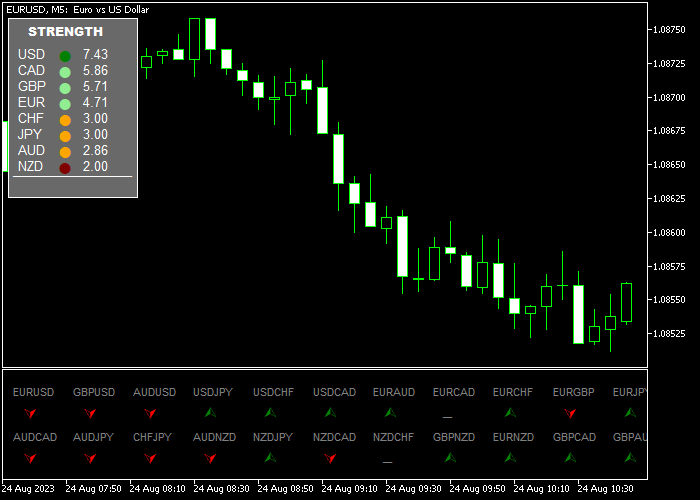
The Advanced Currency Meter Indicator with Signals for MT5 measures the relative strength of major currencies across three different time frames.
It helps traders identify which currencies are strong and which are weak before selecting a pair to trade.
The dashboard appears in the upper left corner of the price window and ranks currencies in real time.
This allows traders to quickly compare strength differences and focus on pairs with strong momentum imbalance.
Actual trade signals appear in a separate window below the price area.
A green arrow indicates a buying opportunity, while a red arrow signals a selling opportunity.
By combining currency strength analysis with arrow confirmation, traders can improve entry timing and pair selection.
Free Download
Advanced Currency Meter MT5.ex5 Indicator (MT5)
Key Features
- Displays a real-time currency strength ranking dashboard.
- Analyzes strength across three different time frames.
- Customizable symbol prefix, suffix, and color settings.
Indicator Chart
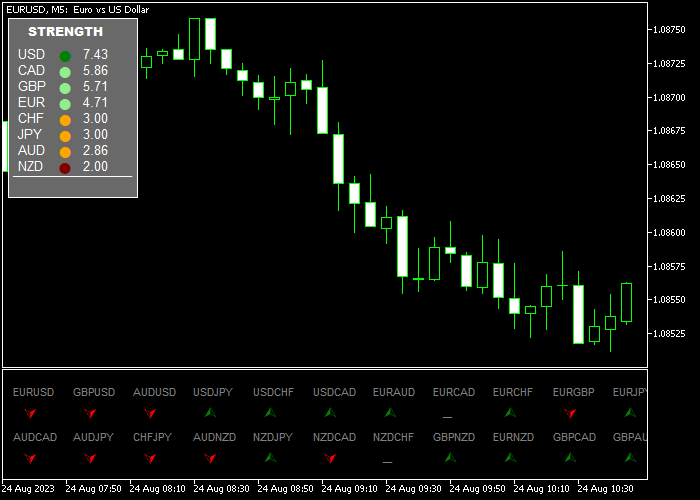
The Advanced Currency Meter Indicator with Signals shows a strength ranking dashboard in the upper left of the price window.
In the separate window below, green and red arrows mark trade opportunities.
Traders look for strong versus weak currency combinations and use the arrow signals to confirm entry timing.
Guide to Trade with the Advanced Currency Meter Indicator with Signals
Buy Rules
- Confirm the base currency is strong and the quote currency is weak on the dashboard.
- Wait for a green arrow to appear in the separate window.
- Open a buy market order after the signal candle closes.
- Trade pairs with clear strength divergence for better momentum.
Sell Rules
- Confirm the base currency is weak and the quote currency is strong on the dashboard.
- Wait for a red arrow to appear in the separate window.
- Open a sell market order after the signal candle closes.
- Focus on pairs with strong imbalance between currencies.
Stop Loss
- Place the stop loss below short-term support for buy trades.
- Place the stop loss above short-term resistance for sell trades.
- Keep risk per trade aligned with your money management plan.
Take Profits
- Close buy trades when a red arrow appears.
- Close sell trades when a green arrow appears.
- Trail the stop along recent swing lows for buys and swing highs for sells.
- Optionally, take partial profit at the first reaction zone and let the rest run.
Advanced Currency Meter and Super Trend Hull MT5 Day Trading Strategy
This day trading strategy combines the Advanced Currency Meter Indicator with Signals for MT5 and the Super Trend Hull Forex Indicator for MT5 to capture high-probability trend trades.
The Advanced Currency Meter provides insight into currency strength, confirming that the base currency is strong and the quote currency is weak for buys, or vice versa for sells.
The indicator also provides green and red arrows in a separate window for precise entry timing.
The Super Trend Hull indicator filters trades by trend, showing a green line for bullish conditions and a violet line for bearish conditions.
Combining currency strength analysis, trend confirmation, and clear entry signals allows professional-level trade setups with managed risk.
Buy Entry Rules
- Check the Advanced Currency Meter dashboard to ensure the base currency is strong and the quote currency is weak.
- Wait for a green arrow to appear in the separate window for confirmation.
- Ensure the Super Trend Hull line is green, confirming a bullish trend.
- Open a buy trade once all conditions align.
- Place the stop loss below the most recent swing low, giving price room to fluctuate naturally.
- Set the take profit dynamically: aim for the next resistance level or 1.5 to 2 times the risk amount.
- Alternatively, trail the stop above higher lows if momentum continues.
- Close the trade early if the Super Trend Hull line turns violet or a red arrow appears on the currency meter window.
Sell Entry Rules
- Confirm the base currency is weak and the quote currency is strong on the Advanced Currency Meter dashboard.
- Wait for a red arrow to appear in the separate window for entry confirmation.
- Ensure the Super Trend Hull line is violet, confirming a bearish trend.
- Open a sell trade once all conditions are met.
- Place the stop loss above the recent swing high cluster to protect against retracements.
- Set the take profit dynamically: target the next support level or a risk-reward ratio of 1:1.5 to 1:2.
- Alternatively, trail the stop below lower highs as the trend continues.
- Exit early if the Super Trend Hull line switches to green or a green arrow appears on the currency meter window.
Cast Study 1
On the EUR/USD H1 chart, the Advanced Currency Meter showed the euro as strong and the US dollar as weak.
A green arrow appeared in the confirmation window, while the Super Trend Hull line was green.
A buy trade was entered with the stop loss placed below a nearby swing low.
Price moved steadily toward the next resistance, reaching 45 pips.
A trailing stop locked in gains as the trend extended, eventually closing the trade at 60 pips.
This setup demonstrates how aligning currency strength, trend confirmation, and precise entry signals enhances day trading efficiency.
Cast Study 2
On the GBP/JPY M15 chart, the Advanced Currency Meter indicated a weak pound against a strong yen.
A red arrow appeared, confirming a bearish entry, and the Super Trend Hull line was violet.
A sell trade was executed with the stop loss above a minor resistance level.
Price fell 30 pips rapidly, partial profit was taken, and the remaining position followed the trend to 42 pips.
Download Now
Advanced Currency Meter MT5.ex5 Indicator (MT5)
FAQ
How does the currency strength ranking help?
The ranking highlights which currencies dominate across multiple time frames.
Trading strong currencies against weak ones increases the probability of sustained movement.
Can I use this indicator for scalping?
Yes, it works effectively on lower time frames.
Short-term traders often combine M1 or M5 entries with higher time frame strength confirmation.
What should I adjust in the settings?
You may need to configure the symbol prefix or suffix depending on your broker.
Color customization and alert options can also be adjusted.
Summary
The Advanced Currency Meter Indicator with Signals for MT5 helps traders spot the strongest and weakest currencies across multiple time frames.
Green and red arrows guide entries and exits in real time, simplifying decision-making.
Users can focus on high-probability currency pairs while monitoring momentum shifts.
Using the dashboard for strength comparison and reacting to signal arrows allows more precise entries and flexible exits.
This approach supports consistent trading while adapting to changing market conditions.





