

About the Currency Pair Symbol and Timeframe Changer Indicator
The Currency Pair Symbol and Timeframe Changer Indicator for MT4 is an essential utility designed to optimize the workflow of multi-currency traders.
Instead of manually dragging symbols from the market watch or using traditional drop-down menus, this tool places a comprehensive control panel directly on your active chart.
It allows for instantaneous navigation between over 50 different currency pairs and every available MT4 timeframe with a single click.
This tool is built for speed and efficiency, especially for those who scan dozens of assets to find specific price action setups.
Free Download
Download the “symbol-time-frame-changer.mq4” MT4 indicator
Key Features
- Provides one-click access to over 50 currency pairs directly on the main chart.
- Includes dedicated buttons for all standard timeframes from M1 to MN.
- Eliminates the need to use the Market Watch or Navigator windows for switching assets.
- Updates the current chart window instantly without the need to open new tabs.
- Saves significant time for traders who monitor large watchlists for breakout signals.
Indicator Chart
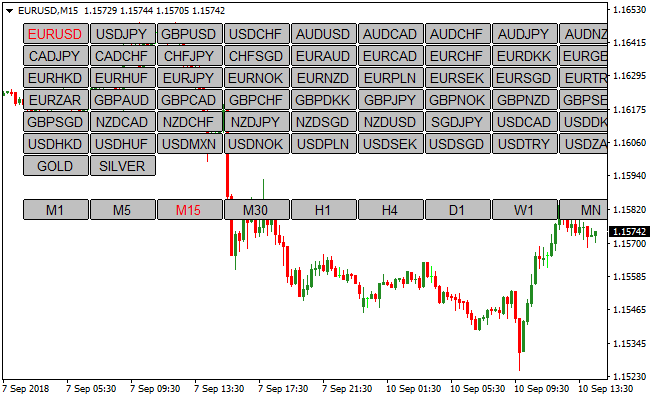
The Currency Pair Symbol and Timeframe Changer Indicator is displayed as an interactive dashboard on the MT4 workspace.
The chart shows a grid of buttons representing various currency pairs and timeframes, allowing the trader to switch the entire view of the active window with a single mouse click.
Guide to Trade with Currency Pair Symbol and Timeframe Changer Indicator
Buy Rules
- Use the dashboard to select a currency pair showing a bullish bias.
- Select the desired timeframe to confirm a long-entry setup.
- Execute your buy trade once the chart displays your preferred technical signals.
- Monitor the trade by toggling between higher and lower timeframes for perspective.
Sell Rules
- Click the currency pair button on the indicator panel to locate a bearish setup.
- Switch to a lower timeframe to find a precise entry point for a short position.
- Execute the sell trade when the price action aligns with your strategy.
- Use the panel to quickly check correlated pairs for confirmation.
Stop Loss
- Place your stop loss according to the structural levels shown on the updated chart.
- Utilize the timeframe buttons to identify support levels for long protection.
- Utilize the timeframe buttons to identify resistance levels for short protection.
Take Profit
- Identify target levels by switching to higher timeframes using the dashboard.
- Set your exit point at the next significant liquidity zone.
- Close the trade manually if the dashboard helps you spot a reversal on a different timeframe.
MT4 Strategy: Currency Pair Symbol & Timeframe Changer + Slope Arrow Signals Method
This MT4 strategy combines the Currency Pair Symbol and Timeframe Changer Indicator and the Slope Arrow Signals Indicator to create a fast and flexible intraday trading method.
The Currency Pair Symbol and Timeframe Changer allows traders to quickly switch between over 50 pairs and multiple timeframes directly from the chart, making it easier to spot opportunities across different markets.
The Slope Arrow Signals indicator provides clear entry points, with gray arrows signaling buys and magenta arrows signaling sells.
This combination works best on lower timeframes like M5, M15, and M30 where price reacts quickly and setups appear frequently.
By aligning the ability to monitor multiple pairs and timeframes with clear arrow signals, traders can spot high probability entries efficiently.
The method is suitable for scalpers and day traders who value speed and simplicity.
The strategy focuses on trading in the direction of the arrow signals while using the Changer indicator to ensure the best pairs and timeframes are monitored at all times.
This increases efficiency and allows traders to take advantage of multiple opportunities during active sessions.
Buy Entry Rules
- A gray arrow from the Slope Arrow Signals indicator appears on the chart.
- Confirm that the pair is in a short-term bullish slope or trend.
- Wait for at least one candle to close above the previous high for additional confirmation.
- Place a stop loss below the nearest swing low.
- Take profit when the gray arrow changes to magenta.
Sell Entry Rules
- A magenta arrow from the Slope Arrow Signals indicator appears on the chart.
- Confirm that the pair is in a short-term bearish slope or trend.
- Wait for at least one candle to close below the previous low for extra confirmation.
- Place a stop loss above the nearest swing high.
- Take profit when the magenta arrow changes to gray.
Advantages
- Quickly switch between pairs and timeframes without leaving the chart.
- Clear and simple buy and sell signals from the Slope Arrow indicator.
- Reduces chart clutter and saves time in multi-pair monitoring.
- Works well on multiple lower timeframes for scalping and day trading.
- Suitable for beginners and experienced traders who value speed.
Drawbacks
- Arrow signals may produce false entries during low volatility.
- Rapid pair switching can be overwhelming if too many setups are monitored at once.
- Requires discipline to avoid overtrading across multiple pairs and timeframes.
Case Study 1: GBPUSD M15
During the London session, GBPUSD showed a gray arrow from the Slope Arrow Signals indicator.
The pair was in a short-term bullish slope.
After one candle closed above the previous high for confirmation, a buy trade was executed with a stop below the swing low.
The trade was closed automatically when the gray arrow turned magenta, resulting in a gain of 18 pips.
Using the Changer indicator allowed the trader to quickly focus on GBPUSD among multiple pairs.
Case Study 2: EURCAD M5
EURCAD formed a magenta arrow during the early New York session.
The pair was in a short-term bearish slope.
After one candle closed below the previous low for confirmation, a sell trade was taken with a stop above the nearest swing high.
The trade exited automatically when the magenta arrow changed to gray, producing a profit of 15 pips.
The Currency Pair and Timeframe Changer made it easy to quickly switch to EURCAD and capture the move.
Strategy Tips
- Use the Currency Pair Symbol and Timeframe Changer to monitor the most active pairs during London and New York sessions.
- Only take trades when the arrow appears in alignment with the short-term slope or trend to avoid false signals.
- Wait for an additional candle close beyond recent highs or lows for extra confirmation before entering.
- Avoid trading during major news releases that may cause sudden spikes.
- Focus on one or two pairs at a time to maintain discipline and avoid overtrading.
- Use the arrow color change as a dynamic take profit signal to automatically exit when momentum shifts.
Download Now
Download the “symbol-time-frame-changer.mq4” Metatrader 4 indicator
FAQ
Can I add custom symbols like Gold or Bitcoin to the panel?
The indicator is pre-configured with a wide range of standard currency pairs.
However, most versions allow you to input specific symbols in the settings menu.
As long as the symbol is provided by your broker and active in your market watch, the indicator can be set to navigate to it.
Where is the best place to position the dashboard on my chart?
The indicator allows you to choose which corner of the chart the panel is anchored to.
Most professional traders prefer the left or right side where it doesn’t overlap with the most recent price candles.
This ensures you have constant access to navigation without blocking your view of the current price action.
Summary
The Currency Pair Symbol and Timeframe Changer Indicator is a practical tool that significantly improves the trading experience by streamlining chart management.
Its ability to switch between assets and timeframes instantly makes it a favorite for those who value efficiency and speed.
It is a simple, effective utility that helps you stay organized and focused on the best trading opportunities across the entire forex market.





