

About the Forex Off Trend Indicator
The Forex Off Trend indicator for MT5 is a technical tool that provides trend-following signals through a non-repainting cloud system.
It simplifies market analysis by visualizing momentum as colored zones directly on the price chart, allowing traders to see the dominant bias at a glance.
By utilizing a specific lookback period and price smoothing, it helps filter out minor fluctuations while focusing on sustained directional moves.
This indicator is particularly effective for traders who want to maintain a disciplined approach to trend identification without the distraction of disappearing signals.
Free Download
forexofftrend.mq5 Indicator (MT5)
Key Features
- The indicator generates pale-green and violet clouds to define the current market trend.
- Non-repainting logic ensures that entry signals remain permanent once the candle closes.
- A customizable period setting allows traders to adjust the responsiveness to price action.
- The visual interface is designed to be accessible for traders of all experience levels.
- It functions effectively across various financial instruments, including forex majors and indices.
- Adjustable K max and style parameters provide flexibility for different chart templates.
Indicator Chart
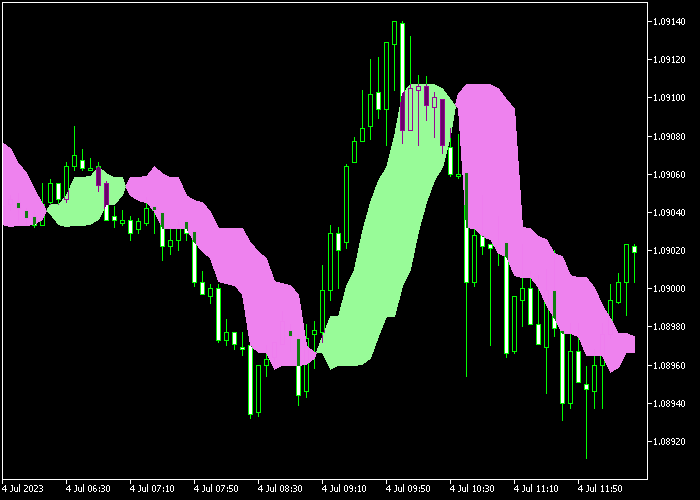
The chart shows the Forex Off Trend indicator highlighting the market bias with shaded cloud areas.
You can see how the pale-green cloud tracks bullish expansions, while the violet cloud marks the onset of bearish momentum.
These signals provide a consistent map for entering and exiting trades based on the prevailing trend.
Guide to Trade with the Forex Off Trend indicator
Buy Rules
- Initiate a buy market order immediately upon the appearance of the pale-green cloud.
- Confirm that the price action is trading above the cloud boundary for added validation.
- Execute the trade during peak market volatility to ensure sufficient trend follow-through.
- Maintain the long position for as long as the indicator remains pale-green on the chart.
Sell Rules
- Open a sell market order as soon as the violet colored Forex Off Trend cloud is displayed.
- Ensure the bearish signal is confirmed on a closed candle to lock in the trend shift.
- Check that the market sentiment is turning downward to support the short-side momentum.
- Keep the short trade active until the indicator generates an opposite bullish cloud signal.
Stop Loss
- Place a protective stop loss order a few pips below the previous swing low zone for buys.
- Set the stop loss above the previous swing high region for all sell entries.
- Alternatively, use the opposite edge of the current trend cloud as a dynamic stop level.
Take Profit
- Close the current position when the cloud color changes to signal a potential trend reversal.
- Set a fixed target based on the nearest major technical level identified on the daily chart.
- Consider exiting half of the position at a 1:1 ratio and letting the rest run for a full reversal.
Forex Off Trend Indicator Day Trading Strategy for MT5
This day trading strategy combines trend filtering with momentum timing using the Forex Off Trend Indicator and the XO Indicator.
It is designed to help traders stay aligned with the dominant trend while entering trades at precise momentum shifts.
The Forex Off Trend indicator displays a cloud that defines the market direction.
A pale-green cloud signals bullish conditions, while a violet cloud reflects bearish pressure.
This allows traders to avoid trading against the prevailing direction and stay focused on high-probability setups.
The XO Indicator adds confirmation through its histogram.
Green bars indicate buying momentum, while red bars highlight selling pressure.
This makes it easier to time entries when the market begins to accelerate in the direction of the trend.
Buy Entry Rules
- Wait for the cloud to turn pale-green, confirming a bullish trend.
- Check that the XO histogram prints green bars.
- Enter a buy trade at the close of the confirmation candle.
- Place the stop loss below the recent swing low or below the cloud.
- Close the trade when the XO histogram turns red or when the cloud shifts to violet.
- You can also use a 1:2 risk-to-reward target or trail the stop below higher lows.
Sell Entry Rules
- Wait for the cloud to turn violet, confirming a bearish trend.
- Check that the XO histogram prints red bars.
- Enter a sell trade at the close of the signal candle.
- Place the stop loss above the recent swing high or above the cloud.
- Close the trade when the XO histogram turns green or when the cloud shifts to pale-green.
- Alternatively, manage the trade with a fixed risk-to-reward such as 1:2 or trail the stop above lower highs.
Case Study 1: USDJPY M15 Buy Setup
On USDJPY M15 during the London session, the cloud shifted to pale-green, establishing a bullish bias.
Shortly after, the XO histogram began printing green bars, confirming upward momentum.
A buy trade was triggered at the close of the confirmation candle, with the stop loss placed below the recent swing low.
Price advanced steadily with higher highs and higher lows forming.
As momentum faded, the XO histogram flipped to red while the cloud started transitioning, which signaled the exit based on the strategy rules.
Case Study 2: EURAUD M30 Sell Setup
On EURAUD M30 during the New York session, the cloud turned violet, indicating bearish conditions.
The XO histogram followed with consistent red bars, reinforcing selling pressure.
A sell trade was initiated after a strong bearish candle closed.
The stop loss was positioned above the recent swing high.
The market moved downward in a controlled trend.
As the decline slowed, the XO histogram shifted to green and the cloud began losing its bearish structure, which prompted the exit according to the defined conditions.
Download Now
forexofftrend.mq5 Indicator (MT5)
FAQ
How does the period setting affect the cloud signals?
The period determines the sensitivity of the trend detection.
A smaller period results in faster signals for scalping, while a larger period provides smoother clouds for swing trading on higher timeframes.
Is the Forex Off Trend indicator reliable in ranging markets?
In sideways markets, the cloud colors may switch more frequently.
It is essential to use this tool when there is clear market volatility or in conjunction with a strength meter to filter out flat periods.
What makes the non-repainting feature important?
Non-repainting signals provide a true historical record of the indicator’s performance.
This allows for accurate backtesting and gives you confidence that the signal you see live will not disappear later.
Summary
The Forex Off Trend indicator is a popular trend analysis tool offering reliable signals for buying and selling pairs in the Forex market.
It provides a visual framework for capturing market momentum through its intuitive pale-green and violet cloud system.
By focusing on non-repainting data, it helps traders avoid the psychological traps of traditional indicators.
While it works well as a standalone tool, its effectiveness is maximized when aligned with broader market structure.
Overall, it is a versatile and stable utility for any trend-following strategy.





