About the Gap Finder Indicator
The Gap Finder Indicator for MT5 is designed to detect price gaps that occur between the close of one candle and the open of the next.
These gaps often appear when strong buying or selling pressure enters the market, especially during volatile sessions or after major news events.
The indicator automatically scans the price action and highlights these gaps directly on the price area.
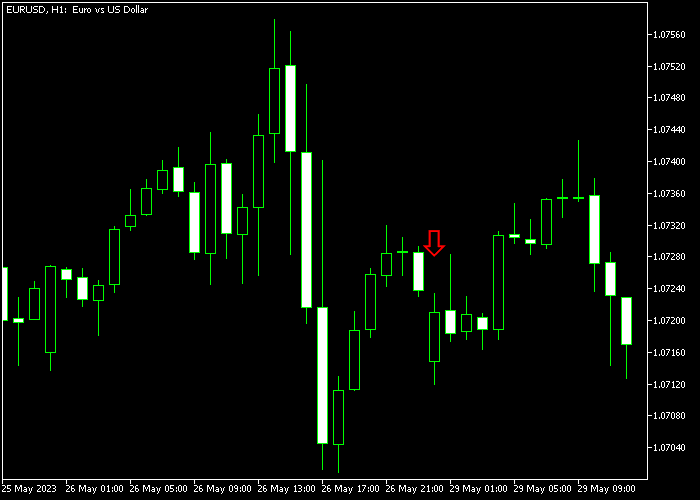
When a bullish gap appears, the indicator prints a green arrow. When a bearish gap forms, a red arrow is displayed.
These arrows help traders quickly identify moments where price momentum may continue in the direction of the gap.
Many traders combine it with trend indicators or support and resistance analysis to confirm the best possible entry after a gap has formed.
Free Download
Key Features
- Automatically detects price gaps between consecutive candles.
- Displays green arrows for bullish gaps and red arrows for bearish gaps.
- Helps traders identify momentum shifts in the market.
- Useful for identifying continuation opportunities in trending markets.
- Can be combined with other technical indicators for confirmation.
Indicator Chart
The Gap Finder Indicator highlights bullish and bearish price gaps beneath the main price area using directional arrows.
The example shows green arrows marking upward gaps and red arrows marking downward gaps as price moves with the trend.
Guide to Trade with Gap Finder Indicator
Buy Rules
- Confirm that the market is moving in a visible uptrend.
- Wait for a green Gap Finder arrow to appear on the price area.
- The arrow signals a bullish gap between the previous close and current open.
- Open a buy position after the bullish gap signal appears.
Sell Rules
- Confirm that the market is moving in a visible downtrend.
- Wait for a red Gap Finder arrow to appear on the price area.
- The arrow signals a bearish gap between the previous close and current open.
- Open a sell position after the bearish gap signal appears.
Stop Loss
- Place the stop loss below the most recent swing support for buy trades.
- For sell trades, place the stop loss above the most recent swing resistance.
- Adjust the stop loss as new support or resistance levels develop.
Take Profit
- Close the buy trade if momentum weakens and price drops below recent support.
- Close the sell trade if price climbs back above recent resistance.
- Many traders also secure profits gradually as the trend continues.
Download Now
FAQ
What does the Gap Finder indicator detect?
The indicator scans the market for gaps between the previous candle’s close and the current candle’s open.
These gaps can reveal sudden changes in buying or selling pressure.
Should the Gap Finder indicator be used alone?
Many traders combine the indicator with trend indicators, moving averages, or support and resistance levels.
This helps confirm whether the gap aligns with the broader market direction.
Summary
The Gap Finder Indicator is a practical tool for identifying sudden price gaps that can signal strong market momentum.
By highlighting bullish and bearish gaps with simple arrow signals, the indicator allows traders to react quickly when unusual price movement occurs.
These signals become more useful when they appear during established trends.
Traders can use them as confirmation for continuation trades or as a warning that volatility has entered the market.




