About the Super Arrow Indicator
The Super Arrow Indicator is a sophisticated signal-generation tool designed for the MetaTrader 4 platform.
This tool utilizes a combination of Moving Averages, the Relative Strength Index (RSI), Bollinger Bands, and Bulls/Bear Power.
A proprietary “magic filter” is integrated into the algorithm to further refine the output and eliminate market noise.
By confirming directional strength through both buyer and seller pressure metrics, the indicator helps traders avoid weak or counter-trend setups that often lead to false breakouts.
It is a versatile solution that caters to various trading styles, including fast-paced scalping and longer-term swing trading across all major currency pairs.
Free Download
Download the “super-arrow-indicator.mq4” MT4 indicator
Key Features
- Combines five distinct technical indicators into a single visual signal.
- Utilizes a “Magic Filter” algorithm to reduce false signals in ranging markets.
- Generates real-time buy and sell arrows that appear on completed candles.
- Works effectively across multiple timeframes from M1 up to Daily charts.
- Provides a simplified interface for identifying market pivot highs and lows.
Indicator Chart
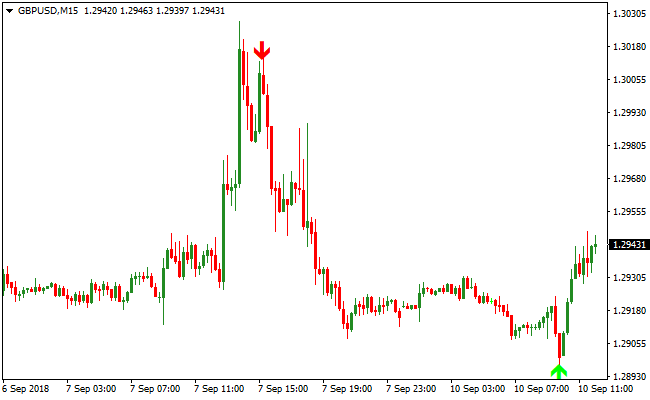
The Super Arrow Indicator is displayed on the activity chart, featuring green arrows for bullish entries and red arrows for bearish entries.
It illustrates how the tool identifies significant market turns by evaluating price position relative to Bollinger Bands and momentum shifts in the RSI and Bulls/Bear Power levels.
Guide to Trade with Super Arrow Indicator
Buy Rules
- Monitor the chart for the appearance of a green upward-pointing arrow.
- Ensure the green arrow appears at a logical support level or the bottom of a trend channel.
- Verify that the candle has closed before entering the trade to confirm the signal.
- Open a long position at the start of the next candle following the green arrow.
Sell Rules
- Monitor the chart for the appearance of a red downward-pointing arrow.
- Ensure the red arrow appears at a logical resistance level or the top of a trend channel.
- Confirm that the signal candle has finished its formation to avoid repainting issues.
- Open a short position at the start of the next candle following the red arrow.
Stop Loss
- For buy trades, place the stop loss a few pips below the most recent swing low.
- For sell trades, place the stop loss a few pips above the most recent swing high.
Take Profit
- Exit the trade manually when an opposite signal arrow appears on the chart.
- Set a target profit level at the next significant support or resistance zone.
- Use a minimum risk-to-reward ratio of 1:2 to ensure long-term profitability.
MT4 Strategy: Super Arrow + Buy Sell Cloud Scalping Method
This MT4 scalping strategy combines the Super Arrow Indicator and the Buy Sell Cloud Indicator to capture fast, high probability trades on lower time frames.
The Super Arrow provides clear buy and sell signals with green and red arrows, while the Buy Sell Cloud shows the prevailing trend using a green cloud for bullish momentum and a red cloud for bearish momentum.
Combining these indicators ensures entries align with the current market direction.
This strategy works best on M1, M5, and M15 charts where price reacts quickly to intraday momentum.
By confirming arrow signals with the cloud trend, traders can reduce false entries and capture short term moves with high accuracy.
The method is ideal for scalpers looking for frequent setups across multiple currency pairs.
Buy Entry Rules
- A green arrow from the Super Arrow indicator appears on the chart.
- The Buy Sell Cloud is green, indicating bullish momentum.
- Enter the trade immediately after confirmation from both indicators.
- Place a stop loss below the nearest swing low.
- Take profit when the Super Arrow arrow changes from green to red or the cloud turns red.
Sell Entry Rules
- A red arrow from the Super Arrow indicator appears on the chart.
- The Buy Sell Cloud is red, indicating bearish momentum.
- Enter the trade immediately after confirmation from both indicators.
- Place a stop loss above the nearest swing high.
- Take profit when the Super Arrow arrow changes from red to green or the cloud turns green.
Advantages
- Clear visual signals make entries and exits straightforward to follow.
- Aligning arrow signals with cloud trends reduces the risk of counter trend trades.
- Effective on multiple lower timeframes, making it ideal for scalping sessions.
- Quick decision-making with minimal chart clutter, saving time during active trading.
- Works across a wide range of currency pairs, providing multiple opportunities per session.
- Automatic exit on arrow or cloud color change helps lock in profits efficiently.
Drawbacks
- Rapid price spikes can trigger early exits if the arrow or cloud changes color temporarily.
- Requires strict discipline to avoid taking signals that do not fully align with both indicators.
- Not ideal for very long-term trades since it focuses on short-term momentum.
- Frequent signals on lower timeframes can lead to overtrading if not carefully managed.
Case Study 1: GBPJPY M5
During the London session, GBPJPY showed a green Super Arrow while the Buy Sell Cloud was also green.
A buy trade was executed with a stop placed below the nearest swing low.
Price moved quickly upward and the trade was closed automatically when the Super Arrow changed to red, producing a gain of 17 pips.
Case Study 2: AUDUSD M1
AUDUSD formed a red Super Arrow during the early New York session while the Buy Sell Cloud was also red.
A sell trade was taken with a stop above the nearest swing high.
The trade remained open as price moved downward and exited automatically when the arrow turned green, resulting in a profit of 12 pips.
The strategy captured a fast intraday move with minimal risk.
Strategy Tips
- Focus on active sessions such as London and New York for the best scalping opportunities.
- Use lower timeframes for faster signals but maintain strict stop loss discipline.
- Monitor volatility and avoid trading during major news announcements.
- Take profit automatically when the arrow or cloud changes color to lock in gains efficiently.
- Limit the number of pairs traded at the same time to avoid overtrading and maintain focus.
Download Now
Download the “super-arrow-indicator.mq4” Metatrader 4 indicator
FAQ
How does the “Magic Filter” improve the accuracy of the signals?
The Magic Filter is a specialized algorithm within the Super Arrow Indicator that evaluates the “smoothness” of a trend.
It prevents the indicator from firing signals during choppy, sideways price action where standard moving average crossovers often fail.
Can I adjust the sensitivity of the RSI and Bollinger Bands?
Yes, all internal parameters are accessible through the inputs tab.
Is this indicator suitable for trading Gold and Cryptocurrencies?
The Super Arrow Indicator is designed to analyze price action and volatility, which are universal across liquid markets.
It performs well on Gold (XAU/USD) and major Cryptocurrencies like Bitcoin.
Summary
The Super Arrow Indicator simplifies technical analysis into clear visual signals, using filters like RSI and Bollinger Bands for higher-confidence trades.
It detects pivot points to catch trends early and works best confirming entries at key support and resistance levels.
With flexible settings, it adapts to any market, helping traders execute intraday or swing trades with precision.





