About the Super Forex Launcher Indicator
The Super Forex Launcher indicator for MT4 is a complete trading system built around channel slope trading and higher time frame trend direction.
It combines dynamic price channels with trend filtering to help traders focus only on high-probability setups.
The indicator analyzes the overall market bias and aligns it with the slope of the channel before issuing any signal.
When market conditions are favorable, the indicator displays guidance directly on the chart, such as taking only long or only short trades.
This approach keeps traders disciplined and reduces overtrading during sideways conditions. The channel itself acts as dynamic support and resistance, allowing precise entries, exits, and risk placement.
Super Forex Launcher is designed for traders who prefer trend-following strategies with clear rules.
It works on most currency pairs and performs best during active market sessions.
The indicator can also be combined with oscillators, momentum tools, or price action analysis for additional confirmation.
Free Download
Download the “Launcher Directional Indicator.ex4” MT4 indicator
Key Features
- A channel-based trading system that adapts to market conditions.
- Trend direction filter to avoid low-quality trades.
- Visual buy and sell guidance is displayed directly on the chart.
- Dynamic support and resistance through channel boundaries.
- Built-in notifications for new trading opportunities.
Indicator Chart
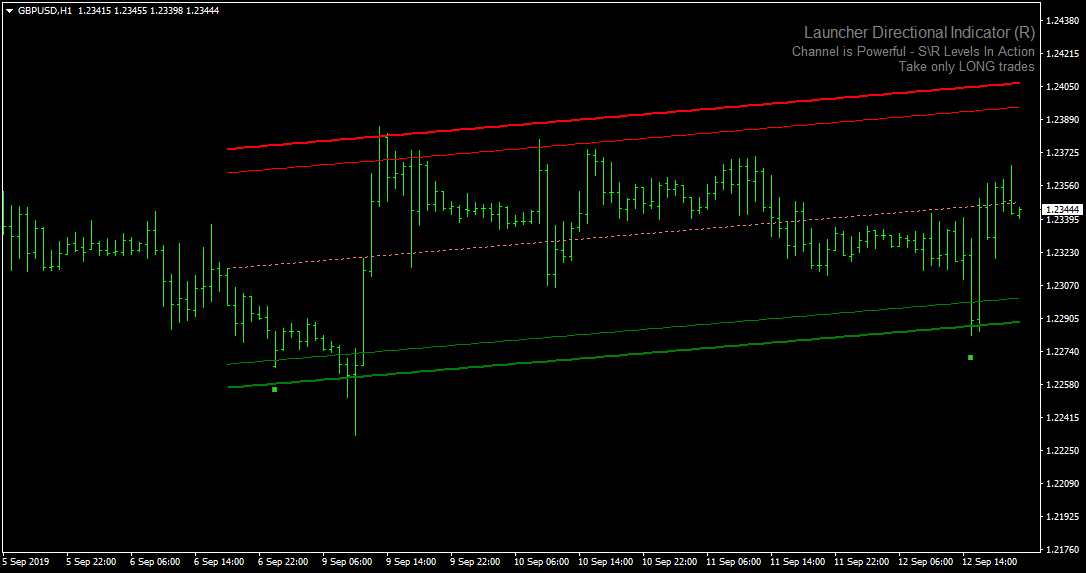
The Super Forex Launcher indicator chart shows a price channel with colored upper and lower boundaries.
Buy and sell guidance appears on the chart, helping traders align entries with the dominant trend.
The chart highlights trend direction, channel slope, and potential pullback zones where trades can be executed with defined risk.

Guide to Trade with Super Forex Launcher Indicator
Buy Rules
- Confirm the Super Forex Launcher indicator displays “Take only LONG trades”.
- Wait for the price to pull back into the area between the two lower green channel lines.
- Enter a buy trade once price stabilizes inside the channel zone.
Sell Rules
- Confirm the Super Forex Launcher indicator displays “Take only SHORT trades”.
- Wait for the price to retrace into the area between the two upper red channel lines.
- Enter a sell trade once price shows rejection inside the channel zone.
Stop Loss
- Place the stop loss below the channel low for buy trades.
- Place the stop loss above the channel high for sell trades.
- You may also apply your own preferred stop loss method.
Take Profit
- Set the first target at the middle channel line.
- Extend the take profit toward the opposite channel boundary.
- Partial profits can be secured near key channel levels.
Super Forex Launcher + RSI Signal Forex Scalping Strategy for MT4
This scalping strategy combines two powerful MT4 indicators: the Super Forex Launcher and the RSISignal indicator.
The Super Forex Launcher shows the market trend through a channel: when the channel slopes upward, the market is bullish, and when it slopes downward, the market is bearish.
The RSI Signal indicator displays green histogram bars for buy signals and red histogram bars for sell signals.
This strategy is optimized for M1 and M5 charts, making it ideal for scalpers looking for fast, intraday trades in alignment with the trend while capturing quick reversals.
Buy Entry Rules
- The Super Forex Launcher channel is sloping upward, indicating a bullish trend.
- The RSI Signal histogram turns green, confirming a buy opportunity.
- Enter a buy trade when both conditions are met.
- Set the stop loss 5–7 pips below the recent swing low or the bottom of the channel.
- Set a take profit of 10–20 pips on M1 or 15–30 pips on M5, or use a trailing stop to maximize gains.
Sell Entry Rules
- The Super Forex Launcher channel is sloping downward, indicating a bearish trend.
- The RSISignal histogram turns red, confirming a sell opportunity.
- Enter a sell trade when both indicators align.
- Set the stop loss 5–7 pips above the recent swing high or the top of the channel.
- Set a take profit of 10–20 pips on M1 or 15–30 pips on M5, or use a trailing stop.
Advantages
- Combines trend direction with momentum-based signals for more accurate entries.
- Channel slope and colored histogram bars make entries easy to read.
- Works well on fast timeframes suitable for scalping.
- Flexible exits using fixed targets or trailing stops.
- Can be applied to multiple currency pairs during active sessions.
Drawbacks
- Quick decision-making is required for M1 and M5 charts.
- The channel may lag slightly, leading to delayed entry or exit signals.
Case Study 1 — EUR/USD on M1
On the EUR/USD M1 chart, the Super Forex Launcher channel sloped upward, signaling a bullish trend.
The RSI Signal histogram turned green, indicating a buy.
A buy trade was entered with a stop loss 8 pips below the recent swing low and a take profit of 15 pips.
Price moved higher, and the trade closed at the target, capturing a quick scalp.
Case Study 2 — GBP/JPY on M5
On the GBP/JPY M5 chart, the Super Forex Launcher channel sloped downward, indicating a bearish trend.
The RSI Signal histogram turned red, signaling a sell.
A sell trade was placed with a stop loss 10 pips above the recent swing high and a take profit of 25 pips.
Price dropped steadily and hit the target, demonstrating the strategy’s effectiveness on a volatile cross-pair.
Strategy Tips
- Trade only when both the channel and histogram confirm the same direction.
- Use brokers with low spreads and fast execution for optimal scalping.
- Consider using a trailing stop to secure profits during extended moves.
- Check higher timeframes for overall trend confirmation before scalping lower timeframes.
Download Now
Download the “Launcher Directional Indicator.ex4” Metatrader 4 indicator
FAQ
Does the Super Forex Launcher indicator repaint?
The channel adapts to changing market conditions, but trade guidance is based on confirmed trends and channel slope.
Signals remain stable once market direction is established.
Is this indicator suitable for trend-only trading?
Yes. The built-in trend filter ensures trades are taken only in the dominant market direction, helping traders avoid ranging conditions.
Summary
The Super Forex Launcher MT4 indicator offers a disciplined way to trade trends using channel slope analysis.
Its ability to filter trades based on overall market direction helps traders stay focused on higher-quality setups.
The dynamic channel provides practical entry zones, stop loss placement, and profit targets.
This indicator is easy to use, adaptable to different trading styles, and effective when combined with sound risk management.
With potential improvements such as additional alert customization, it already stands as a solid choice for traders seeking a rule-based trend trading system.





