

About the Time Zones Indicator
The Time Zones indicator for MT5 helps traders monitor the three major trading sessions directly on the chart.
It highlights GMT, MST, and EST time zones with distinct colors, allowing you to quickly identify when liquidity and volatility are likely to increase.
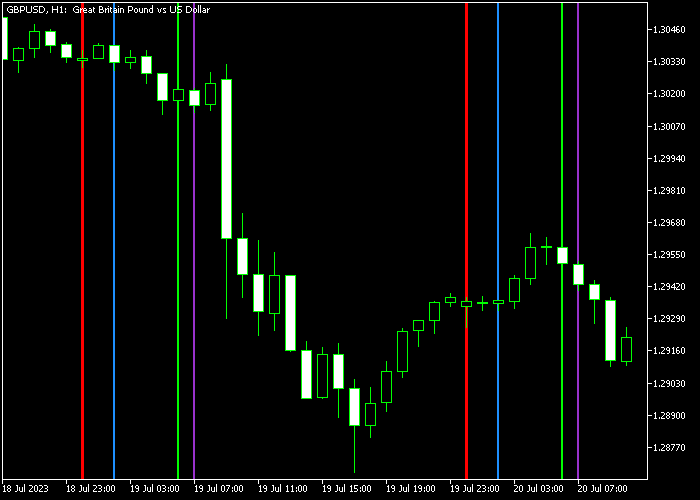
The GMT zone appears in Dodger-Blue, the MST zone in Lime, and the EST zone in Dark-Orchid.
A red day line separates trading days for additional reference. This layout allows traders to align their strategies with active market hours and avoid slow periods.
You can customize the session colors, line style, and line width to match your chart preferences.
The indicator works smoothly with all currency pairs and time frames available on the MT5 platform.
Free Download
Key Features
- Displays GMT, MST, and EST trading sessions on the chart.
- Dodger-Blue for GMT, Lime for MST, and Dark-Orchid for EST.
- Red day separator line for daily reference.
- Customizable session colors and line styles.
- Helps identify high-activity trading windows.
Indicator Chart
The Time Zones indicator appears directly on the main chart, shading different market sessions with specific colors.
Users can instantly recognize when major financial centers are active and prepare for session-based volatility or breakout setups.
Guide to Trade with Time Zones Indicator
Buy Guidance
- Focus on buy setups during high-liquidity sessions such as GMT or EST.
- Look for bullish breakouts near the start of a major session.
- Confirm upward momentum with price action or a trend indicator.
- Avoid entering during low-activity transition periods.
Sell Guidance
- Focus on sell setups during active trading sessions.
- Look for bearish breakouts as volatility expands.
- Confirm downward pressure using price action confirmation.
- Avoid trading during quiet market hours.
Time Zones MT5 and ASC Trend Scalping Strategy
This scalping strategy is built around trading during the most active market sessions with clear and simple signals.
It combines the Time Zones Forex Indicator for MT5 with the ASC Trend Indicator for MT5.
The goal is to focus only on high-volatility periods and take quick trades with defined targets.
The Time Zones indicator highlights the three major trading sessions, helping traders align their entries with periods of strong market activity.
This is important because volatility increases during the London and New York sessions, creating better scalping opportunities.
The ASC Trend indicator provides clear entry signals.
By combining session timing with signal confirmation, this strategy avoids low-quality trades and focuses only on active market conditions.
This strategy works best on M1 and M5 timeframes.
The target is small and consistent, aiming for 10 to 20 pips per trade.
Buy Entry Rules
- Trade only during the London or New York session, highlighted by the Time Zones indicator.
- Wait for a blue dot from the ASC Trend indicator.
- Ensure price is showing momentum with strong bullish candles.
- Enter a buy trade immediately after the signal candle closes.
- Place the stop loss 2 to 3 pips below the recent consolidation area.
- Set take profit between 10 and 20 pips depending on volatility.
Sell Entry Rules
- Trade only during the London or New York session.
- Wait for a magenta dot from the ASC Trend indicator.
- Confirm bearish momentum with consecutive bearish candles.
- Enter a sell trade after a minor pullback instead of entering instantly.
- Place the stop loss 2 to 3 pips above the recent rejection wick.
- Set take profit between 10 and 20 pips or exit early if momentum fades.
Case Study 1: London Session Scalping on AUD/USD
During the London session on M5, AUD/USD showed increasing volatility after a quiet Asian session.
The Time Zones indicator clearly marked the session start.
Shortly after, the ASC Trend indicator printed a blue dot. A buy trade was entered after a strong bullish candle close.
The stop loss was placed below a small consolidation zone.
Price moved steadily upward and reached a 15 pip target within 20 minutes.
The trade was closed at the target, capturing a clean scalping opportunity.
Case Study 2: New York Session Scalping on USD/CAD
In the New York session on M1, USD/CAD showed a sharp move downward.
The ASC Trend indicator printed a magenta dot after a brief pullback.
A sell trade was entered following the retracement for a better price.
The stop loss was placed above the recent wick high. Price quickly dropped with strong momentum.
The trade reached a 12 pip target and was closed as price began to slow near a support area.
Download Now
FAQ
Why are trading sessions important in Forex?
Different sessions bring different levels of liquidity and volatility.
Major sessions often produce stronger price movements and clearer breakout opportunities.
Can I adjust the session times?
The indicator allows you to customize visual settings such as colors and line styles.
Session display aligns with platform time, so make sure your broker time is correctly configured.
Does this indicator generate buy or sell signals?
The Time Zones indicator does not produce direct entry signals.
It provides timing context so traders can align their strategies with active market hours.
Is it suitable for scalping?
Yes. Scalpers often rely on high-volume sessions like GMT and EST to capture short-term price movements.
Summary
The Time Zones indicator for MT5 helps traders track the three major Forex sessions directly on the chart.
By identifying GMT, MST, and EST trading hours, it allows better timing of breakout and momentum strategies.
This tool supports improved session awareness, helping traders focus on periods when the market is most active and avoid low-volatility conditions.





