
About the Trend Power Indicator
The Trend Power indicator for MT4 identifies buy and sell opportunities by analyzing trend strength across any currency pair and timeframe.
It plots colored signal lines directly on the price chart, making trend direction easy to follow at a glance.
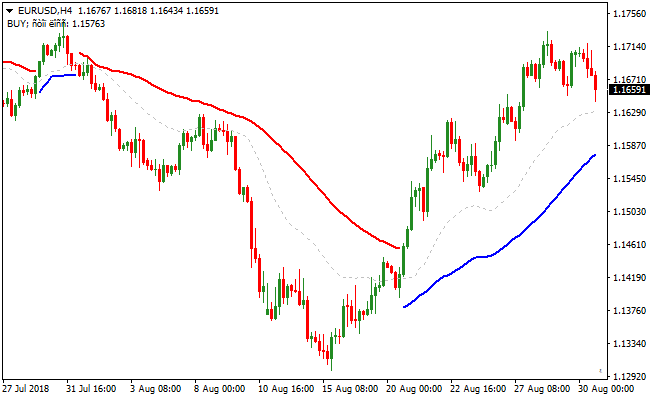
A blue line appearing below the candlesticks indicates a bullish trend, signaling that traders should look for buy opportunities.
Conversely, a red line above the candlesticks shows a bearish trend, suggesting that sellers are in control and short positions may be favorable.
The default PeriodStep is set to 10, but it can be adjusted to match your preferred timeframe and trading style.
This flexibility allows traders to fine-tune sensitivity for scalping, intraday, or swing trading.
The indicator can be used on its own or combined with oscillators like MACD or Slow Stochastic to confirm entries.
Free Download
Download the “trend-power.mq4” MT4 indicator
Key Features
- Displays colored buy and sell trend lines directly on the MT4 chart.
- Adjustable PeriodStep for sensitivity tuning.
- Can be used as a standalone indicator or with oscillators for confirmation.
Indicator Chart
The Trend Power indicator chart shows blue and red trend lines overlayed on the candlesticks.
The image illustrates how a blue line below price generates a buy signal, while a red line above price generates a sell signal.

Guide to Trade with the Trend Power Indicator
Buy Rules
- Wait for a blue line to form below the candlesticks, indicating a bullish trend.
- Enter a buy trade at the close of the confirmation candle.
Sell Rules
- Wait for a red line to form above the candlesticks, indicating a bearish trend.
- Enter a sell trade at the close of the confirmation candle.
Stop Loss
- Set the stop loss a few pips below the blue line for buy trades.
- Set the stop loss a few pips above the red line for sell trades.
Take Profit
- Close part of the trade when price reaches the next support or resistance level.
- Exit the full trade if the line changes color or opposite trend signals appear.
- Allow trades to run in strong trends while monitoring for potential reversals.
Trend Power and Waddah Attar Indicator Forex Scalping Strategy
This MT4 forex strategy combines trend direction analysis from the Trend Power indicator with momentum confirmation from the Waddah Attar Forex Scalping indicator.
The strategy focuses on entering trades when both trend and momentum align, making it ideal for short-term trend following and scalping setups.
The Trend Power indicator provides clear trend direction with colored lines.
A green line indicates bullish momentum, while a red line signals bearish momentum.
The Waddah Attar indicator adds confirmation by displaying a histogram; green bars confirm buy momentum, and red bars confirm sell momentum.
Combining these two indicators reduces false signals and improves entry accuracy.
This strategy works best on M5, M15, and M30 timeframes.
It is suitable for traders who prefer quick, buy/sell trades with defined trend and momentum confirmation.
It works well on major and minor currency pairs with sufficient liquidity.
Buy Entry Rules
- The Trend Power indicator must display a green line, confirming a bullish trend.
- The Waddah Attar histogram must display green bars, indicating strong buying momentum.
- Enter the buy trade at the close of the candle where both indicators align.
- Stop loss is placed below the most recent swing low or the last consolidation area.
- Take profit is set near the next resistance level or when either indicator shows a potential reversal.
Sell Entry Rules
- The Trend Power indicator must display a red line, confirming a bearish trend.
- The Waddah Attar histogram must display red bars, indicating strong selling momentum.
- Enter the sell trade at the close of the candle where both indicators align.
- Stop loss is placed above the most recent swing high or the last consolidation area.
- Take profit is set near the next support level or when either indicator shows a potential reversal.
Advantages
- Aligning trend direction with momentum confirmation increases the likelihood of successful trades.
- Clear color-coded signals allow for fast decision-making, ideal for short-term trading.
- Helps traders avoid entering trades against the dominant market trend.
- Works effectively on multiple timeframes, making it versatile for different trading styles.
- Reduces emotional trading by providing structured entry and exit rules.
- Suitable for scalping and quick intraday trades, capturing small but consistent gains.
Drawbacks
- Less effective during low volatility periods or ranging markets, resulting in fewer trading opportunities.
- Requires constant monitoring, especially on lower timeframes, which can be demanding.
- Short-term focus may lead to smaller profits compared to long-term trend strategies.
- Traders may face whipsaws if stop losses are set too tight in volatile markets.
Case Study 1
On GBPUSD M15 during the London session, the Trend Power indicator showed a green line confirming bullish momentum.
Simultaneously, the Waddah Attar histogram displayed strong green bars.
A buy trade was entered at candle close, with stop loss below the last swing low.
Price moved upward and the trade was exited near the next resistance zone, capturing 28 pips.
Case Study 2
On AUDNZD M5 during the Asian session, the Trend Power indicator displayed a red line, signaling a bearish trend.
The Waddah Attar histogram also showed red bars, confirming selling momentum.
A sell trade was executed at candle close, with stop loss above the recent swing high.
Price declined steadily and the trade was closed near support, securing around 15 pips.
Strategy Tips
- Always ensure both Trend Power and Waddah Attar indicators confirm the same direction before entering a trade.
- Focus on high liquidity currency pairs to reduce slippage and false signals.
- Use recent swing highs and lows or key support/resistance levels to fine-tune stop loss and take profit points.
- Consider higher timeframes to filter out minor noise and confirm the dominant trend.
- Close trades early if either indicator shows a potential reversal, even before reaching the target.
- Keep position sizes consistent and manage risk carefully to protect capital on short-term setups.
- Combine with trend strength analysis or session timing for higher probability entries.
Download Now
Download the “trend-power.mq4” Metatrader 4 indicator
FAQ
What market conditions work best for Trend Power?
The indicator performs best in trending markets.
It can generate false signals during sideways or choppy price action, so avoid trading when the market lacks direction.
Can I adjust the indicator for more aggressive trading?
Yes, lowering the PeriodStep makes the trend lines more sensitive, allowing earlier entries.
This can increase trade frequency but may produce more false signals.
Is Trend Power suitable for automated trading?
Yes, its fixed color lines and clear buy/sell signals make it compatible with automated systems.
You can program entries based on line color and position relative to candlesticks.
Summary
The Trend Power indicator for MT4 is a straightforward yet effective tool for identifying market trends and potential trade entries.
Blue and red lines provide clear signals for bullish and bearish momentum, making it easy to align trades with the prevailing trend.
Adjustable PeriodStep settings allow traders to fine-tune sensitivity for scalping, intraday, or swing strategies.
When combined with oscillators for confirmation, it becomes a versatile and reliable trading tool.
Overall, the Trend Power indicator helps traders enter trades in the direction of strong trends, manage risk effectively, and improve timing for both short-term and longer-term positions.





