
About the TRIX Alert Arrows Indicator
The TRIX Alert Arrows Indicator for MT5 converts the classic Triple Exponential Average (TRIX) into clear trading signals.
It displays blue and red arrows in a separate sub-chart, helping traders quickly identify buy and sell opportunities without analyzing the TRIX line manually.
Blue arrows indicate potential buy setups, while red arrows indicate potential sell setups.
The indicator is non-repaint, ensuring that once an arrow appears, it remains a reliable signal for entry.
Traders can adjust the EMA period, signal period, and symbol codes for up and down arrows to match their trading style.
For lower timeframe traders on M1 or M5, performance is typically strongest during the London and New York sessions.
Free Download
TRIX ARROWS.mq5 Indicator (MT5)
Key Features
- Blue arrow signals a buy opportunity.
- Red arrow signals a sell opportunity.
- Non-repaint alerts for reliable entries.
- Customizable EMA period and signal period.
- Adjustable symbol codes for up and down arrows.
- Optimal for London and New York sessions on lower timeframes.
Indicator Chart
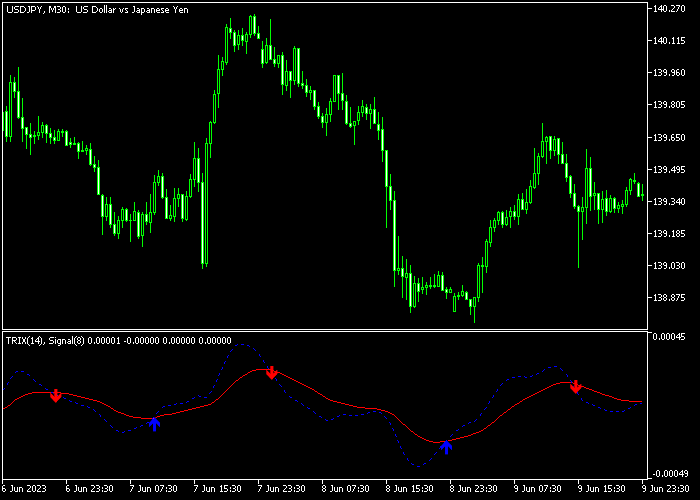
The TRIX Alert Arrows Indicator shows colored arrows in a sub-chart beneath the main price area.
Blue arrows signal buying pressure, while red arrows signal selling pressure.
Traders monitor these alerts to time entries without manually interpreting the TRIX line.
Guide to Trade with TRIX Alert Arrows Indicator
Buy Rules
- Wait for a blue arrow to appear in the sub-chart.
- Enter a buy trade at the opening of the next candle after the blue arrow forms.
- Check for alignment with higher timeframe trends or moving averages to strengthen the entry.
Sell Rules
- Wait for a red arrow to appear in the sub-chart.
- Enter a sell trade at the opening of the next candle after the red arrow forms.
- Verify that the trade aligns with broader market direction or trend indicators.
Stop Loss
- Place stop loss below recent swing lows for buy trades and above swing highs for sell trades.
- Optionally, trail stops as the trade moves in your favor.
- Keep stop levels consistent with your overall risk management plan.
Take Profit
- Close buy trades when a red arrow appears.
- Close sell trades when a blue arrow appears.
- Alternatively, use a fixed profit target based on your trading plan.
- You can scale out partially at key levels of support or resistance.
Download Now
TRIX ARROWS.mq5 Indicator (MT5)
FAQ
How does the TRIX Alert Arrows differ from the standard TRIX indicator?
It converts the TRIX line into simple arrow signals, eliminating the need to interpret the oscillator manually, which speeds up decision-making for traders.
Which timeframes work best?
While it can be used on all timeframes, M1 and M5 charts perform best during active London and New York sessions for more reliable signals.
Can I customize the arrow signals?
Yes, the EMA period, signal period, and symbol codes for the up and down arrows can be adjusted to match different trading styles and volatility conditions.
Summary
The TRIX Alert Arrows Indicator turns the complex TRIX oscillator into easy-to-read blue and red arrow signals.
Its non-repaint design ensures that traders can rely on each signal for precise entries.
Customizable settings allow adaptation to multiple instruments and trading styles.
While most effective in trending markets, it provides actionable alerts for both short-term and intraday traders seeking a streamlined approach to momentum-based entries.




