
About the Instantaneous Trend Filter Indicator
The Instantaneous Trend Filter Indicator is a technical tool for MT5 designed to isolate market direction by smoothing out price noise.
It utilizes a dynamic signal line that changes color based on the prevailing momentum, helping traders distinguish between trending phases and sideways consolidation.
Unlike many lagging moving averages, this indicator focuses on reacting quickly to price shifts while maintaining a stable trend bias.
The indicator is built to be non-repainting, which is vital for traders who rely on historical data to backtest their strategies accurately.
This makes it an effective filter for trend-following systems, as it provides a clear bias for either buying or selling without the distraction of minor price pullbacks.
Free Download
instantaneous_trendfilter.mq5 Indicator (MT5)
Key Features
- Non-repainting signals ensure that historical trend changes remain fixed on the chart for accurate analysis.
- Dual-color signal line provides an immediate visual representation of the current market state.
- Adjustable indicator ratio allows traders to fine-tune the sensitivity to suit different market conditions.
- Universal compatibility means it can be applied to any Forex pair, commodity, or index on the MT5 platform.
- Functions as both a standalone signal generator and a trend filter for existing trading systems.
Indicator Chart
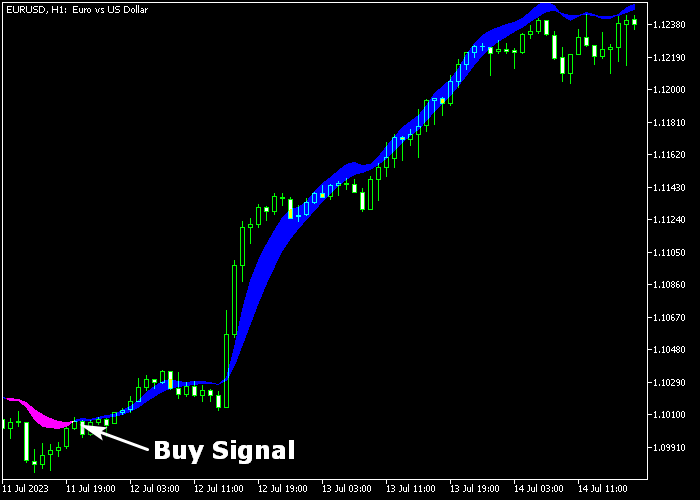
The Instantaneous Trend Filter Indicator appears as a continuous line that tracks price movement.
When the line is blue, it signifies that the bulls are in control, while a magenta line indicates a bearish environment.
Guide to Trade with Instantaneous Trend Filter Indicator
Buy Rules
- Wait for the signal line to change color from magenta to blue on your chosen timeframe.
- Confirm that the price candle closes above the newly formed blue trend line to establish momentum.
- Execute a long position at the opening of the next candle once the trend change is confirmed.
- Ensure the higher timeframe trend is also bullish to increase the probability of a successful trade.
Sell Rules
- Observe the signal line as it transitions from blue to magenta indicating a bearish shift.
- Check that the price action remains below the magenta line after the initial color change.
- Open a sell order immediately following the confirmation of the downward trend signal.
- Verify that no major support levels are in the immediate path of the projected move.
Stop Loss
- Place the stop loss order below the most recent swing low support for buy entries.
- For sell trades, position the stop loss just above the previous swing high resistance level.
- Keep the stop loss tight enough to protect capital while allowing for normal market breathing room.
- Consider moving the stop loss to break even once the trade moves significantly into profit.
Take Profits
- Set a target profit level that offers at least a 1.5 risk to reward ratio relative to your stop.
- Monitor the signal line and exit the trade manually if the color changes against your position.
- Look for major historical supply or demand zones as natural points to bank your earnings.
Instantaneous Trend Filter MT5 Pivot Oscillator Scalping Strategy
This strategy combines the Instantaneous Trend Filter indicator for MT5 with the Pivot Oscillator indicator MT5 to create a clean and responsive scalping system.
It focuses on short-term price movements and uses trend direction together with momentum confirmation to improve trade timing.
The Instantaneous Trend Filter helps define the immediate market direction.
It reacts quickly to price shifts and gives a clear visual of bullish and bearish phases.
The Pivot Oscillator complements this by showing momentum strength around key levels, especially the zero line.
Together, they filter out weak setups and highlight high-probability entries.
This approach works best on lower timeframes such as M1, M5, and M15.
It suits scalpers who prefer quick entries and exits and want a structured method without overcomplication.
Buy Entry Rules
- Wait for the blue line of the Instantaneous Trend Filter to move above the magenta line, indicating a bullish shift.
- Confirm that the Pivot Oscillator is above the zero level, showing bullish momentum.
- Enter a buy trade at the opening of the next candle after confirmation.
- Place the stop loss a few pips below the most recent minor support level or below the entry candle low.
- Take profit when the Pivot Oscillator starts turning downward or crosses back toward zero, or close near a nearby resistance level.
Sell Entry Rules
- Wait for the magenta line of the Instantaneous Trend Filter to move above the blue line, signaling bearish pressure.
- Confirm that the Pivot Oscillator is below the zero level, indicating bearish momentum.
- Enter a sell trade at the opening of the next candle after confirmation.
- Place the stop loss a few pips above the most recent minor resistance level or above the entry candle high.
- Take profit when the Pivot Oscillator starts turning upward or moves back toward zero, or close near a nearby support level.
Case Study 1: EURUSD M5 Scalping Trade
On the EURUSD M5 timeframe, the blue line crossed above the magenta line on the Instantaneous Trend Filter, indicating a bullish move.
At the same time, the Pivot Oscillator was clearly positioned above zero, confirming upward momentum.
A buy trade was entered at the next candle open. Price moved steadily upward for several candles.
The trade was closed when the oscillator started to flatten and turn down, capturing a quick scalping profit before momentum weakened.
Case Study 2: GBPJPY M1 Quick Sell Setup
On GBPJPY M1, the Pivot Oscillator dropped below zero, signaling bearish pressure.
Shortly after, the magenta line overtook the blue line on the Instantaneous Trend Filter, confirming a downtrend.
A sell position was opened immediately after confirmation. Price dropped quickly due to strong momentum.
The trade was closed once the oscillator began rising toward zero, locking in a fast scalp during a sharp move.
Download Now
instantaneous_trendfilter.mq5 Indicator (MT5)
FAQ
Does the Instantaneous Trend Filter Indicator repaint its signals?
No, the indicator is designed to be non-repainting.
Once a candle closes and the signal line color is set, it will not change or disappear, making it reliable for live trading and backtesting.
What is the best timeframe to use this indicator?
While it works on all timeframes, many traders find the best results on the H1 and H4 charts where the trends are more established.
Scalpers can also use it on M5 or M15 to catch short-term momentum shifts.
How do the input parameters affect the signals?
The indicator ratio is the primary setting.
Increasing this value will make the indicator less sensitive to minor price changes, while a lower value will result in more frequent signals during volatile periods.
Summary
The Instantaneous Trend Filter Indicator offers a straightforward way to stay on the right side of the market.
Its primary benefit is the reduction of psychological stress by providing a definitive color-coded bias for every trade.
While no tool is perfect, its non-repainting nature and adjustable sensitivity make it a robust choice for both new and experienced traders.
To maximize results, it is best used in conjunction with price action analysis or other momentum oscillators to avoid entries during low-volume market phases.





