

About the Step Trend Signals Indicator
The Step Trend Signals indicator for MT5 provides clear buy and sell signals using an alternating colored line plotted directly on the price chart.
It is based on the average step trading method and does not repaint, making it reliable for traders of all experience levels.
A blue line indicates an uptrend and potential buy opportunity, while a brown line signals a downtrend and potential sell opportunity.
The indicator can be used as a standalone tool or combined with other trend or momentum indicators to confirm trades.
Traders can customize settings such as average period, average type, applied price, step size in pips, and the line color.
These options allow the indicator to be tailored to different trading styles, currency pairs, and timeframes.
Free Download
Step average.mq5 Indicator (MT5)
Key Features
- Displays a non-repainting signal line directly on the chart.
- Blue line signals bullish trends; brown line signals bearish trends.
- Based on the average step trading method for trend detection.
- Customizable average period, type, step size, price, and line color.
- Can be used as a standalone trend-following tool.
- Helps identify trend reversals and continuation moves.
Indicator Chart
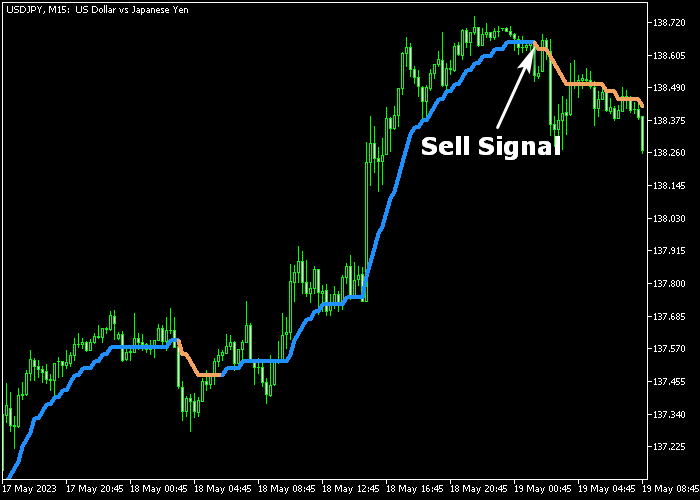
The Step Trend Signals indicator plots an alternating colored line directly on the price chart.
Blue lines indicate bullish momentum, while brown lines signal bearish momentum.
Traders monitor the color changes to time entries and exits, using the line as a visual guide for trend direction and potential reversals.
Guide to Trade with Step Trend Signals Indicator
Buy Rules
- Wait for the blue line to appear, signaling an uptrend.
- Open a buy trade after the signal is confirmed.
Sell Rules
- Wait for the brown line to appear, signaling a downtrend.
- Open a sell trade once the signal is confirmed.
Stop Loss
- For buy trades, set the stop below the previous swing low or strong support area.
- For sell trades, set the stop above the previous swing high or strong resistance area.
- This protects trades while allowing the trend to continue.
Take Profit
- Exit trades when the signal line changes color, indicating a potential trend reversal.
- Alternatively, set a fixed take profit according to your strategy.
- Monitor the trend strength and consider exiting early if momentum slows.
Step Trend Signals and Gann Multi Trend Scalping Strategy for MT5
This scalping strategy combines the Step Trend Signals Indicator with the Gann Multi Trend Scalper Indicator to capture short intraday moves with strong trend confirmation.
The Step Trend Signals Indicator defines the main market direction. A blue line shows a bullish trend, a brown line shows a bearish trend.
The Gann Multi Trend Scalper Indicator provides entry confirmation using multiple trend lines.
Green Gann lines signal a buy setup. Red, gold, and brown trend lines signal a sell setup.
When both indicators align, the probability of continuation increases.
This strategy works best on M5 and M15 charts during London and New York sessions where momentum and breakouts are more reliable.
Buy Entry Rules
- Wait for the Step Trend Signals line to be blue, confirming a bullish trend.
- Confirm that the Gann Multi Trend Scalper shows green trend lines.
- Enter a buy trade at the close of the confirmation candle.
- Place stop loss below the most recent swing low or just below the blue Step Trend line.
- Close the trade when the Step Trend line turns brown or when Gann lines switch to bearish colors.
Sell Entry Rules
- Wait for the Step Trend Signals line to be brown, confirming a bearish trend.
- Confirm that Gann Multi Trend Scalper shows red, gold, or brown trend lines.
- Enter a sell trade at the close of the confirmation candle.
- Place a stop loss above the most recent swing high or just above the brown Step Trend line.
- Close the trade when the Step Trend line turns blue or when Gann lines switch to green.
Case Study 1: M5 Buy Scalping Setup
On EURUSD M5, the Step Trend Signals blue line turned blue, confirming a bullish trend.
Shortly after, the Gann Multi Trend Scalper showed aligned green lines, confirming upward momentum.
A buy trade was entered at the close of the signal candle.
The stop loss was placed just below the most recent swing low and slightly under the Step Trend line to protect against intraday noise.
Price moved upward in short impulsive waves with small pullbacks.
The trade was closed when the Step Trend line turned brown, showing a shift in trend direction.
Case Study 2: M15 Sell Scalping Setup
On GBPJPY M15, the Step Trend Signals line turned brown, indicating a bearish trend.
The Gann Multi Trend Scalper displayed red and gold lines, confirming bearish momentum.
A sell trade was entered at candle close after a minor pullback into resistance.
The stop loss was placed above the recent swing high and just above the Step Trend line to allow normal volatility.
Price continued downward in a controlled move with minor retracements.
The trade was closed when Gann lines shifted back to green, indicating a short-term bullish trend reversal.
Download Now
Step average.mq5 Indicator (MT5)
FAQ
Can this indicator be used with other trading tools?
Yes. It can be combined with support/resistance levels, oscillators, or other trend indicators to confirm entries and exits.
Is the indicator suitable for all trading styles?
Yes. It works for scalping, day trading, and swing trading across all timeframes in MT5.
How do I adjust the indicator for different currency pairs?
You can modify the average period, average type, step size, applied price, and line color to match volatility and trading characteristics of different pairs.
Summary
The Step Trend Signals indicator delivers straightforward trend-following signals via an alternating blue and brown line on the price chart.
Blue highlights bullish momentum, while brown shows bearish momentum.
Traders can use the line to determine trend direction, identify entry points, and monitor potential reversals.
Its non-repainting design ensures reliable signals, and adjustable settings allow customization for different instruments and trading strategies.
This makes the indicator a versatile tool suitable for scalpers, day traders, and swing traders aiming to trade in line with prevailing market trends efficiently.





