
About the FX10 Forex Signal indicator
The FX10 Forex Signal indicator for MtT5 is a technical tool built to provide high-probability entry points by identifying the start of new market trends.
It uses a specialized algorithm to filter price action and deliver non-repainting signals, which means the arrows stay fixed once the candle closes.
By focusing on the relationship between price velocity and direction, it helps traders capture the meat of a move while avoiding the confusion of complex oscillators.
It serves as a reliable trend follower that allows users to maintain an objective perspective on market sentiment during volatile sessions.
Free Download
Key Features
- The indicator delivers 100% non-repainting buy and sell signals directly on the chart.
- Green arrows signal bullish momentum while magenta arrows indicate bearish pressure.
- A customizable multiplier setting allows traders to adjust the sensitivity of the signals.
- The tool is optimized for all skill levels due to its easy-to-read arrow system.
Indicator Chart
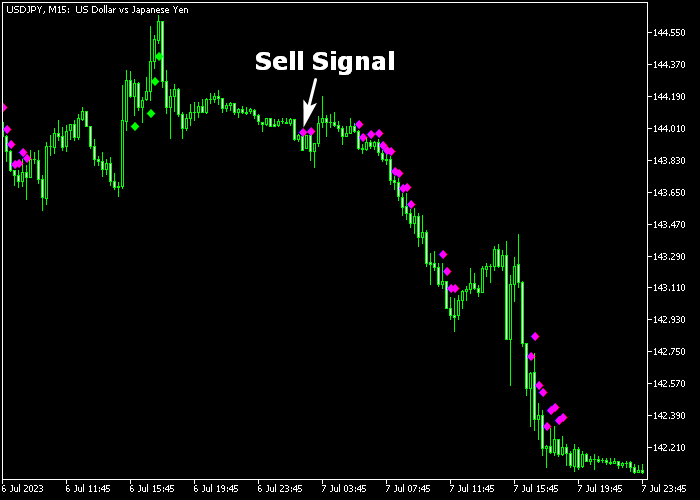
The chart below shows the FX10 Forex Signal indicator plotted over the price candles.
You can see green arrows appearing at the bottom of bullish waves and magenta arrows marking the top of bearish turns.
These signals provide a logical map for entering trades at the earliest stage of a trend shift.
Guide to Trade with the FX10 Forex Signal indicator
Buy Rules
- Initiate a buy transaction immediately when the first green colored FX10 arrow appears.
- Ensure the signal candle has closed to confirm that the arrow is locked and non-repainting.
- Prioritize buy entries when market volatility is high during the London or New York sessions.
- Hold the long position as long as the market maintains its upward trajectory.
Sell Rules
- Open a sell transaction as soon as the first magenta colored FX10 arrow is printed.
- Verify that the currency pair being traded has a tight spread to keep costs low.
- Check that the bearish signal is supported by strong downward price action on the candle close.
- Keep the short trade active until a bullish reversal signal appears on the chart.
Stop Loss
- Set your protective stop loss order below the previous swing low level for buy signals.
- Place a defensive stop loss above the previous swing high level for all sell entries.
- The stop should be positioned far enough to avoid noise but tight enough to protect capital.
- Move the stop to break-even once the price has moved significantly in your favor.
Take Profit
- Exit the trade for a fixed pip profit target that aligns with your specific risk plan.
- Alternatively, wait for a bullish trend reversal signal to close and reverse a short trade.
- Close a buy transaction when a magenta arrow appears to signal a change in direction.
FX10 Forex Signal Indicator Scalping MT5 Strategy
This fast-paced scalping strategy is designed for the most active trading hours using the FX10 Forex Signal Indicator and the RSI Trend Scalper Indicator.
It focuses on capturing quick bursts of momentum during the London and New York sessions when volatility and liquidity are at their highest.
The FX10 Forex Signal Indicator provides clear entry triggers with arrows.
A green arrow signals bullish momentum, while a magenta arrow signals bearish pressure. The RSI Trend Scalper confirms direction using its colored lines.
A green line supports buying conditions, while a red line confirms selling pressure.
This combination works effectively because it aligns immediate entry signals with underlying momentum.
Momentum indicators such as RSI are commonly used to detect shifts in strength and direction, helping traders avoid weak setups and improve timing.
This strategy performs best on M1 and M5 timeframes.
It suits traders who want quick entries, tight risk, and multiple opportunities during peak market sessions.
Buy Entry Rules
- Wait for a green arrow from the FX10 Forex Signal Indicator.
- Confirm that the RSI Trend Scalper shows a green line.
- Enter a buy trade at the close of the signal candle.
- Place the stop loss below the most recent short-term low.
- Close the trade when a magenta arrow appears or when the RSI line turns red.
Sell Entry Rules
- Wait for a magenta arrow from the FX10 Forex Signal Indicator.
- Confirm that the RSI Trend Scalper shows a red line.
- Enter a sell trade at the close of the signal candle.
- Place the stop loss above the most recent short-term high.
- Close the trade when a green arrow appears or when the RSI line turns green.
Case Study 1: EURUSD M1 London Session Buy
During the London session on EURUSD M1, the market showed strong upward momentum after a brief pullback.
A green arrow appeared from the FX10 Forex Signal Indicator, signaling a potential entry.
At the same time, the RSI Trend Scalper displayed a green line, confirming bullish strength.
A buy trade was opened at candle close.
The stop loss was placed just below the recent low.
Price moved quickly upward as volatility increased during the session open.
The trade was closed shortly after as momentum slowed and a red arrow appeared, capturing a fast scalp.
Case Study 2: GBPUSD M5 New York Session Sell
During the New York session on GBPUSD M5, price showed signs of exhaustion after a short upward move.
A magenta arrow appeared from the FX10 Forex Signal Indicator, indicating a bearish setup.
The RSI Trend Scalper confirmed this with a red line, showing that sellers were gaining control.
A sell trade was entered at the close of the signal candle.
The stop loss was placed above the recent high. Price dropped with momentum as the session progressed.
The trade was closed for 29 pips when the indicators signaled a slowdown, securing a quick intraday profit.
Download Now
FAQ
What does the multiplier setting do?
The multiplier adjusts the sensitivity of the algorithm.
A lower multiplier produces more frequent signals for scalping, while a higher value filters out more noise for longer-term trading.
Can I use this indicator on the one-minute chart?
Yes, the FX10 indicator is effective for scalping on M1 and M5 timeframes.
It is best used on major pairs with low spreads during the most active trading hours.
Do the arrows disappear after they are printed?
No, the FX10 indicator is designed to be non-repainting.
Once a signal is confirmed at the close of a candle, it remains on the chart permanently.
Summary
The FX10 Forex Signal indicator is a popular trend analysis tool offering reliable signals for buying and selling pairs in the Forex market.
It provides a simple and effective way to follow market momentum without the risk of repainting signals.
The ability to adjust sensitivity via the multiplier makes it adaptable to any asset or timeframe.
By following the clear arrow signals, traders can execute a disciplined strategy with confidence.
Overall, it is a robust tool for improving entry timing and trend identification.





