
About the TRIX Alert Arrows Indicator
The TRIX Alert Arrows Indicator for MT5 converts the classic Triple Exponential Average (TRIX) into clear trading signals.
It displays blue and red arrows in a separate sub-chart, helping traders quickly identify buy and sell opportunities without analyzing the TRIX line manually.
Blue arrows indicate potential buy setups, while red arrows indicate potential sell setups.
The indicator is non-repaint, ensuring that once an arrow appears, it remains a reliable signal for entry.
Traders can adjust the EMA period, signal period, and symbol codes for up and down arrows to match their trading style.
For lower timeframe traders on M1 or M5, performance is typically strongest during the London and New York sessions.
Free Download
TRIX ARROWS.mq5 Indicator (MT5)
Key Features
- Blue arrow signals a buy opportunity.
- Red arrow signals a sell opportunity.
- Non-repaint alerts for reliable entries.
- Customizable EMA period and signal period.
- Adjustable symbol codes for up and down arrows.
- Optimal for London and New York sessions on lower timeframes.
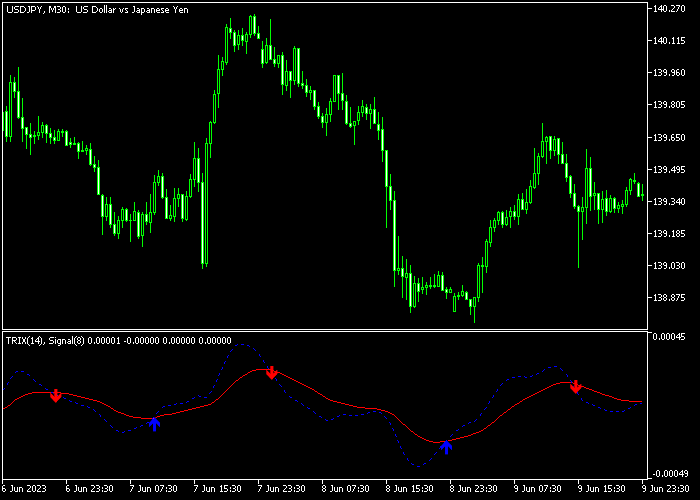
Indicator Chart
The TRIX Alert Arrows Indicator shows colored arrows in a sub-chart beneath the main price area.
Blue arrows signal buying pressure, while red arrows signal selling pressure.
Traders monitor these alerts to time entries without manually interpreting the TRIX line.
Guide to Trade with TRIX Alert Arrows Indicator
Buy Rules
- Wait for a blue arrow to appear in the sub-chart.
- Enter a buy trade at the opening of the next candle after the blue arrow forms.
- Check for alignment with higher timeframe trends or moving averages to strengthen the entry.
Sell Rules
- Wait for a red arrow to appear in the sub-chart.
- Enter a sell trade at the opening of the next candle after the red arrow forms.
- Verify that the trade aligns with broader market direction or trend indicators.
Stop Loss
- Place stop loss below recent swing lows for buy trades and above swing highs for sell trades.
- Optionally, trail stops as the trade moves in your favor.
- Keep stop levels consistent with your overall risk management plan.
Take Profit
- Close buy trades when a red arrow appears.
- Close sell trades when a blue arrow appears.
- Alternatively, use a fixed profit target based on your trading plan.
- You can scale out partially at key levels of support or resistance.
TRIX Alert Arrows Forex Scalping Strategy for MT5
This strategy combines the TRIX Alert Arrows indicator with the Instantaneous Trend Filter indicator to create a fast and responsive day trading system.
The TRIX Alert Arrows indicator is based on a smoothed triple exponential average, which helps filter out market noise and highlight meaningful momentum shifts.
The Instantaneous Trend Filter adds a clear view of the current trend using a signal line, allowing traders to stay aligned with market direction.
This setup focuses on entering trades when both momentum and trend agree.
It works best on M1 and M5 charts where quick price movements provide multiple opportunities during active sessions.
The strategy is designed for traders who want simple signals with confirmation, helping reduce hesitation and improve timing.
Buy Entry Rules
- Enter a buy when a blue arrow appears from the TRIX Alert Arrows indicator.
- Confirm the trade when the Instantaneous Trend Filter line is blue.
- Open the position at the close of the signal candle.
- Set a stop loss a few pips below the recent swing low.
- Take profit when a red arrow appears or the trend line turns magenta.
- You can also secure gains at a fixed intraday target.
Sell Entry Rules
- Enter a sell when a red arrow appears from the TRIX Alert Arrows indicator.
- Confirm the trade when the Instantaneous Trend Filter line is magenta.
- Open the position at the close of the signal candle.
- Set a stop loss a few pips above the recent swing high.
- Take profit when a blue arrow appears or the trend line turns blue.
- You can also aim for a consistent risk to reward ratio.
Case Study 1: EUR/GBP Intraday Momentum Trade
On a 5-minute EUR/GBP chart, a blue arrow appeared from the TRIX Alert Arrows indicator as price began to push higher.
At the same time, the Instantaneous Trend Filter line was already blue, confirming bullish conditions.
A buy trade was opened at the candle close with a stop loss placed just below the recent swing low.
Price accelerated upward with strong momentum.
The trade was closed for +23 pips when the trend line shifted to magenta, capturing a quick scalp profit during the move.
Case Study 2: NZD/USD Bearish Continuation
On a 1-minute NZD/USD chart, a red arrow appeared from the TRIX Alert Arrows indicator, signaling increasing selling pressure.
The Instantaneous Trend Filter line was also magenta, confirming the bearish trend.
A sell trade was entered at the close of the signal candle with a stop loss above the recent swing high.
The position was closed for a 9 pip loss when a blue arrow appeared, indicating a bullish trend reversal.
Download Now
TRIX ARROWS.mq5 Indicator (MT5)
FAQ
How does the TRIX Alert Arrows differ from the standard TRIX indicator?
It converts the TRIX line into simple arrow signals, eliminating the need to interpret the oscillator manually, which speeds up decision-making for traders.
Which timeframes work best?
While it can be used on all timeframes, M1 and M5 charts perform best during active London and New York sessions for more reliable signals.
Can I customize the arrow signals?
Yes, the EMA period, signal period, and symbol codes for the up and down arrows can be adjusted to match different trading styles and volatility conditions.
Summary
The TRIX Alert Arrows Indicator turns the complex TRIX oscillator into easy-to-read blue and red arrow signals.
Its non-repaint design ensures that traders can rely on each signal for precise entries.
Customizable settings allow adaptation to multiple instruments and trading styles.
While most effective in trending markets, it provides actionable alerts for both short-term and intraday traders seeking a streamlined approach to momentum-based entries.